FreeFileSync, a robust open-source tool for file and folder comparison and synchronization, has released its latest version, 14.12. This program is designed to simplify the process of backing up and syncing files, ensuring that users can manage their data efficiently without the hassle of bloatware, advertisements, or unnecessary complexity.
FreeFileSync stands out as an essential tool for various users, offering several features that enhance its functionality:
- Fast & Smart Syncing: The software compares files by size, date, and content, allowing for precise synchronization.
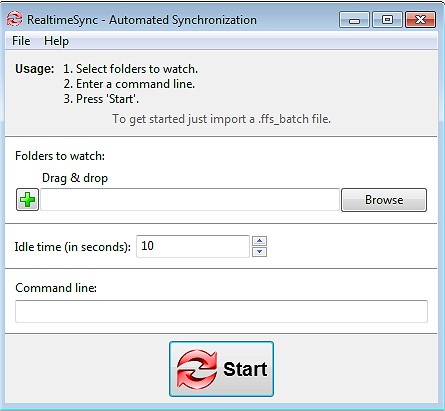
- Real-Time Syncing: Automatically updates files as soon as changes occur, ensuring that your data is always current.
- Flexible Sync Options: Users can choose from mirror, two-way, or custom sync settings to meet their specific needs.
- Batch Jobs & Automation: Schedule sync tasks to run without manual intervention, streamlining the backup process.
- Cross-Platform Compatibility: Works seamlessly on Windows, macOS, and Linux systems.
- Versioning & Conflict Detection: Maintains previous versions of files to prevent accidental data loss.
- No Ads or Gimmicks: Provides a clean user experience focused solely on functionality.
FreeFileSync is advantageous for a wide range of users, including:
- Everyday Users: For personal file backups and organization.
- Professionals & Businesses: To synchronize work projects across various locations.
- Creatives: Photographers and videographers can safeguard their media libraries.
- Gamers: Easily sync saved games across multiple devices.
- IT Administrators: Automate backups and server synchronization.
- Cloud Storage Users: Efficiently manage backups for services like Google Drive and Dropbox.
In addition to its core functionalities, FreeFileSync offers various enhancements:
- Drag & Drop Support: Simplifies the process of setting up sync tasks.
- Portable Version: Use the software directly from a USB drive without installation.
- External & Network Drive Support: Sync with NAS devices, FTP servers, and cloud storage.
- Filters & Exclusions: Customize which files are included in sync operations.
- Multi-Threaded Performance: Utilizes all CPU cores for faster synchronization.
- Detailed Sync Reports: Provides logs and summaries to track changes made during syncs.
To ensure efficient and safe synchronization, users should consider the following:
- Caution with Mirror Syncing: Deleted files on one side will be removed from the other in Mirror Mode. Use Two-Way Sync to avoid accidental deletions.
- Setup Automation Properly: While batch jobs facilitate scheduled tasks, users must configure them correctly for effective operation.
- Permissions & File Locks: Some files may need administrative permissions to sync correctly.
FreeFileSync is a lightweight yet powerful synchronization tool that serves as an ideal solution for anyone looking to manage their files effectively. With its comprehensive features and user-friendly design, it allows users to keep their data secure and synchronized effortlessly. Download FreeFileSync today to take control of your file management and ensure you never lose important data again!
- Learn how to customize Folder Options for efficient navigation.
- Find tips on managing recent files and improving file search in Windows
Key Features of FreeFileSync
FreeFileSync stands out as an essential tool for various users, offering several features that enhance its functionality:
- Fast & Smart Syncing: The software compares files by size, date, and content, allowing for precise synchronization.
- Real-Time Syncing: Automatically updates files as soon as changes occur, ensuring that your data is always current.
- Flexible Sync Options: Users can choose from mirror, two-way, or custom sync settings to meet their specific needs.
- Batch Jobs & Automation: Schedule sync tasks to run without manual intervention, streamlining the backup process.
- Cross-Platform Compatibility: Works seamlessly on Windows, macOS, and Linux systems.
- Versioning & Conflict Detection: Maintains previous versions of files to prevent accidental data loss.
- No Ads or Gimmicks: Provides a clean user experience focused solely on functionality.
Who Can Benefit?
FreeFileSync is advantageous for a wide range of users, including:
- Everyday Users: For personal file backups and organization.
- Professionals & Businesses: To synchronize work projects across various locations.
- Creatives: Photographers and videographers can safeguard their media libraries.
- Gamers: Easily sync saved games across multiple devices.
- IT Administrators: Automate backups and server synchronization.
- Cloud Storage Users: Efficiently manage backups for services like Google Drive and Dropbox.
Additional Features
In addition to its core functionalities, FreeFileSync offers various enhancements:
- Drag & Drop Support: Simplifies the process of setting up sync tasks.
- Portable Version: Use the software directly from a USB drive without installation.
- External & Network Drive Support: Sync with NAS devices, FTP servers, and cloud storage.
- Filters & Exclusions: Customize which files are included in sync operations.
- Multi-Threaded Performance: Utilizes all CPU cores for faster synchronization.
- Detailed Sync Reports: Provides logs and summaries to track changes made during syncs.
Best Practices for Safe Syncing
To ensure efficient and safe synchronization, users should consider the following:
- Caution with Mirror Syncing: Deleted files on one side will be removed from the other in Mirror Mode. Use Two-Way Sync to avoid accidental deletions.
- Setup Automation Properly: While batch jobs facilitate scheduled tasks, users must configure them correctly for effective operation.
- Permissions & File Locks: Some files may need administrative permissions to sync correctly.
Conclusion
FreeFileSync is a lightweight yet powerful synchronization tool that serves as an ideal solution for anyone looking to manage their files effectively. With its comprehensive features and user-friendly design, it allows users to keep their data secure and synchronized effortlessly. Download FreeFileSync today to take control of your file management and ensure you never lose important data again!
Related Resources
- Explore ways to open File Explorer in Windows 10 & 11.- Learn how to customize Folder Options for efficient navigation.
- Find tips on managing recent files and improving file search in Windows
FreeFileSync 14.12 released
FreeFileSync is a file/folder comparison and synchronization tool.