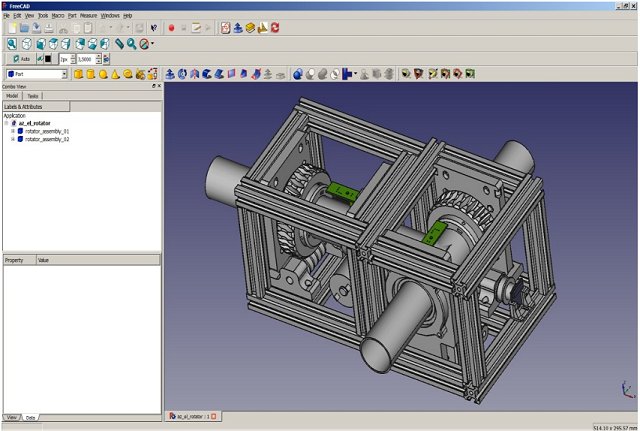
FreeCAD, now at version 1.1.2, is a powerful, open-source parametric 3D modeling tool tailored for mechanical engineering and product design. However, its versatility extends beyond these domains, making it useful for architecture, electrical design, and various engineering applications. The platform is designed to be modular and extensible, appealing to hobbyists, students, small businesses, and anyone who prefers investing in materials rather than software licenses.
Key Features and Functionality
One of FreeCAD's standout features is its parametric modeling system, which allows users to modify their design history effortlessly. If a measurement is adjusted, the entire model updates automatically, facilitating iterative design and rapid prototyping—an advantage for both amateurs and professionals. FreeCAD supports multiple file formats, including STEP, IGES, STL, SVG, DXF, OBJ, IFC, and DAE, ensuring seamless import and export capabilities with other CAD programs and 3D printers.
The workbench system enhances user experience by allowing users to switch between specialized toolsets for various tasks, such as part design, drafting, finite element analysis (FEM), and even robotic simulation. The addition of a CAM workbench with add-ons enables users to create CNC toolpaths directly from their designs.
Cross-Platform and Python Integration
FreeCAD is compatible with Windows, macOS, and Linux, providing a consistent interface across platforms. Developed in C++, the software boasts performance efficiency, while its Python scripting capabilities allow for task automation, custom tool creation, and complex parametric designs that adapt to variables or external data. The well-documented Python API and built-in console facilitate real-time experimentation for users.
Target Audience and Usability
FreeCAD is particularly beneficial for students learning CAD, makers producing 3D-printed parts, and engineers developing intricate mechanical assemblies. It also proves useful for architectural layouts and modeling plumbing and HVAC systems through its BIM and MEP modules. While it may not be as polished as some commercial software, the absence of licensing fees and the full control it offers make it an attractive option. The learning curve can be steep, and some users may find the interface clunky compared to commercial tools.
Pros and Cons Summary
Pros:
- Completely free and open-source
- Parametric modeling with comprehensive edit history
- Active community with numerous add-ons available
- Built-in Python console for automation
- Cross-platform support
Cons:
- Challenging for beginners to navigate
- User interface may feel less refined
- Certain advanced features are still under development
Conclusion
Although FreeCAD may not have the sleekness of commercial packages like Fusion 360, it offers a depth and flexibility that is hard to find, especially at no cost. It's an excellent choice for those beginning their journey into CAD design, particularly for parts and 3D printing, without the burden of hefty software fees. Moving forward, continued community-driven development and updates will likely enhance its features, making FreeCAD an ever-more robust tool in the realm of 3D modeling
Key Features and Functionality
One of FreeCAD's standout features is its parametric modeling system, which allows users to modify their design history effortlessly. If a measurement is adjusted, the entire model updates automatically, facilitating iterative design and rapid prototyping—an advantage for both amateurs and professionals. FreeCAD supports multiple file formats, including STEP, IGES, STL, SVG, DXF, OBJ, IFC, and DAE, ensuring seamless import and export capabilities with other CAD programs and 3D printers.
The workbench system enhances user experience by allowing users to switch between specialized toolsets for various tasks, such as part design, drafting, finite element analysis (FEM), and even robotic simulation. The addition of a CAM workbench with add-ons enables users to create CNC toolpaths directly from their designs.
Cross-Platform and Python Integration
FreeCAD is compatible with Windows, macOS, and Linux, providing a consistent interface across platforms. Developed in C++, the software boasts performance efficiency, while its Python scripting capabilities allow for task automation, custom tool creation, and complex parametric designs that adapt to variables or external data. The well-documented Python API and built-in console facilitate real-time experimentation for users.
Target Audience and Usability
FreeCAD is particularly beneficial for students learning CAD, makers producing 3D-printed parts, and engineers developing intricate mechanical assemblies. It also proves useful for architectural layouts and modeling plumbing and HVAC systems through its BIM and MEP modules. While it may not be as polished as some commercial software, the absence of licensing fees and the full control it offers make it an attractive option. The learning curve can be steep, and some users may find the interface clunky compared to commercial tools.
Pros and Cons Summary
Pros:
- Completely free and open-source
- Parametric modeling with comprehensive edit history
- Active community with numerous add-ons available
- Built-in Python console for automation
- Cross-platform support
Cons:
- Challenging for beginners to navigate
- User interface may feel less refined
- Certain advanced features are still under development
Conclusion
Although FreeCAD may not have the sleekness of commercial packages like Fusion 360, it offers a depth and flexibility that is hard to find, especially at no cost. It's an excellent choice for those beginning their journey into CAD design, particularly for parts and 3D printing, without the burden of hefty software fees. Moving forward, continued community-driven development and updates will likely enhance its features, making FreeCAD an ever-more robust tool in the realm of 3D modeling
FreeCAD 1.1.2 released
FreeCAD is a parametric 3D modeler for CAD, MCAD, CAx, CAE, and PLM aimed directly at mechanical engineering and product design.