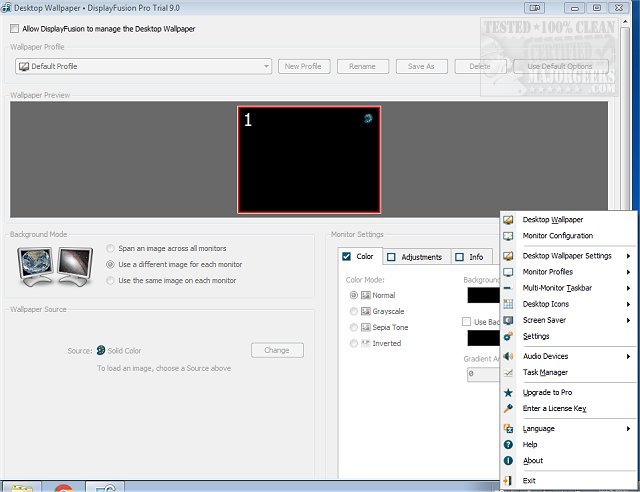
DisplayFusion 12.1.1 has been launched, offering users advanced capabilities to effectively manage multiple monitor setups. With the rise in popularity of multi-monitor configurations, managing numerous screens can become challenging. DisplayFusion is designed to streamline this experience with features such as multi-monitor taskbars and extensive customization options.
- Wallpaper Sizing Options: Choose from seven different sizing options for wallpapers, including solid colors and gradients.
- Image Adjustments: Apply effects such as greyscale, sepia, and invert to personalize your desktop environment.
- How to Change DPI Scaling Level in Windows 10 & 11
- How to Access a Window When the Title Bar Goes Off the Screen
In summary, whether you are a casual user or a power user looking to optimize your multi-monitor setup, DisplayFusion provides the tools necessary for a tailored and efficient workspace
Why Use DisplayFusion?
As the use of multiple monitors becomes increasingly common, the need for efficient management tools is essential. DisplayFusion simplifies workspace organization by allowing users to configure taskbars for each monitor, either displaying all windows or only those relevant to the respective screen. Additional features include screen auto-hide, button grouping, pinned shortcuts, and window previews, all designed to enhance multitasking efficiency. The "Smart Window Management" feature enables seamless window movement between monitors, using simple gestures like middle-clicking or dragging maximized windows.Key Features of DisplayFusion
- Custom Wallpapers: Set different images on each monitor or span a single image across multiple displays. Users can also load images from various online sources or directly from URLs.- Wallpaper Sizing Options: Choose from seven different sizing options for wallpapers, including solid colors and gradients.
- Image Adjustments: Apply effects such as greyscale, sepia, and invert to personalize your desktop environment.
Free vs. Pro Versions
Upon installation, users can access all Pro features for a trial period of 30 days. After this, the software reverts to a free version, which offers fundamental tools such as Multi-Monitor Taskbars and Window Snapping. These features are sufficient for casual users. However, for those looking for advanced functionality, DisplayFusion Pro provides a robust suite that includes customizable macros, hotkeys, advanced monitor controls, multi-monitor screen savers, and task automation. The Pro version even allows remote control via a mobile app, offering unparalleled flexibility.Conclusion
DisplayFusion stands out as an exceptional tool for enhancing the experience of multi-monitor setups. Its powerful features, including customizable multi-monitor taskbars, significantly boost productivity and user satisfaction. With DisplayFusion, users can tailor their experience to meet their specific needs, leading to improved efficiency and seamless management of multiple displays.Related Topics
- How to Turn Off Monitor Only on Demand- How to Change DPI Scaling Level in Windows 10 & 11
- How to Access a Window When the Title Bar Goes Off the Screen
In summary, whether you are a casual user or a power user looking to optimize your multi-monitor setup, DisplayFusion provides the tools necessary for a tailored and efficient workspace
DisplayFusion 12.1.1 released
DisplayFusion enables you to manage multiple monitors with powerful features, including multi-monitor taskbars and fully customizable functions.