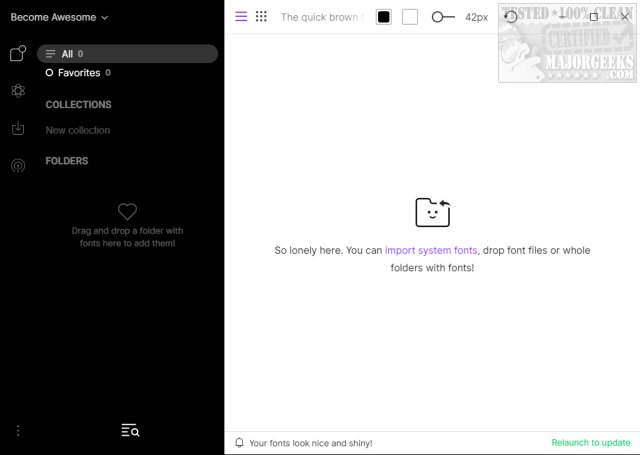
FontBase version 2026.7.4 has recently been released, continuing its mission as a free font management software tailored for designers and those with large font collections. It offers a straightforward interface that facilitates the organization, previewing, and management of fonts, making it an essential tool for typography enthusiasts.
- Preview Functionality: The Preview tab allows experimentation with different styles for headings and other text elements.
- Comprehensive Style View: Users can view all font styles on one page, which aids in discovering combinations and weights for creative projects.
- Activation Without Installation: Fonts can be activated without needing to install them, offering a flexible approach to font usage.
- Collection Management: Users can create and manage collections of fonts, as well as explore default collections, activating them with one click.
- File Structure Display: FontBase reflects the user’s existing file structure, eliminating the need for reorganization.
- Performance: The software is optimized for fast font display and loading.
- Automatic Updates: Users benefit from ongoing improvements and new features through automatic updates.
- Restoring Default Font Settings in Windows
- Acquiring More Fonts in Windows 10 & 11
- Customizing Fonts and Colors Using PowerShell or Command Prompt
As font management becomes increasingly critical in design, tools like FontBase will continue to evolve, offering even more features and improvements to meet the needs of creative professionals
What is FontBase?
FontBase stands out as an effective solution for font management, allowing users to easily import fonts—either by dragging and dropping folders or through manual uploads. Users can organize their fonts into personalized folders, named according to various projects or applications, which significantly simplifies the process of locating specific fonts. Additionally, FontBase can load all default Windows fonts, providing a solid foundation for users when integrating new fonts.Key Features of FontBase:
- Instant Access to Google Fonts: Users can utilize any font from Google's library with a single click as if it were stored locally.- Preview Functionality: The Preview tab allows experimentation with different styles for headings and other text elements.
- Comprehensive Style View: Users can view all font styles on one page, which aids in discovering combinations and weights for creative projects.
- Activation Without Installation: Fonts can be activated without needing to install them, offering a flexible approach to font usage.
- Collection Management: Users can create and manage collections of fonts, as well as explore default collections, activating them with one click.
- File Structure Display: FontBase reflects the user’s existing file structure, eliminating the need for reorganization.
- Performance: The software is optimized for fast font display and loading.
- Automatic Updates: Users benefit from ongoing improvements and new features through automatic updates.
Conclusion
FontBase is a powerful tool for anyone who manages a large array of fonts. It alleviates the stress of navigating through extensive collections, allowing for a more streamlined and creative workflow. By adopting FontBase, users can enhance their font management experience, leading to a more organized and productive design process.Additional Resources
- Installing or Uninstalling Fonts in Windows- Restoring Default Font Settings in Windows
- Acquiring More Fonts in Windows 10 & 11
- Customizing Fonts and Colors Using PowerShell or Command Prompt
As font management becomes increasingly critical in design, tools like FontBase will continue to evolve, offering even more features and improvements to meet the needs of creative professionals
FontBase 2026.7.4 released
FontBase is a free font management software designed specifically for designers and individuals with extensive font collections. It provides a user-friendly interface that helps organize, preview, and manage fonts efficiently, making it an ideal tool for those working with typography.