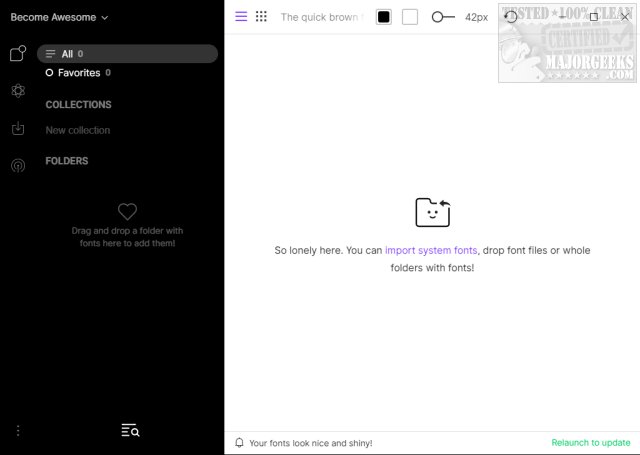
FontBase is a free font management software tailored for designers and anyone with a large collection of fonts. It boasts a user-friendly interface that streamlines the process of organizing, previewing, and managing fonts, making it an essential tool for typography enthusiasts and professionals alike.
What is FontBase?
FontBase is designed to assist users in efficiently managing their extensive font libraries. Its intuitive interface allows users to easily import fonts by dragging and dropping them into the application or manually adding them. The software supports the creation of organized folders named according to specific projects or applications, facilitating quick access to the desired fonts. Users can also load all default Windows fonts, simplifying the initial setup process.
Key Features of FontBase:
- Access any font from Google's library with a single click, as if it were locally installed.
- Utilize the Preview tab to apply various styles to typography elements like H1, H2, etc.
- View all font styles on one page, enabling users to experiment with combinations and weights.
- Activate fonts without installation, providing a fresh and efficient approach to font usage.
- Create and manage custom collections alongside default ones, with quick activation options.
- Maintain the existing file structure without reorganization, allowing for seamless navigation.
- Experience good performance in displaying and loading fonts.
- Benefit from automatic updates to ensure the software remains current.
Geek Verdict
Managing an extensive font collection can be daunting, but FontBase offers a transformative solution. This powerful tool enhances the organization of typographic resources, making it an invaluable asset for anyone looking to improve their font management experience. Users can bid farewell to confusion and embrace a more creative workflow.
Additional Resources
For those looking to enhance their font management skills further, related topics include:
- How to Install or Uninstall Fonts in Windows
- How to Restore Default Font Settings in Windows
- How to Get More Fonts in Windows 10 & 11
- Customizing Fonts, Colors, Window Size, and More Using PowerShell or Command Prompt
Future Prospects
As design trends evolve and the digital landscape continues to change, FontBase is likely to implement more innovative features in future updates. For instance, the integration of AI-driven font suggestions based on user preferences or project types could greatly enhance the user experience. Additionally, improved collaboration features for teams working on shared design projects could make FontBase a go-to solution for professionals in creative industries.
In summary, FontBase not only facilitates font management but also fosters creativity and efficiency in design, making it an essential tool for any typography-focused individual
What is FontBase?
FontBase is designed to assist users in efficiently managing their extensive font libraries. Its intuitive interface allows users to easily import fonts by dragging and dropping them into the application or manually adding them. The software supports the creation of organized folders named according to specific projects or applications, facilitating quick access to the desired fonts. Users can also load all default Windows fonts, simplifying the initial setup process.
Key Features of FontBase:
- Access any font from Google's library with a single click, as if it were locally installed.
- Utilize the Preview tab to apply various styles to typography elements like H1, H2, etc.
- View all font styles on one page, enabling users to experiment with combinations and weights.
- Activate fonts without installation, providing a fresh and efficient approach to font usage.
- Create and manage custom collections alongside default ones, with quick activation options.
- Maintain the existing file structure without reorganization, allowing for seamless navigation.
- Experience good performance in displaying and loading fonts.
- Benefit from automatic updates to ensure the software remains current.
Geek Verdict
Managing an extensive font collection can be daunting, but FontBase offers a transformative solution. This powerful tool enhances the organization of typographic resources, making it an invaluable asset for anyone looking to improve their font management experience. Users can bid farewell to confusion and embrace a more creative workflow.
Additional Resources
For those looking to enhance their font management skills further, related topics include:
- How to Install or Uninstall Fonts in Windows
- How to Restore Default Font Settings in Windows
- How to Get More Fonts in Windows 10 & 11
- Customizing Fonts, Colors, Window Size, and More Using PowerShell or Command Prompt
Future Prospects
As design trends evolve and the digital landscape continues to change, FontBase is likely to implement more innovative features in future updates. For instance, the integration of AI-driven font suggestions based on user preferences or project types could greatly enhance the user experience. Additionally, improved collaboration features for teams working on shared design projects could make FontBase a go-to solution for professionals in creative industries.
In summary, FontBase not only facilitates font management but also fosters creativity and efficiency in design, making it an essential tool for any typography-focused individual
FontBase 2026.4.6 released
FontBase is a free font management software designed specifically for designers and individuals with extensive font collections. It provides a user-friendly interface that helps organize, preview, and manage fonts efficiently, making it an ideal tool for those working with typography.