FluentCleaner is an innovative drive cleaning utility that emphasizes transparency and user trust. Developed by Belim (Builtbybel), this tool is designed to eliminate spyware, scareware, and deceptive marketing practices like upselling and fake registry improvements. Inspired by the classic CCleaner, FluentCleaner has been modernized to meet contemporary user needs, featuring a minimalistic interface built with WinUI 3.
User-Friendly and Efficient Cleaning Process
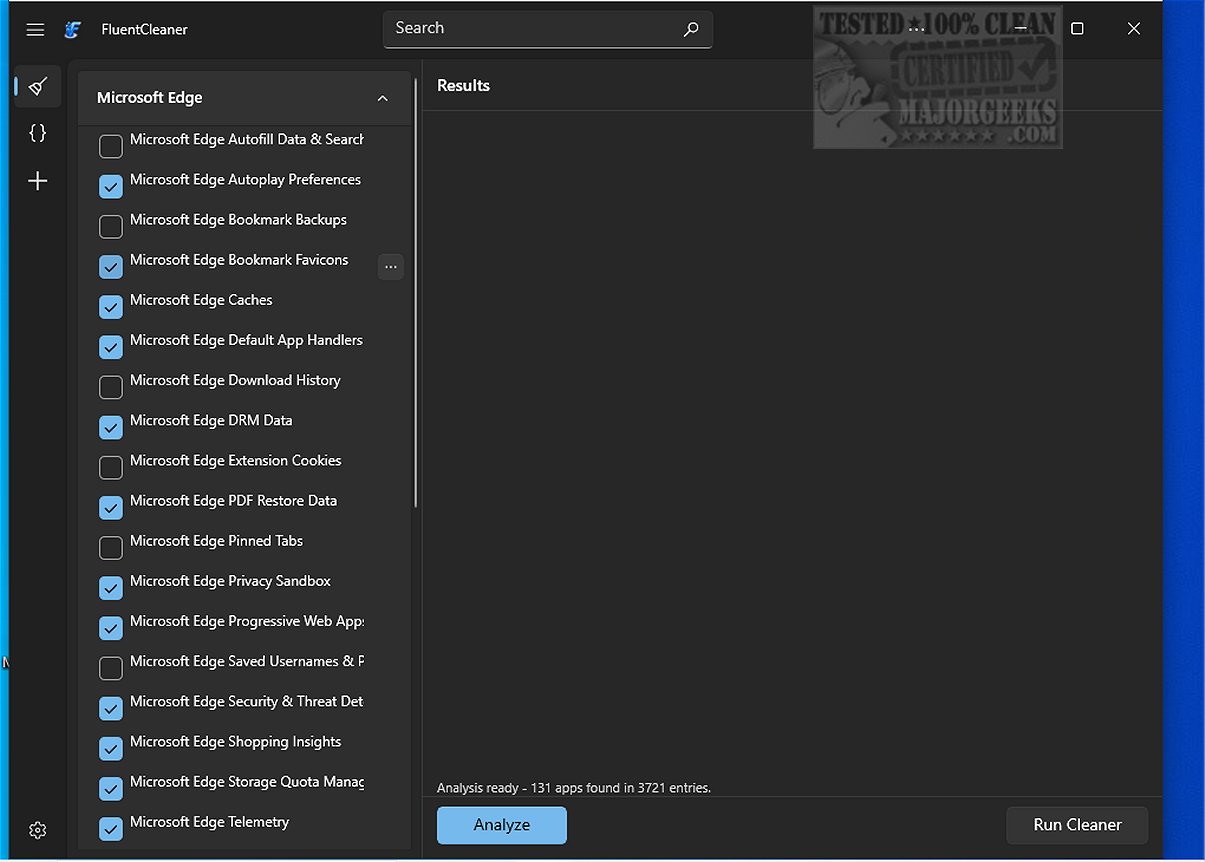
Using FluentCleaner is straightforward; users need only press a button to commence the cleaning process. The tool efficiently removes selected entries and provides a summary of freed storage space, helping users understand its impact on system performance. The interface is sleek and modern, seamlessly integrating with Windows 10 and 11, divided into sections for cleaning options and system analysis results.
Comprehensive Cleaning Capabilities
FluentCleaner addresses a wide range of system files generated by both applications and the operating system. It effectively cleans stored data and traces from popular web browsers, including Microsoft Edge, targeting cached files, cookies, autofill data, bookmarks, download history, pinned tabs, and telemetry data. Additionally, it thoroughly analyzes registry entries from various applications, covering multimedia software, built-in system applications like .NET Framework and DirectX, and remnants from Microsoft Store apps and installed games.
While the tool automatically selects safe entries for cleaning, users are advised to review the generated lists before proceeding. This is crucial as some registry data may be essential for system functionality. A backup or restore point is also recommended for added safety, and users will need the Windows App SDK installed.
Expert Opinion
FluentCleaner is a commendable choice for routine system maintenance. However, users should exercise caution with registry data and take the time to review cleaning options carefully. By manually selecting or deselecting items, users can ensure they are only removing unnecessary files. The default selections are generally safe, but attentive review will optimize the cleaning process.
Conclusion
FluentCleaner stands out as a reliable and user-friendly tool that promotes effective system maintenance without the pitfalls of traditional cleaning utilities. Its focus on transparency, ease of use, and comprehensive cleaning capabilities make it a worthy addition to any user's software toolkit. For those interested in optimizing their system performance, FluentCleaner is an excellent starting point.
Related Articles:
- How to Use Storage Sense to Delete Junk Files in Windows 10 & 11 Automatically
- How to Securely Delete Files in Windows 10 With PowerShell and Cipher
- How to Back up or Restore the Windows Registry
Overall, FluentCleaner is not just another cleaning tool; it's a modern solution tailored for today's computing environment, prioritizing user safety and system efficiency
User-Friendly and Efficient Cleaning Process
Using FluentCleaner is straightforward; users need only press a button to commence the cleaning process. The tool efficiently removes selected entries and provides a summary of freed storage space, helping users understand its impact on system performance. The interface is sleek and modern, seamlessly integrating with Windows 10 and 11, divided into sections for cleaning options and system analysis results.
Comprehensive Cleaning Capabilities
FluentCleaner addresses a wide range of system files generated by both applications and the operating system. It effectively cleans stored data and traces from popular web browsers, including Microsoft Edge, targeting cached files, cookies, autofill data, bookmarks, download history, pinned tabs, and telemetry data. Additionally, it thoroughly analyzes registry entries from various applications, covering multimedia software, built-in system applications like .NET Framework and DirectX, and remnants from Microsoft Store apps and installed games.
While the tool automatically selects safe entries for cleaning, users are advised to review the generated lists before proceeding. This is crucial as some registry data may be essential for system functionality. A backup or restore point is also recommended for added safety, and users will need the Windows App SDK installed.
Expert Opinion
FluentCleaner is a commendable choice for routine system maintenance. However, users should exercise caution with registry data and take the time to review cleaning options carefully. By manually selecting or deselecting items, users can ensure they are only removing unnecessary files. The default selections are generally safe, but attentive review will optimize the cleaning process.
Conclusion
FluentCleaner stands out as a reliable and user-friendly tool that promotes effective system maintenance without the pitfalls of traditional cleaning utilities. Its focus on transparency, ease of use, and comprehensive cleaning capabilities make it a worthy addition to any user's software toolkit. For those interested in optimizing their system performance, FluentCleaner is an excellent starting point.
Related Articles:
- How to Use Storage Sense to Delete Junk Files in Windows 10 & 11 Automatically
- How to Securely Delete Files in Windows 10 With PowerShell and Cipher
- How to Back up or Restore the Windows Registry
Overall, FluentCleaner is not just another cleaning tool; it's a modern solution tailored for today's computing environment, prioritizing user safety and system efficiency
FluentCleaner 26.06.03 released
FluentCleaner is a modern drive cleaner tool designed with transparency in mind; it avoids spyware, scareware, and misleading marketing tactics such as upselling or fake registry enhancements.