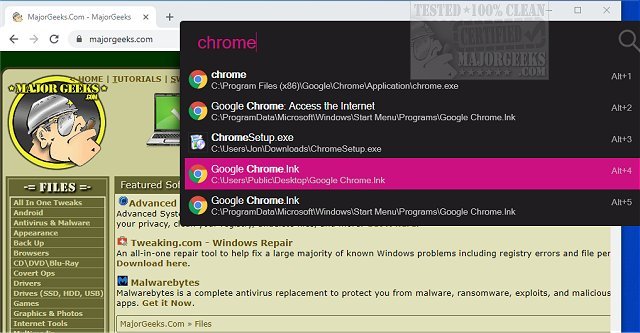
Flow Launcher version 2.1.4 has been released, enhancing its capabilities as an open-source app launcher for Windows. This tool is designed for users who are frustrated with the sluggishness of Windows Search. It allows for quick access to apps, files, commands, and even web searches, all through a simple keyboard-driven interface. By pressing Alt+Space, users can immediately start typing their desired item and hit Enter to launch it, significantly streamlining the navigation process.
Flow Launcher replaces the traditional hunt-and-click method with a centralized search bar that provides fast results for applications, system settings, and bookmarks. In addition to this core functionality, it supports plugins that enhance its utility, allowing for integrations with various services such as YouTube, GitHub, and more. This flexibility transforms Flow Launcher from a mere Start Menu alternative into a comprehensive command center.
Unlike Windows Search, which can be inconsistent in finding desired applications or information, Flow Launcher offers a more reliable and efficient experience. It is particularly beneficial for power users who regularly work with PowerShell, batch scripts, and file searching, providing features like administrative command execution and direct calculator access within the search bar.
Key features of Flow Launcher include customizable hotkeys, a preview panel for file details, and the ability to integrate with existing file search tools like Everything. The plugin system is a standout aspect, allowing users to tailor the application to their needs, whether they want a simple launcher or a robust utility toolbox.
To get started with Flow Launcher, users simply need to install the application, launch it, and familiarize themselves with the settings for optimal configuration. Although it may not be necessary for every Windows user—particularly those who only use a few pinned applications—it is a powerful tool for those seeking enhanced productivity.
While there are some downsides, such as potential plugin inconsistencies and the need for users to navigate settings, Flow Launcher remains a valuable asset for anyone looking to improve their workflow. It is particularly appealing to those who prefer the efficiency of tools like macOS Spotlight.
In summary, Flow Launcher is a powerful, customizable tool that can significantly enhance the user experience on Windows by providing a quick and efficient way to launch applications and access files. It’s worth trying for anyone who finds Windows Search lacking, especially for users who appreciate a streamlined, keyboard-driven workflow
Flow Launcher replaces the traditional hunt-and-click method with a centralized search bar that provides fast results for applications, system settings, and bookmarks. In addition to this core functionality, it supports plugins that enhance its utility, allowing for integrations with various services such as YouTube, GitHub, and more. This flexibility transforms Flow Launcher from a mere Start Menu alternative into a comprehensive command center.
Unlike Windows Search, which can be inconsistent in finding desired applications or information, Flow Launcher offers a more reliable and efficient experience. It is particularly beneficial for power users who regularly work with PowerShell, batch scripts, and file searching, providing features like administrative command execution and direct calculator access within the search bar.
Key features of Flow Launcher include customizable hotkeys, a preview panel for file details, and the ability to integrate with existing file search tools like Everything. The plugin system is a standout aspect, allowing users to tailor the application to their needs, whether they want a simple launcher or a robust utility toolbox.
To get started with Flow Launcher, users simply need to install the application, launch it, and familiarize themselves with the settings for optimal configuration. Although it may not be necessary for every Windows user—particularly those who only use a few pinned applications—it is a powerful tool for those seeking enhanced productivity.
While there are some downsides, such as potential plugin inconsistencies and the need for users to navigate settings, Flow Launcher remains a valuable asset for anyone looking to improve their workflow. It is particularly appealing to those who prefer the efficiency of tools like macOS Spotlight.
In summary, Flow Launcher is a powerful, customizable tool that can significantly enhance the user experience on Windows by providing a quick and efficient way to launch applications and access files. It’s worth trying for anyone who finds Windows Search lacking, especially for users who appreciate a streamlined, keyboard-driven workflow
Flow Launcher 2.1.4 released
Flow Launcher is an Open Source system navigation tool that enables fast search results.