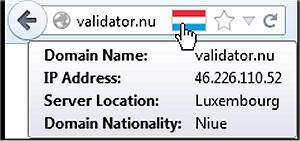
Flagfox has released version 6.2.0 of its popular Firefox add-on, which enhances user awareness and security while browsing the internet. The add-on prominently displays a flag icon that indicates the geographical location of the webserver you are currently connected to. This feature not only helps users understand the server's physical location but also provides insights into the native language of the website and the legal jurisdiction that may apply to the content.
Users can access a wealth of additional information through various external lookups, and the add-on allows for customization through the context menu of the flag icon or via keyboard shortcuts for quick actions. By clicking on the flag icon, you can launch a Geo tool that presents a detailed map pinpointing the server's city, along with other pertinent data such as local time and Internet Service Provider (ISP) details.
Flagfox offers a wide array of features aimed at enhancing the browsing experience, including:
- Site safety and malware checks
- Recommendations for similar sites and user reviews
- Automatic translation to the user's preferred language
- Tools for SEO and web development research
- Diagnostic utilities like pings and traceroutes
- Access to Whois and DNS information
- Page code validation for developers
- Quick URL shortening options
- The ability to copy a server's IP address or other relevant information, with customizable actions available for user convenience.
In summary, Flagfox 6.2.0 is a versatile tool that not only improves security by informing users of the geographical context of their connections but also provides a variety of functionalities that cater to both everyday users and web developers alike. For those looking to enhance their browsing efficiency, Flagfox is a valuable addition to the Firefox ecosystem.
As online security and awareness continue to be significant concerns for internet users, tools like Flagfox will likely see increased adoption, highlighting the importance of understanding the implications of server locations in our globalized digital landscape
Users can access a wealth of additional information through various external lookups, and the add-on allows for customization through the context menu of the flag icon or via keyboard shortcuts for quick actions. By clicking on the flag icon, you can launch a Geo tool that presents a detailed map pinpointing the server's city, along with other pertinent data such as local time and Internet Service Provider (ISP) details.
Flagfox offers a wide array of features aimed at enhancing the browsing experience, including:
- Site safety and malware checks
- Recommendations for similar sites and user reviews
- Automatic translation to the user's preferred language
- Tools for SEO and web development research
- Diagnostic utilities like pings and traceroutes
- Access to Whois and DNS information
- Page code validation for developers
- Quick URL shortening options
- The ability to copy a server's IP address or other relevant information, with customizable actions available for user convenience.
In summary, Flagfox 6.2.0 is a versatile tool that not only improves security by informing users of the geographical context of their connections but also provides a variety of functionalities that cater to both everyday users and web developers alike. For those looking to enhance their browsing efficiency, Flagfox is a valuable addition to the Firefox ecosystem.
As online security and awareness continue to be significant concerns for internet users, tools like Flagfox will likely see increased adoption, highlighting the importance of understanding the implications of server locations in our globalized digital landscape
Flagfox for Firefox 6.2.0 released
Flagfox is a Firefox add-on that displays a flag icon indicating the current webserver's physical location.