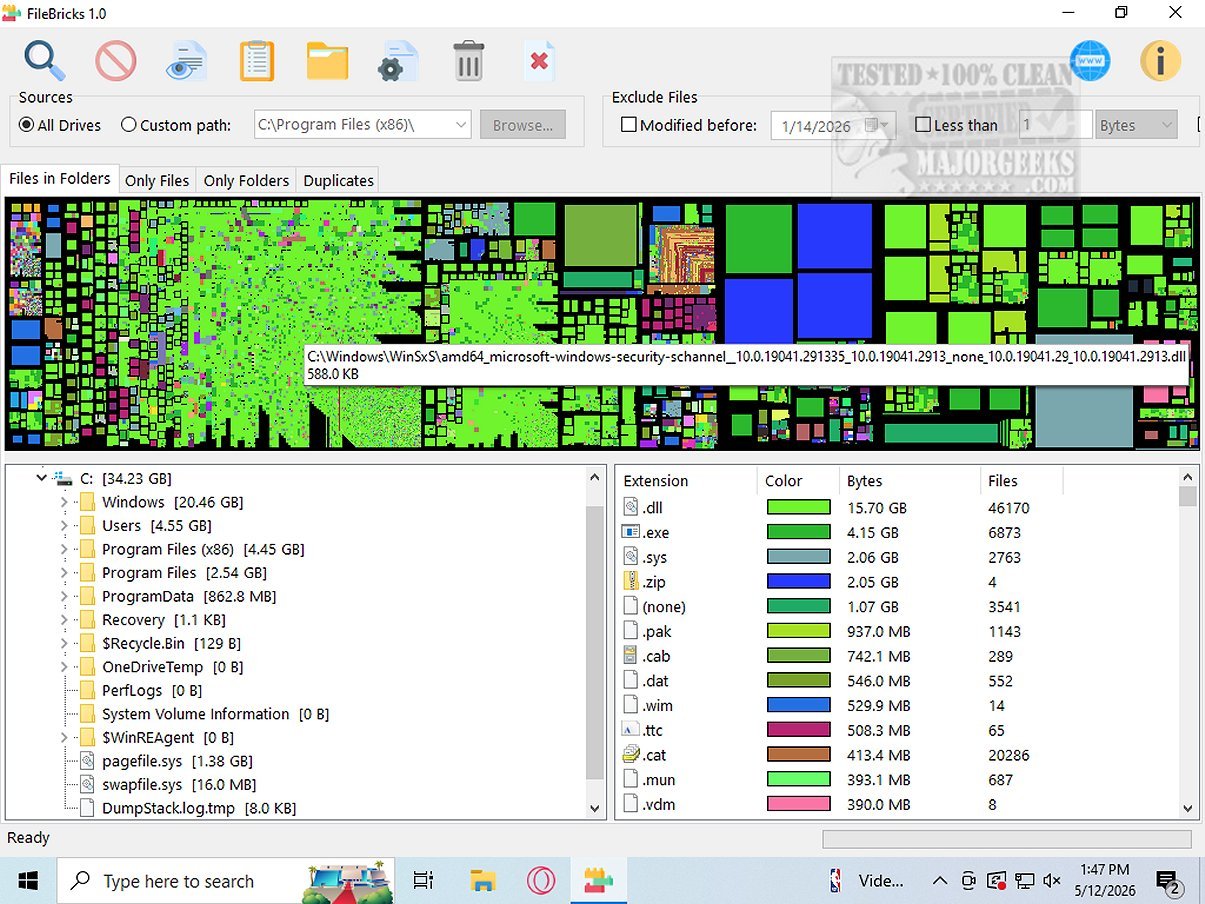
FileBricks 2.3 has been released, offering users an advanced visual disk space analyzer that provides a detailed understanding of storage allocation across drives. This user-friendly application presents files, folders, and duplicates as colorful, easily distinguishable blocks, enabling users to quickly identify large files, crowded folders, and redundant items.
Key Features of FileBricks:
1. Targeted Scanning: Users can select specific drives or folders for analysis, along with robust filtering options to exclude files based on modified dates, file sizes, or specific name patterns. This personalized approach enhances disk space management.
2. In-Depth Analysis: Unlike traditional file listing tools, FileBricks offers dedicated views for thorough disk analysis. Users can explore individual folder contents, view files sorted by size, and compare files across different folders. It also groups duplicates, simplifying the process of identifying and managing redundant files.
3. Color-Coded Organization: The application uses color-coding for files with the same extensions, which allows users to quickly recognize categories like videos, images, archives, executables, and documents. This visual aid streamlines the assessment of which file types are taking up the most space.
User Experience: FileBricks transforms disk management by providing a visual map of storage distribution. This feature is particularly beneficial for users who prefer visual data representation over raw statistics, as it empowers them to optimize storage utilization effectively.
In summary, FileBricks 2.3 is an essential tool for anyone looking to enhance their disk space management strategies. Its innovative visual approach and customizable features make it a standout choice for users who want to take control of their storage resources effectively. Whether you are dealing with a single drive or multiple storage devices, FileBricks offers the tools necessary to manage your digital files efficiently and free up valuable space
Key Features of FileBricks:
1. Targeted Scanning: Users can select specific drives or folders for analysis, along with robust filtering options to exclude files based on modified dates, file sizes, or specific name patterns. This personalized approach enhances disk space management.
2. In-Depth Analysis: Unlike traditional file listing tools, FileBricks offers dedicated views for thorough disk analysis. Users can explore individual folder contents, view files sorted by size, and compare files across different folders. It also groups duplicates, simplifying the process of identifying and managing redundant files.
3. Color-Coded Organization: The application uses color-coding for files with the same extensions, which allows users to quickly recognize categories like videos, images, archives, executables, and documents. This visual aid streamlines the assessment of which file types are taking up the most space.
User Experience: FileBricks transforms disk management by providing a visual map of storage distribution. This feature is particularly beneficial for users who prefer visual data representation over raw statistics, as it empowers them to optimize storage utilization effectively.
In summary, FileBricks 2.3 is an essential tool for anyone looking to enhance their disk space management strategies. Its innovative visual approach and customizable features make it a standout choice for users who want to take control of their storage resources effectively. Whether you are dealing with a single drive or multiple storage devices, FileBricks offers the tools necessary to manage your digital files efficiently and free up valuable space
FileBricks 2.3 released
FileBricks is an innovative visual disk space analyzer designed for users who want a comprehensive understanding of how storage is allocated across their drives. This intuitive program presents files, folders, and duplicate items in the form of colorful, easily identifiable blocks.