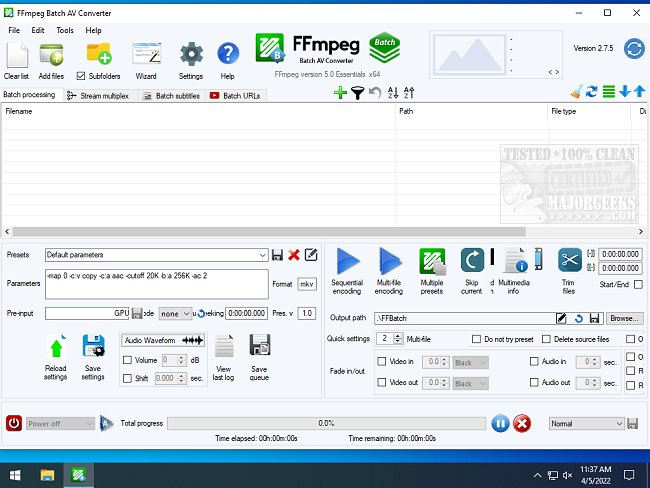
FFmpeg Batch AV Converter 3.2.9 has been released, providing an open-source graphical user interface (GUI) for the powerful FFmpeg multimedia framework. This software enables users of all skill levels to fully utilize FFmpeg's capabilities with features designed for ease of use, such as drag-and-drop functionality, progress tracking, adjustable encoding priorities, and options for pausing or resuming tasks.
One of the standout features of FFmpeg Batch AV Converter is its multi-file encoding capability, which optimizes system resources by executing multiple encoding processes concurrently based on the user's CPU thread count. The converter supports an extensive range of audio and video formats, allowing for unlimited single or multi-file batch encoding. Users can customize encoding parameters and perform various tasks including multiplexing streams, adding subtitles (both as tracks and hardcoded), trimming, concatenating files, recording the screen, and capturing content from M3U8 or YouTube URLs. Additionally, it provides detailed multimedia information.
Key features of FFmpeg Batch AV Converter include:
- Video encoding for formats like AV1, H264, H265, NVENC, QuickSync, ProRes, VP9, and others supported by FFmpeg.
- Audio encoding for formats such as MP3, AAC, AC3, FLAC, WAV, Opus, Vorbis, among others.
- Unlimited batch processing and multi-file encoding capabilities.
- Dynamic variables for FFmpeg parameters for greater flexibility.
- Automatic shutdown options post-encoding, with the ability to run executables.
- User-friendly features like drag-and-drop functionality and a job manager for stream mapping and multiplexing.
- Capabilities for batch muxing and demuxing, file filtering based on criteria, and multimedia information extraction with extensive property columns.
- Tools for trimming, concatenating files, extracting thumbnails from images, creating videos from images, detecting audio silence, and downloading content from YouTube and M3U8 URLs.
In addition to these features, the software acts as a frontend for YouTube-dl, supporting any URLs that it can process. This extensive functionality makes FFmpeg Batch AV Converter a versatile tool for multimedia conversion and management.
Overall, FFmpeg Batch AV Converter 3.2.9 stands out as a comprehensive solution for anyone looking to perform batch audio and video conversions efficiently and effectively. As technology evolves, future updates may introduce even more features, enhancing user experience and expanding format support
One of the standout features of FFmpeg Batch AV Converter is its multi-file encoding capability, which optimizes system resources by executing multiple encoding processes concurrently based on the user's CPU thread count. The converter supports an extensive range of audio and video formats, allowing for unlimited single or multi-file batch encoding. Users can customize encoding parameters and perform various tasks including multiplexing streams, adding subtitles (both as tracks and hardcoded), trimming, concatenating files, recording the screen, and capturing content from M3U8 or YouTube URLs. Additionally, it provides detailed multimedia information.
Key features of FFmpeg Batch AV Converter include:
- Video encoding for formats like AV1, H264, H265, NVENC, QuickSync, ProRes, VP9, and others supported by FFmpeg.
- Audio encoding for formats such as MP3, AAC, AC3, FLAC, WAV, Opus, Vorbis, among others.
- Unlimited batch processing and multi-file encoding capabilities.
- Dynamic variables for FFmpeg parameters for greater flexibility.
- Automatic shutdown options post-encoding, with the ability to run executables.
- User-friendly features like drag-and-drop functionality and a job manager for stream mapping and multiplexing.
- Capabilities for batch muxing and demuxing, file filtering based on criteria, and multimedia information extraction with extensive property columns.
- Tools for trimming, concatenating files, extracting thumbnails from images, creating videos from images, detecting audio silence, and downloading content from YouTube and M3U8 URLs.
In addition to these features, the software acts as a frontend for YouTube-dl, supporting any URLs that it can process. This extensive functionality makes FFmpeg Batch AV Converter a versatile tool for multimedia conversion and management.
Overall, FFmpeg Batch AV Converter 3.2.9 stands out as a comprehensive solution for anyone looking to perform batch audio and video conversions efficiently and effectively. As technology evolves, future updates may introduce even more features, enhancing user experience and expanding format support
FFmpeg Batch AV Converter 3.2.9 released
FFmpeg Batch AV Converter is an Open Source FFmpeg GUI that allows users to harness the full potential of FFmpeg.