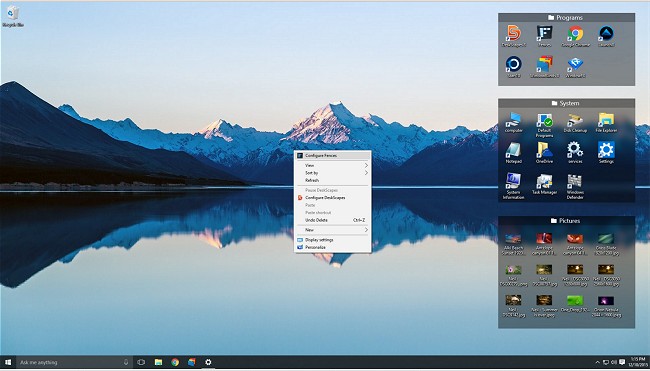
Fences version 6.58 / 4.23 has been released, offering users enhanced capabilities to manage their desktop space effectively. This software is designed to organize your desktop by creating "fences," which are movable and resizable shaded areas that serve as containers for desktop icons.
Key features of Fences include:
- The ability to create custom fences to neatly arrange your icons.
- A simple click option to hide or show desktop icons, keeping your workspace tidy.
- The option to mirror folder contents directly on the desktop for quick access.
- Automatic sorting of new desktop icons into designated fences, ensuring ongoing organization without manual effort.
Furthermore, for a more interactive experience, users can view a demonstration video by clicking on the designated link, which will seamlessly embed a YouTube video to showcase Fences' functionalities in action.
In addition to the main features, users may find related topics valuable, such as:
- Instructions on enabling or disabling the “Show Desktop” feature in Windows 11.
- Guidance on creating shortcuts for quick access to the desktop in both Windows 10 and 11.
- Tips on managing desktop background images in Windows 10.
- An explanation of Desktop.ini files and their significance in desktop organization.
As desktop clutter can be a significant distraction, Fences provides a streamlined solution for those looking to enhance productivity and maintain an organized digital workspace. With ongoing updates, users can expect continuous improvements and new features that further refine their desktop experience
Key features of Fences include:
- The ability to create custom fences to neatly arrange your icons.
- A simple click option to hide or show desktop icons, keeping your workspace tidy.
- The option to mirror folder contents directly on the desktop for quick access.
- Automatic sorting of new desktop icons into designated fences, ensuring ongoing organization without manual effort.
Furthermore, for a more interactive experience, users can view a demonstration video by clicking on the designated link, which will seamlessly embed a YouTube video to showcase Fences' functionalities in action.
In addition to the main features, users may find related topics valuable, such as:
- Instructions on enabling or disabling the “Show Desktop” feature in Windows 11.
- Guidance on creating shortcuts for quick access to the desktop in both Windows 10 and 11.
- Tips on managing desktop background images in Windows 10.
- An explanation of Desktop.ini files and their significance in desktop organization.
As desktop clutter can be a significant distraction, Fences provides a streamlined solution for those looking to enhance productivity and maintain an organized digital workspace. With ongoing updates, users can expect continuous improvements and new features that further refine their desktop experience
Fences 6.58 / 4.23 released
Fences will help you organize your desktop and hide your icons when they're not in use.