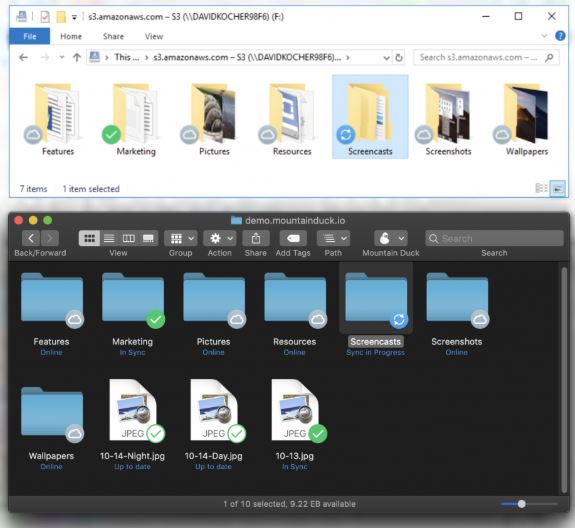
Mountain Duck is a powerful utility designed for both Windows and macOS that allows users to seamlessly mount various remote storage solutions, such as FTP, SFTP, WebDAV, Amazon S3, Google Cloud, and more, as local drives. This innovative approach enables users to access, edit, and save cloud files directly through their familiar file management systems (Finder or Explorer), eliminating the need for tedious syncing or switching between different applications.
What is Mountain Duck?
Essentially, Mountain Duck acts as an intermediary that connects your desktop environment to cloud storage. By mapping remote servers to local drives, it simplifies the process of interacting with cloud files as if they were stored directly on your device. With Mountain Duck, there’s no need for cumbersome uploads or downloads; users can open, edit, and save files instantly, similar to how they would interact with files on a USB stick.
Why You Want This Tool
For professionals working with remote servers or cloud storage, Mountain Duck significantly enhances productivity. It allows for direct file manipulation on platforms like Google Drive or Amazon S3 without the hassle of downloading and re-uploading. For instance, if you have documents in Google Drive, instead of downloading, editing, and then uploading them, you can simply mount Google Drive as a local drive and edit them directly.
Trial and Features
Mountain Duck offers a fully functional 14-day free trial, which allows users to explore all features without any limitations. Key features include support for various protocols, deep integration with file explorers, smart caching, and secure logins via OS keychains. Users can also bookmark servers for quick access, manage files from applications like Photoshop or Visual Studio, and utilize offline access when needed.
Usage Scenarios
Imagine you are editing a configuration file on a remote Linux server; instead of launching an FTP client, you can easily mount it as a drive, edit it in your preferred text editor, and save changes directly. Similarly, if you are archiving project files to S3, you can streamline the process without additional applications.
Pros and Cons
Pros:
- Supports a wide array of cloud and server protocols.
- Integrates seamlessly with existing applications.
- Provides offline access during unstable connections.
Cons:
- Requires a license fee after the trial period.
- May have a learning curve for users unfamiliar with remote mounting.
- Performance might be affected by slow network connections.
Conclusion
Mountain Duck transforms the often chaotic nature of remote file management into a streamlined, local-like experience. The generous 14-day trial provides users with full access to all features, making it an attractive option for those frustrated with traditional syncing or manual uploads. If your work involves regular interaction with cloud storage or remote files, Mountain Duck is definitely worth a try.
Future Enhancements
To further improve user experience, potential updates could include enhanced performance optimizations for slower networks, additional cloud service integrations, and more robust support resources for new users. As cloud storage solutions continue to evolve, Mountain Duck's ongoing development will likely keep it a vital tool for professionals managing remote files efficiently
What is Mountain Duck?
Essentially, Mountain Duck acts as an intermediary that connects your desktop environment to cloud storage. By mapping remote servers to local drives, it simplifies the process of interacting with cloud files as if they were stored directly on your device. With Mountain Duck, there’s no need for cumbersome uploads or downloads; users can open, edit, and save files instantly, similar to how they would interact with files on a USB stick.
Why You Want This Tool
For professionals working with remote servers or cloud storage, Mountain Duck significantly enhances productivity. It allows for direct file manipulation on platforms like Google Drive or Amazon S3 without the hassle of downloading and re-uploading. For instance, if you have documents in Google Drive, instead of downloading, editing, and then uploading them, you can simply mount Google Drive as a local drive and edit them directly.
Trial and Features
Mountain Duck offers a fully functional 14-day free trial, which allows users to explore all features without any limitations. Key features include support for various protocols, deep integration with file explorers, smart caching, and secure logins via OS keychains. Users can also bookmark servers for quick access, manage files from applications like Photoshop or Visual Studio, and utilize offline access when needed.
Usage Scenarios
Imagine you are editing a configuration file on a remote Linux server; instead of launching an FTP client, you can easily mount it as a drive, edit it in your preferred text editor, and save changes directly. Similarly, if you are archiving project files to S3, you can streamline the process without additional applications.
Pros and Cons
Pros:
- Supports a wide array of cloud and server protocols.
- Integrates seamlessly with existing applications.
- Provides offline access during unstable connections.
Cons:
- Requires a license fee after the trial period.
- May have a learning curve for users unfamiliar with remote mounting.
- Performance might be affected by slow network connections.
Conclusion
Mountain Duck transforms the often chaotic nature of remote file management into a streamlined, local-like experience. The generous 14-day trial provides users with full access to all features, making it an attractive option for those frustrated with traditional syncing or manual uploads. If your work involves regular interaction with cloud storage or remote files, Mountain Duck is definitely worth a try.
Future Enhancements
To further improve user experience, potential updates could include enhanced performance optimizations for slower networks, additional cloud service integrations, and more robust support resources for new users. As cloud storage solutions continue to evolve, Mountain Duck's ongoing development will likely keep it a vital tool for professionals managing remote files efficiently
Mountain Duck 5.4.0.30093 released
Mountain Duck lets you mount remote storage like FTP, SFTP, WebDAV, Amazon S3, and more as local disks on Windows and macOS, so any file‑based app can open, save, or edit files directly in the cloud.