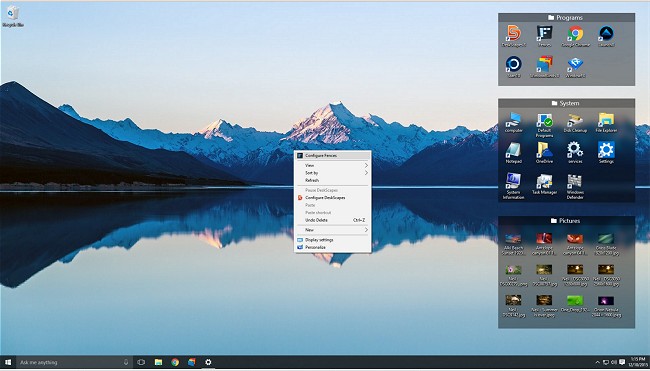
The latest release of Fences, version 6.54/4.23, introduces enhanced features aimed at improving desktop organization and usability. This software allows users to organize their desktop icons effectively by creating customizable "fences," which are shaded areas that can be labeled and resized. These fences serve as containers for organizing icons, making it easier to maintain a clean and clutter-free workspace.
Key features of Fences include:
- The ability to create distinct "fences" on your desktop to categorize icons.
- A simple toggle to hide or show desktop icons with just one click.
- The option to mirror the contents of specific folders directly on the desktop.
- Automatic sorting of new desktop icons into the appropriate fence based on predefined categories.
Additionally, the software includes interactive elements, such as a feature that allows users to watch a demonstration video on how to use Fences effectively.
For users looking to enhance their desktop experience further, related resources are available, including guides on enabling or disabling the "Show Desktop" feature in Windows 11, creating shortcuts for quick access, and understanding Desktop.ini files.
In extension, Fences can significantly improve productivity by allowing users to customize their desktop layout according to their workflow. By utilizing these organizational tools, users can minimize distractions and quickly locate necessary files or applications. Future updates could potentially incorporate AI-driven suggestions for organizing icons or integrating with cloud storage for seamless access to files across devices
Key features of Fences include:
- The ability to create distinct "fences" on your desktop to categorize icons.
- A simple toggle to hide or show desktop icons with just one click.
- The option to mirror the contents of specific folders directly on the desktop.
- Automatic sorting of new desktop icons into the appropriate fence based on predefined categories.
Additionally, the software includes interactive elements, such as a feature that allows users to watch a demonstration video on how to use Fences effectively.
For users looking to enhance their desktop experience further, related resources are available, including guides on enabling or disabling the "Show Desktop" feature in Windows 11, creating shortcuts for quick access, and understanding Desktop.ini files.
In extension, Fences can significantly improve productivity by allowing users to customize their desktop layout according to their workflow. By utilizing these organizational tools, users can minimize distractions and quickly locate necessary files or applications. Future updates could potentially incorporate AI-driven suggestions for organizing icons or integrating with cloud storage for seamless access to files across devices
Fences 6.54 / 4.23 released
Fences will help you organize your desktop and hide your icons when they're not in use.