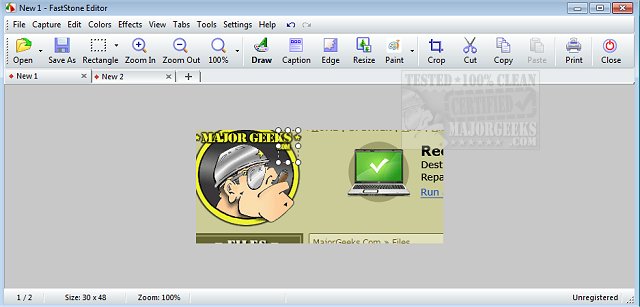
FastStone Capture 11.3 has been released, offering users an advanced yet user-friendly screen capture tool. This software allows for the easy capture and annotation of various screen elements, including entire windows, specific objects, menus, full screens, as well as rectangular and freehand regions. Notably, it can also capture scrolling windows and web pages, making it highly versatile.
Users can direct their captures to a variety of destinations, such as an editor, files, clipboard, printer, email, or even directly into Word or PowerPoint documents, and it supports uploads to websites. FastStone Capture comes equipped with a robust set of editing tools, enabling users to annotate with text, arrows, and highlights, as well as perform tasks like resizing, cropping, sharpening, watermarking, and applying edge effects.
In addition to screen captures, the software also includes functionality for recording screen activities along with audio, saving these as highly compressed video files. FastStone Capture features convenient global hotkeys, automatic filename generation, and compatibility with external editors. Additional tools such as a color picker, screen magnifier, and screen ruler further enhance its usability.
The application supports multiple file formats, allowing users to save their captures in BMP, GIF, JPEG, PCX, PNG, TGA, TIFF, and PDF formats. A portable version is also available, enabling users to carry the application on a USB drive for on-the-go usage.
In summary, FastStone Capture 11.3 is an all-encompassing tool for anyone needing efficient screen capture and editing capabilities, making it suitable for professionals, educators, and casual users alike. As it continues to evolve, users can anticipate further enhancements and features that will streamline their screen capturing and editing processes
Users can direct their captures to a variety of destinations, such as an editor, files, clipboard, printer, email, or even directly into Word or PowerPoint documents, and it supports uploads to websites. FastStone Capture comes equipped with a robust set of editing tools, enabling users to annotate with text, arrows, and highlights, as well as perform tasks like resizing, cropping, sharpening, watermarking, and applying edge effects.
In addition to screen captures, the software also includes functionality for recording screen activities along with audio, saving these as highly compressed video files. FastStone Capture features convenient global hotkeys, automatic filename generation, and compatibility with external editors. Additional tools such as a color picker, screen magnifier, and screen ruler further enhance its usability.
The application supports multiple file formats, allowing users to save their captures in BMP, GIF, JPEG, PCX, PNG, TGA, TIFF, and PDF formats. A portable version is also available, enabling users to carry the application on a USB drive for on-the-go usage.
In summary, FastStone Capture 11.3 is an all-encompassing tool for anyone needing efficient screen capture and editing capabilities, making it suitable for professionals, educators, and casual users alike. As it continues to evolve, users can anticipate further enhancements and features that will streamline their screen capturing and editing processes
FastStone Capture 11.3 released
FastStone Capture is a powerful, lightweight, yet full-featured screen capture tool that allows you to capture and annotate anything on the screen easily.