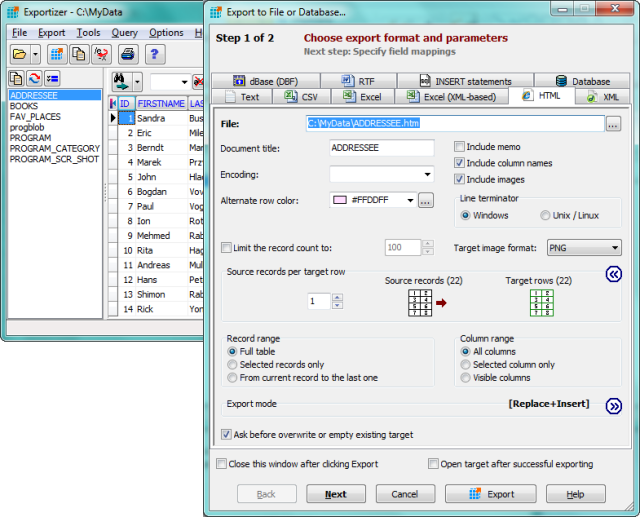
Exportizer 10.3.8.2878 has been released, enhancing its capabilities as a free database export tool designed for versatile data handling. This tool allows users to export data seamlessly to various formats including files, clipboard, or printer outputs. It operates via BDE (Borland Database Engine) or ADO (ActiveX Data Objects) and supports conversions from DB, DBF, text, and CSV files into multiple formats such as text, CSV, XLS, RTF, XML, HTML, DBF, and INSERT statements.
Key features of Exportizer include:
- The ability to open tables from various multi-table database files, including XLS, XLSX, XLSM, XLSB, MDB, ACCDB, HTML, GDB, IB, FDB, UDL, and other ODBC data sources.
- Options for exporting data from all files within a specified folder or all tables from a multi-table data source at once, either through the user interface or the Command Line.
- Customization capabilities, such as specifying field mappings between source and target data, and setting a custom increment number for fields.
- Support for exporting data to Excel (XML-based) and various database formats.
- Advanced Command Line functionalities that include options like /Silent, /LogFile, and /CloseOnError for enhanced automation.
- Additional export modes such as Append and Empty+Insert, allowing for greater control over data output.
In summary, Exportizer 10.3.8.2878 offers a robust solution for users looking to manage and export their database information efficiently. With its rich feature set and user-friendly interface, it caters to a wide range of data export needs, making it an essential tool for database administrators and users alike. Future updates could further expand its compatibility with emerging data formats and enhance its command line capabilities for even more streamlined workflows
Key features of Exportizer include:
- The ability to open tables from various multi-table database files, including XLS, XLSX, XLSM, XLSB, MDB, ACCDB, HTML, GDB, IB, FDB, UDL, and other ODBC data sources.
- Options for exporting data from all files within a specified folder or all tables from a multi-table data source at once, either through the user interface or the Command Line.
- Customization capabilities, such as specifying field mappings between source and target data, and setting a custom increment number for fields.
- Support for exporting data to Excel (XML-based) and various database formats.
- Advanced Command Line functionalities that include options like /Silent, /LogFile, and /CloseOnError for enhanced automation.
- Additional export modes such as Append and Empty+Insert, allowing for greater control over data output.
In summary, Exportizer 10.3.8.2878 offers a robust solution for users looking to manage and export their database information efficiently. With its rich feature set and user-friendly interface, it caters to a wide range of data export needs, making it an essential tool for database administrators and users alike. Future updates could further expand its compatibility with emerging data formats and enhance its command line capabilities for even more streamlined workflows
Exportizer 10.3.8.2878 released
Exportizer is a free database export tool that allows you to export data to a file, clipboard, or printer.