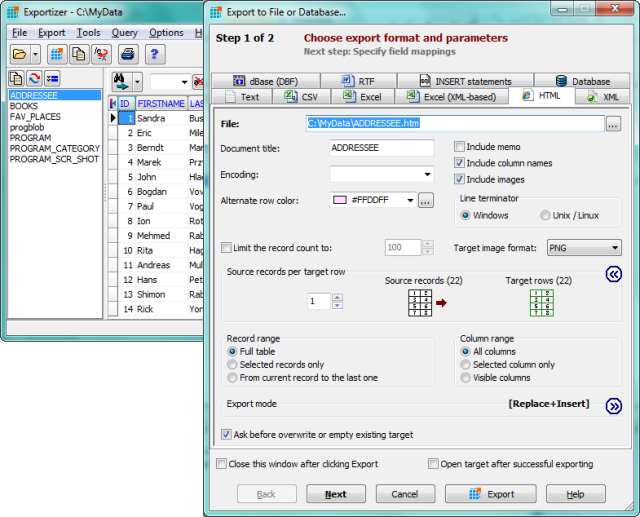
Exportizer, version 10.3.7.1577, has been released as a free tool designed for exporting data from various databases. This versatile software enables users to export data to formats like text, CSV, XLS, RTF, XML, HTML, and DBF, as well as to create INSERT statements. It supports data connections through BDE or ADO and can handle multiple file types, including DB, DBF, and various multi-table database formats such as XLS, MDB, and ODBC sources.
One of Exportizer's notable features is its extensive customization options, allowing users to define field mappings between the source and target, ensuring precise control over the output. Users can perform export operations through an intuitive graphical user interface or via the Command Line, which supports various parameters for advanced functionality. The software also includes utility functions for data manipulation and bookmarking.
Key features of Exportizer include:
- The ability to open and export data from multi-table database files and various formats simultaneously.
- Customization options like specifying increment numbers for fields.
- Options for exporting data directly to Excel and database formats.
- Additional Command Line functionalities, such as silent operation, logging, and error handling.
- Support for different export modes, including Append and Empty+Insert.
In summary, Exportizer is a powerful and flexible database export tool suitable for users looking to efficiently manage and export their data across multiple formats and sources. Its combination of a user-friendly interface and robust command line capabilities makes it an excellent choice for both casual users and advanced data management tasks
One of Exportizer's notable features is its extensive customization options, allowing users to define field mappings between the source and target, ensuring precise control over the output. Users can perform export operations through an intuitive graphical user interface or via the Command Line, which supports various parameters for advanced functionality. The software also includes utility functions for data manipulation and bookmarking.
Key features of Exportizer include:
- The ability to open and export data from multi-table database files and various formats simultaneously.
- Customization options like specifying increment numbers for fields.
- Options for exporting data directly to Excel and database formats.
- Additional Command Line functionalities, such as silent operation, logging, and error handling.
- Support for different export modes, including Append and Empty+Insert.
In summary, Exportizer is a powerful and flexible database export tool suitable for users looking to efficiently manage and export their data across multiple formats and sources. Its combination of a user-friendly interface and robust command line capabilities makes it an excellent choice for both casual users and advanced data management tasks
Exportizer 10.3.7.1577 released
Exportizer is a free database export tool that allows you to export data to a file, clipboard, or printer.