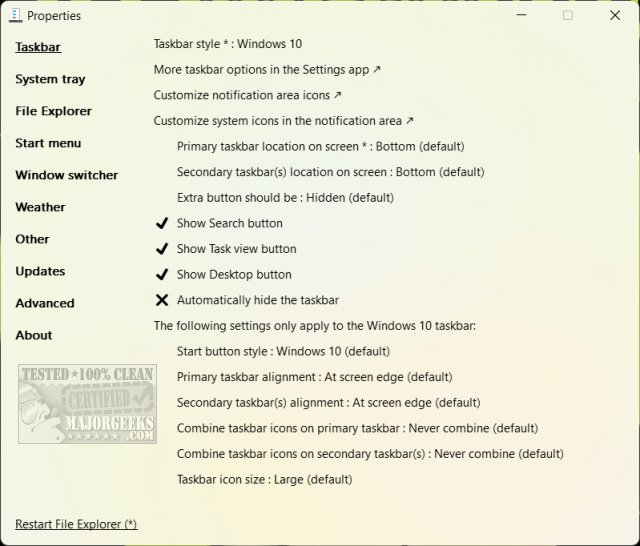
ExplorerPatcher is an open-source, portable utility designed to enhance the customization of the Windows 11 interface. Recently, the software has seen the release of version 26100.4946.69.6 in pre-release, alongside version 26100.4946.69.5. For users dissatisfied with the new UI changes in Windows 11, particularly those who prefer the familiarity of Windows 10, ExplorerPatcher serves as an essential toolkit for restoring and tweaking various interface elements such as the Start Menu, Taskbar, System Tray, and File Explorer.
Key features of ExplorerPatcher include:
- Start Menu Customization: Switch between Windows 10 and 11 styles, disable "Recommended" tiles, and modify the Start Menu's layout.
- Taskbar Adjustments: Resize and reposition the Taskbar, bringing back functionalities reminiscent of Windows 10.
- System Tray Restoration: Customize the System Tray appearance to resemble Windows 10’s icons and features.
- File Explorer Modifications: Access advanced settings, including disabling modern search and altering the right-click context menu.
- Multitasking Enhancements: Tailor the behavior of the Windows Switcher and optimize settings for multiple monitors.
- Weather Widget Customization: Adjust the Taskbar weather widget’s appearance, size, and refresh rate.
ExplorerPatcher stands out due to its lightweight and user-friendly nature, requiring no complicated installation while providing an intuitive interface for easy navigation of options. It empowers users to reclaim control over their computing environment, enhancing efficiency and consistency.
This tool is particularly beneficial for long-time Windows users who find the transition to Windows 11 challenging. While it is not necessarily aimed at beginners, the comprehensive documentation makes it approachable for those willing to tinker with their system settings.
In summary, ExplorerPatcher is a powerful and flexible solution for Windows 11 users seeking to revert to familiar functionalities or customize their experience. Its lightweight design and open-source nature make it a top choice for anyone looking to enhance their Windows interface without incurring additional costs. As such, it is highly recommended for those eager to reclaim productivity and tailor their digital workspace.
Looking ahead, potential future updates could further expand ExplorerPatcher's capabilities, perhaps introducing even deeper customization options or additional features that enhance user experience and workflow efficiency
Key features of ExplorerPatcher include:
- Start Menu Customization: Switch between Windows 10 and 11 styles, disable "Recommended" tiles, and modify the Start Menu's layout.
- Taskbar Adjustments: Resize and reposition the Taskbar, bringing back functionalities reminiscent of Windows 10.
- System Tray Restoration: Customize the System Tray appearance to resemble Windows 10’s icons and features.
- File Explorer Modifications: Access advanced settings, including disabling modern search and altering the right-click context menu.
- Multitasking Enhancements: Tailor the behavior of the Windows Switcher and optimize settings for multiple monitors.
- Weather Widget Customization: Adjust the Taskbar weather widget’s appearance, size, and refresh rate.
ExplorerPatcher stands out due to its lightweight and user-friendly nature, requiring no complicated installation while providing an intuitive interface for easy navigation of options. It empowers users to reclaim control over their computing environment, enhancing efficiency and consistency.
This tool is particularly beneficial for long-time Windows users who find the transition to Windows 11 challenging. While it is not necessarily aimed at beginners, the comprehensive documentation makes it approachable for those willing to tinker with their system settings.
In summary, ExplorerPatcher is a powerful and flexible solution for Windows 11 users seeking to revert to familiar functionalities or customize their experience. Its lightweight design and open-source nature make it a top choice for anyone looking to enhance their Windows interface without incurring additional costs. As such, it is highly recommended for those eager to reclaim productivity and tailor their digital workspace.
Looking ahead, potential future updates could further expand ExplorerPatcher's capabilities, perhaps introducing even deeper customization options or additional features that enhance user experience and workflow efficiency
ExplorerPatcher 26100.4946.69.6 Pre-Release / 26100.4946.69.5 released
ExplorerPatcher is an Open Source, portable executable that lets you customize the Windows 11 Start Menu, Taskbar, System Tray, File Explorer, and more.
ExplorerPatcher 26100.4946.69.6 Pre-Release / 26100.4946.69.5 released @ MajorGeeks