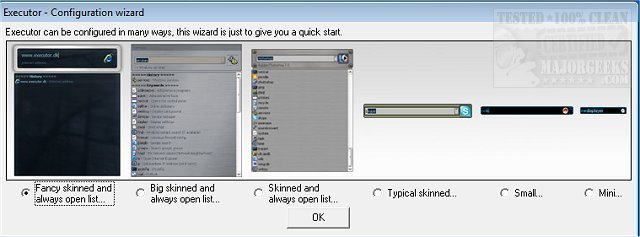
Executor version 2.4.4 has been released, offering users a highly customizable alternative to the traditional Windows Run feature. Designed to enhance productivity, Executor serves as a multi-purpose launcher that streamlines the process of finding and launching applications, especially for users with extensive Start menu lists. Instead of scrolling through numerous programs, users can quickly access their desired applications, optimizing their workflow.
Executor allows for extensive personalization, offering various skins, layouts, and modes tailored to individual preferences. The program features a search function that filters results in real-time as users type, providing instant suggestions that can be launched via a simple double-click. It operates quietly in the system tray, making it readily accessible without interrupting the user's workflow.
Key features of Executor include:
- Keyword Management: Users can create keywords linked to shortcuts, files, and folders by dragging and dropping them into the program.
- Auto-completion: This feature helps users find keywords, file system entries, and history items quickly.
- URL Detection: Users can enter URLs directly for quick access to websites.
- Dynamic Start Menu Integration: Executor can dynamically include matching Start menu items and Control Panel entries in its suggestions.
- Custom Path Scanning: Users can define paths for specific file types.
- Integration with Services: The program can connect with popular services like Gmail and Twitter.
- Customization Options: Users can modify layout, colors, fonts, and transparency to suit their preferences.
- Hotkey Support: Each keyword can be assigned a hotkey, similar to a hotkey manager.
Executor is designed to adapt to users’ working habits and needs, ultimately making daily tasks more efficient. For a complete listing of features and additional resources, users can visit the author’s website.
In addition to these features, Executor may also integrate with other productivity tools and services, further enhancing its utility. As technology continues to evolve, users may expect future updates to include even more advanced functionalities, such as improved AI-driven suggestions and deeper integration with cloud-based services, making Executor an indispensable tool for modern digital workflows
Executor allows for extensive personalization, offering various skins, layouts, and modes tailored to individual preferences. The program features a search function that filters results in real-time as users type, providing instant suggestions that can be launched via a simple double-click. It operates quietly in the system tray, making it readily accessible without interrupting the user's workflow.
Key features of Executor include:
- Keyword Management: Users can create keywords linked to shortcuts, files, and folders by dragging and dropping them into the program.
- Auto-completion: This feature helps users find keywords, file system entries, and history items quickly.
- URL Detection: Users can enter URLs directly for quick access to websites.
- Dynamic Start Menu Integration: Executor can dynamically include matching Start menu items and Control Panel entries in its suggestions.
- Custom Path Scanning: Users can define paths for specific file types.
- Integration with Services: The program can connect with popular services like Gmail and Twitter.
- Customization Options: Users can modify layout, colors, fonts, and transparency to suit their preferences.
- Hotkey Support: Each keyword can be assigned a hotkey, similar to a hotkey manager.
Executor is designed to adapt to users’ working habits and needs, ultimately making daily tasks more efficient. For a complete listing of features and additional resources, users can visit the author’s website.
In addition to these features, Executor may also integrate with other productivity tools and services, further enhancing its utility. As technology continues to evolve, users may expect future updates to include even more advanced functionalities, such as improved AI-driven suggestions and deeper integration with cloud-based services, making Executor an indispensable tool for modern digital workflows
Executor 2.4.4 released
Executor provides a fully customizable alternative to Windows Run that gives you a personalized multi-purpose launcher and more.