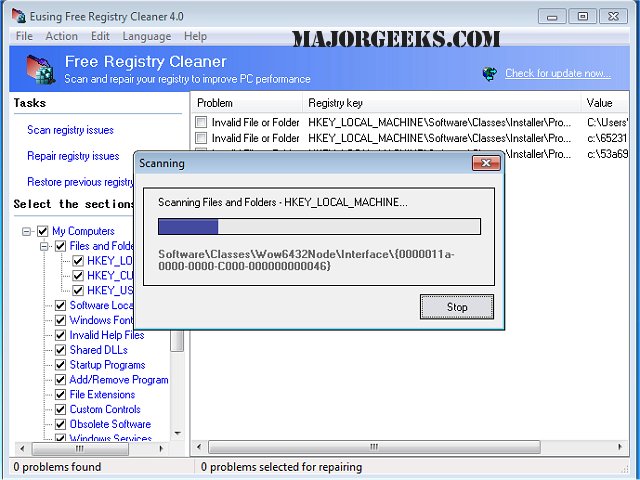
Eusing Free Registry Cleaner version 4.8.5 has been released, offering a reliable solution for cleaning and repairing issues within the Windows registry. Registry problems can arise from various sources like leftover references post-uninstallation, improper software removals, or missing and corrupt drivers, which can lead to an expanded registry size and decreased computer performance.
The software identifies and rectifies a wide range of registry issues, including:
- Missing shared DLLs
- Unused file extensions
- Invalid ActiveX controls
- Invalid help files
- Incorrect paths
- Sound and application events
- Obsolete start menu entries
- Invalid fonts
- Invalid application paths
- Invalid startup programs
- Invalid custom controls
- Missing shortcut references
- Obsolete software keys
- Invalid installer references
- Missing files and folders
Key features of Eusing Free Registry Cleaner include a safe scanning process for invalid or obsolete registry information, a user-friendly interface for easy repairs, and enhancements to overall computer speed and stability. The tool also automatically backs up repaired registry entries, providing users with peace of mind.
For users looking to delve deeper into registry management, there are additional resources available, such as guides on opening the Registry Editor in Windows and instructions for backing up or restoring the registry in Windows 10 and 11.
As technology continues to evolve, the need for efficient system maintenance tools becomes increasingly important. Eusing Free Registry Cleaner not only addresses immediate registry issues but also contributes to the long-term health and performance of Windows PCs. Regular use can prevent potential problems, ensuring a smoother and faster computing experience for users
The software identifies and rectifies a wide range of registry issues, including:
- Missing shared DLLs
- Unused file extensions
- Invalid ActiveX controls
- Invalid help files
- Incorrect paths
- Sound and application events
- Obsolete start menu entries
- Invalid fonts
- Invalid application paths
- Invalid startup programs
- Invalid custom controls
- Missing shortcut references
- Obsolete software keys
- Invalid installer references
- Missing files and folders
Key features of Eusing Free Registry Cleaner include a safe scanning process for invalid or obsolete registry information, a user-friendly interface for easy repairs, and enhancements to overall computer speed and stability. The tool also automatically backs up repaired registry entries, providing users with peace of mind.
For users looking to delve deeper into registry management, there are additional resources available, such as guides on opening the Registry Editor in Windows and instructions for backing up or restoring the registry in Windows 10 and 11.
As technology continues to evolve, the need for efficient system maintenance tools becomes increasingly important. Eusing Free Registry Cleaner not only addresses immediate registry issues but also contributes to the long-term health and performance of Windows PCs. Regular use can prevent potential problems, ensuring a smoother and faster computing experience for users
Eusing Free Registry Cleaner 4.8.5 released
Eusing Free Registry Cleaner safely cleans and repairs registry problems.