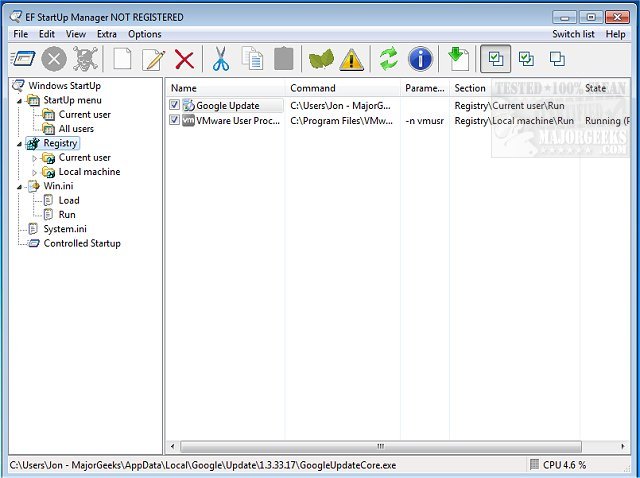
EF StartUp Manager 26.08 has been released, providing users with an intuitive tool for managing the applications that launch during the Windows startup process. It allows for easy insertion, temporary disabling, or removal of programs that start automatically when the operating system boots up. While some of these startup applications are essential for system performance, others may be unnecessary or even malicious, consuming valuable system resources.
The software features a user-friendly interface that resembles Windows Explorer, offering a clear view of all startup entries. Additionally, it provides a controlled starting mode that enables users to specify the order in which programs launch, along with customizable delays between them. This can help improve system boot times and overall performance.
EF StartUp Manager supports multiple languages, including English, German, Arabic, Catalan, Dutch, French, Hebrew, Hungarian, Italian, Japanese, Korean, Romanian, Russian, Spanish, Swedish, Taiwanese, and Ukrainian, making it accessible to a diverse user base.
In addition to EF StartUp Manager, users may find helpful resources for managing their startup applications and understanding running processes in Windows. These include guides on identifying processes or services, saving a list of running processes, customizing information in Task Manager, and managing startup apps specifically for Windows 10 and 11. Furthermore, instructions are available for disabling privacy-related tasks within the Windows Task Scheduler.
Overall, EF StartUp Manager 26.08 is a valuable tool for anyone looking to optimize their Windows startup experience while maintaining control over their system's performance and security
The software features a user-friendly interface that resembles Windows Explorer, offering a clear view of all startup entries. Additionally, it provides a controlled starting mode that enables users to specify the order in which programs launch, along with customizable delays between them. This can help improve system boot times and overall performance.
EF StartUp Manager supports multiple languages, including English, German, Arabic, Catalan, Dutch, French, Hebrew, Hungarian, Italian, Japanese, Korean, Romanian, Russian, Spanish, Swedish, Taiwanese, and Ukrainian, making it accessible to a diverse user base.
In addition to EF StartUp Manager, users may find helpful resources for managing their startup applications and understanding running processes in Windows. These include guides on identifying processes or services, saving a list of running processes, customizing information in Task Manager, and managing startup apps specifically for Windows 10 and 11. Furthermore, instructions are available for disabling privacy-related tasks within the Windows Task Scheduler.
Overall, EF StartUp Manager 26.08 is a valuable tool for anyone looking to optimize their Windows startup experience while maintaining control over their system's performance and security
EF StartUp Manager 26.08 released
EF StartUp Manager allows you a simple handling and complete control of applications that start with Windows. They can insert, temporarily disable or delete any new programs with ease.