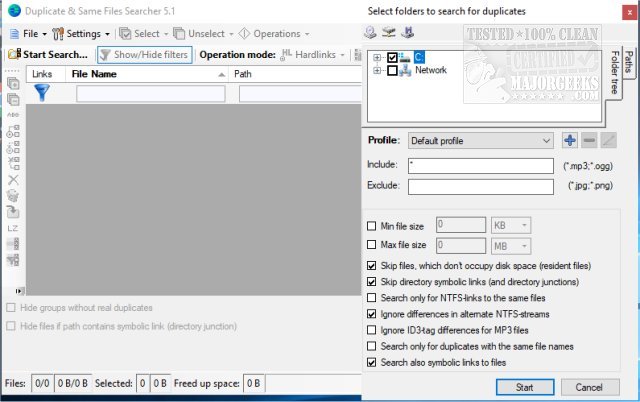
The latest version 10.8.3 of Duplicate Files Search & Link has been released, enhancing its functionality as a portable freeware application specifically designed to identify duplicate files, NTFS hard links, and symbolic links pointing to the same file. This tool employs an effective byte-to-byte comparison to accurately detect duplicate file contents, irrespective of their names.
A key feature that distinguishes Duplicate Files Search & Link from other similar tools is its capability to manage NTFS links. NTFS hard links allow multiple file paths to reference a single file within the same volume, which can help save disk space. For instance, if many applications reference the same library file through NTFS links, the file remains intact until all links are deleted, effectively conserving storage.
Key features of Duplicate Files Search & Link include:
- A fast search engine utilizing byte-to-byte comparisons and algorithms for detecting hard and symbolic links.
- Visualization tools for a detailed view of duplicate files, NTFS hard links, junction points, and symbolic links.
- Functionality for moving, deleting, or replacing files with NTFS hard links or symbolic links.
- Support for scanning long file paths, managing compressed NTFS files, and handling alternate NTFS streams, along with compatibility checks for NTFS permissions.
- An experimental feature for comparing MP3 files based solely on their content, disregarding metadata differences.
In addition, the app allows users to save and load search results, providing flexibility and ease of use.
Overall, Duplicate Files Search & Link 10.8.3 stands out for its comprehensive capabilities in file management, particularly in environments where efficient storage use is critical, such as for developers or users with extensive file libraries.
- Incorporating an AI-driven recommendation system that suggests which duplicates should be kept or deleted based on usage patterns.
- Adding cloud storage support to facilitate the management of duplicates across various platforms and devices.
- Providing a user-friendly tutorial or help section to assist novice users in navigating the app's more advanced features.
- Including a scheduling option that allows users to automate duplicate file scans and cleanups at regular intervals.
This would not only enhance user experience but also broaden the app's appeal to a wider audience looking for efficient file management solutions
A key feature that distinguishes Duplicate Files Search & Link from other similar tools is its capability to manage NTFS links. NTFS hard links allow multiple file paths to reference a single file within the same volume, which can help save disk space. For instance, if many applications reference the same library file through NTFS links, the file remains intact until all links are deleted, effectively conserving storage.
Key features of Duplicate Files Search & Link include:
- A fast search engine utilizing byte-to-byte comparisons and algorithms for detecting hard and symbolic links.
- Visualization tools for a detailed view of duplicate files, NTFS hard links, junction points, and symbolic links.
- Functionality for moving, deleting, or replacing files with NTFS hard links or symbolic links.
- Support for scanning long file paths, managing compressed NTFS files, and handling alternate NTFS streams, along with compatibility checks for NTFS permissions.
- An experimental feature for comparing MP3 files based solely on their content, disregarding metadata differences.
In addition, the app allows users to save and load search results, providing flexibility and ease of use.
Overall, Duplicate Files Search & Link 10.8.3 stands out for its comprehensive capabilities in file management, particularly in environments where efficient storage use is critical, such as for developers or users with extensive file libraries.
Extensions:
In addition to its current features, the application could benefit from further enhancements such as:- Incorporating an AI-driven recommendation system that suggests which duplicates should be kept or deleted based on usage patterns.
- Adding cloud storage support to facilitate the management of duplicates across various platforms and devices.
- Providing a user-friendly tutorial or help section to assist novice users in navigating the app's more advanced features.
- Including a scheduling option that allows users to automate duplicate file scans and cleanups at regular intervals.
This would not only enhance user experience but also broaden the app's appeal to a wider audience looking for efficient file management solutions
Duplicate Files Search and Link 10.8.3 released
Duplicate Files Search & Link is a portable freeware app designed to quickly search out duplicate files, NTFS hard links, and any symbolic links to the same file.
Duplicate Files Search and Link 10.8.3 released @ MajorGeeks