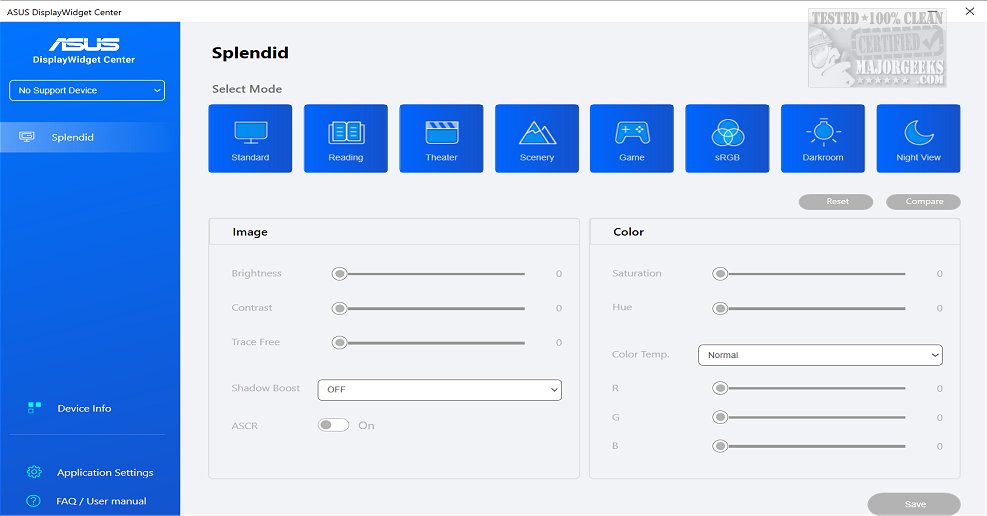
ASUS has released version 1.5.2.8 of the DisplayWidget Center, a dedicated application designed specifically for ASUS monitors. This comprehensive monitor management solution enables users to optimize and personalize their display settings, including brightness, contrast, and color temperature, catering to the specific needs of designers, gamers, and those who use monitors for extended periods. The application features a user-friendly interface that simplifies the adjustment of monitor settings.
One of the standout features of the DisplayWidget Center is the MultiScreen functionality, which allows for customizable window layouts, enhancing productivity by facilitating seamless connectivity and system control. The MultiFrame feature further expands workflow efficiency by offering various customizable templates to maximize screen real estate.
Additionally, the application supports Picture-in-Picture (PIP) and Picture-by-Picture (PBP) modes, enabling users to view and interact with multiple input sources simultaneously. The KVM (Keyboard, Video, Mouse) feature allows control of two systems with a single setup, streamlining file transfers between them.
The App Tweaker within DisplayWidget Center enhances the viewing experience by offering tailored display modes for different activities, such as Cinema Mode for video streaming and FPS Mode for gaming. Furthermore, the OLED Care feature helps protect OLED monitors by providing pixel cleaning, uniform brightness maintenance, and customizable reminders to prevent burn-in issues.
In summary, ASUS DisplayWidget Center is an essential tool for ASUS monitor users, providing them with the ability to easily customize their viewing experiences while maximizing productivity. With its variety of features designed for different use cases, the application stands out as a powerful solution for monitor management.
As technology continues to evolve, future updates to the DisplayWidget Center could introduce additional features such as enhanced AI-driven customization options, improved integration with other smart devices, or advanced analytics that help users track their monitor usage and optimize settings accordingly. This forward-thinking approach would further cement ASUS's commitment to providing users with cutting-edge tools for an optimal viewing experience
One of the standout features of the DisplayWidget Center is the MultiScreen functionality, which allows for customizable window layouts, enhancing productivity by facilitating seamless connectivity and system control. The MultiFrame feature further expands workflow efficiency by offering various customizable templates to maximize screen real estate.
Additionally, the application supports Picture-in-Picture (PIP) and Picture-by-Picture (PBP) modes, enabling users to view and interact with multiple input sources simultaneously. The KVM (Keyboard, Video, Mouse) feature allows control of two systems with a single setup, streamlining file transfers between them.
The App Tweaker within DisplayWidget Center enhances the viewing experience by offering tailored display modes for different activities, such as Cinema Mode for video streaming and FPS Mode for gaming. Furthermore, the OLED Care feature helps protect OLED monitors by providing pixel cleaning, uniform brightness maintenance, and customizable reminders to prevent burn-in issues.
In summary, ASUS DisplayWidget Center is an essential tool for ASUS monitor users, providing them with the ability to easily customize their viewing experiences while maximizing productivity. With its variety of features designed for different use cases, the application stands out as a powerful solution for monitor management.
As technology continues to evolve, future updates to the DisplayWidget Center could introduce additional features such as enhanced AI-driven customization options, improved integration with other smart devices, or advanced analytics that help users track their monitor usage and optimize settings accordingly. This forward-thinking approach would further cement ASUS's commitment to providing users with cutting-edge tools for an optimal viewing experience
ASUS DisplayWidget Center 1.5.2.8 released
ASUS DisplayWidget Center offers a comprehensive monitor management solution that allows you to optimize, personalize, and fully utilize your display to suit your needs and preferences.