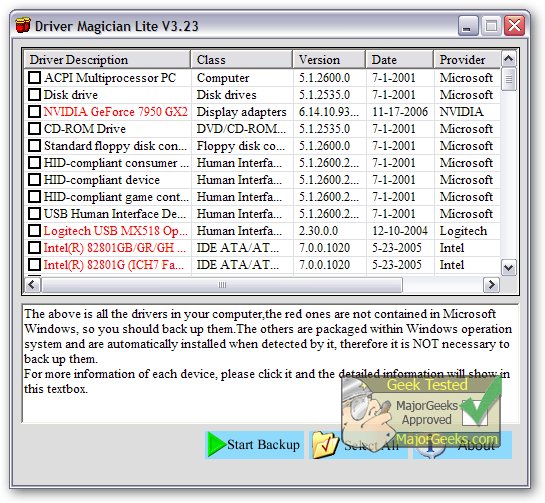
Driver Magician Lite has launched its new version 5.84, providing users with a comprehensive solution for managing device drivers on their computers. This tool is designed for backing up, restoring, updating, and uninstalling drivers effectively.
The software works by identifying all hardware components within the system, extracting their associated drivers from the hard disk, and allowing users to back them up to a preferred location. This feature is particularly useful when formatting or upgrading the operating system, as users can restore their saved drivers easily, mimicking the experience of having original driver diskettes. After a single reboot, the PC will be fully operational with the necessary drivers installed.
One of the standout features of Driver Magician Lite is its integrated database of the latest drivers, which can connect to the internet for driver updates. This capability saves users considerable time in locating the correct drivers, while also enhancing hardware performance through timely updates.
Additionally, the program includes a built-in hardware identifier database that facilitates the detection of unknown devices on the PC, ensuring that all components are recognized and functional.
Key Features of Driver Magician Lite:
- Backup device drivers in four different modes.
- One-click restoration of backed-up drivers.
- Update existing drivers to enhance system performance and stability.
- Uninstall unnecessary device drivers.
- Live updates for both the device identifier and driver update databases.
- Detect and manage unknown devices.
- Backup additional items like My Documents and the system Registry.
- Restore various items from backup with ease.
- Access detailed information about hardware drivers.
- Clone all drivers into an auto-setup package (.EXE) for easy restoration without needing to reinstall Driver Magician.
Additional Resources:
The release also brings attention to helpful guides, such as how to download the latest drivers for Windows, how to backup and restore drivers, and methods to prevent Windows updates from automatically downloading drivers on Windows 10 and 11.
In conclusion, Driver Magician Lite 5.84 is a powerful tool for anyone looking to manage their computer's drivers efficiently, ensuring that their systems run smoothly and are equipped with the latest software
The software works by identifying all hardware components within the system, extracting their associated drivers from the hard disk, and allowing users to back them up to a preferred location. This feature is particularly useful when formatting or upgrading the operating system, as users can restore their saved drivers easily, mimicking the experience of having original driver diskettes. After a single reboot, the PC will be fully operational with the necessary drivers installed.
One of the standout features of Driver Magician Lite is its integrated database of the latest drivers, which can connect to the internet for driver updates. This capability saves users considerable time in locating the correct drivers, while also enhancing hardware performance through timely updates.
Additionally, the program includes a built-in hardware identifier database that facilitates the detection of unknown devices on the PC, ensuring that all components are recognized and functional.
Key Features of Driver Magician Lite:
- Backup device drivers in four different modes.
- One-click restoration of backed-up drivers.
- Update existing drivers to enhance system performance and stability.
- Uninstall unnecessary device drivers.
- Live updates for both the device identifier and driver update databases.
- Detect and manage unknown devices.
- Backup additional items like My Documents and the system Registry.
- Restore various items from backup with ease.
- Access detailed information about hardware drivers.
- Clone all drivers into an auto-setup package (.EXE) for easy restoration without needing to reinstall Driver Magician.
Additional Resources:
The release also brings attention to helpful guides, such as how to download the latest drivers for Windows, how to backup and restore drivers, and methods to prevent Windows updates from automatically downloading drivers on Windows 10 and 11.
In conclusion, Driver Magician Lite 5.84 is a powerful tool for anyone looking to manage their computer's drivers efficiently, ensuring that their systems run smoothly and are equipped with the latest software
Driver Magician Lite 5.84 released
Driver Magician Lite offers a professional solution for device driver's backup, restoration, update, and removal.