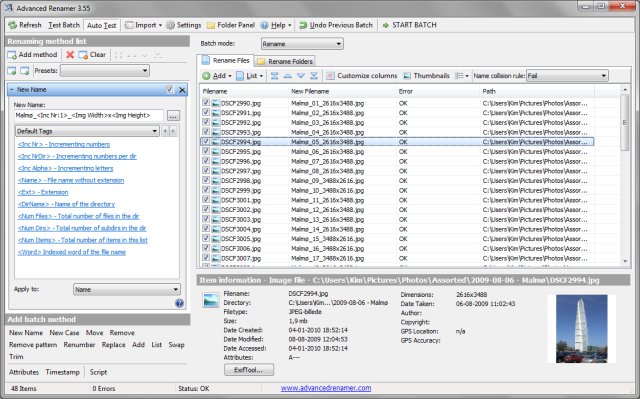
Advanced Renamer version 4.25 has been released, offering a robust free solution for users looking to rename multiple files and folders simultaneously. This powerful tool allows for the easy setup of advanced batch jobs using a variety of methods to manipulate a large number of files efficiently. With 13 different renaming methods available, users can modify file names, attributes, and timestamps all at once. The program also provides the functionality to copy or move files to new locations based on embedded information.
Advanced Renamer allows users to create new file names by adding, removing, or replacing parts of the names, altering case styles, or generating entirely new names based on existing file data. A notable feature is the real-time preview, which lets users verify their changes before executing them. Additionally, if users change their minds after a batch operation, the software includes an undo option to revert to the previous state.
Key features of Advanced Renamer include:
- Unicode support for diverse character sets
- Real-time preview of new file names
- Tag-based renaming capabilities
- Integration with MP3/ID3 metadata
- Support for regular expressions and wildcards
- Renaming images based on EXIF data, alongside thumbnail displays
- Ability to rename files using video tags and GPS information from images
- Comprehensive support for both files and folders
- Capability to perform batch operations such as renaming, copying, or moving
- Creation of custom renaming methods using JavaScript
- Setting file timestamps and attributes
Advanced Renamer is a versatile tool that can streamline file management tasks and is particularly useful for users dealing with large volumes of data.
For users interested in managing their files more effectively, there are similar tools and resources available, such as guides on resetting default apps and file associations, clearing recent items, and adjusting folder view settings in Windows 10. This highlights the importance of efficient file organization in digital workflows
Advanced Renamer allows users to create new file names by adding, removing, or replacing parts of the names, altering case styles, or generating entirely new names based on existing file data. A notable feature is the real-time preview, which lets users verify their changes before executing them. Additionally, if users change their minds after a batch operation, the software includes an undo option to revert to the previous state.
Key features of Advanced Renamer include:
- Unicode support for diverse character sets
- Real-time preview of new file names
- Tag-based renaming capabilities
- Integration with MP3/ID3 metadata
- Support for regular expressions and wildcards
- Renaming images based on EXIF data, alongside thumbnail displays
- Ability to rename files using video tags and GPS information from images
- Comprehensive support for both files and folders
- Capability to perform batch operations such as renaming, copying, or moving
- Creation of custom renaming methods using JavaScript
- Setting file timestamps and attributes
Advanced Renamer is a versatile tool that can streamline file management tasks and is particularly useful for users dealing with large volumes of data.
For users interested in managing their files more effectively, there are similar tools and resources available, such as guides on resetting default apps and file associations, clearing recent items, and adjusting folder view settings in Windows 10. This highlights the importance of efficient file organization in digital workflows
Advanced Renamer 4.25 released
Advanced Renamer is a free program for renaming multiple files and folders at once.