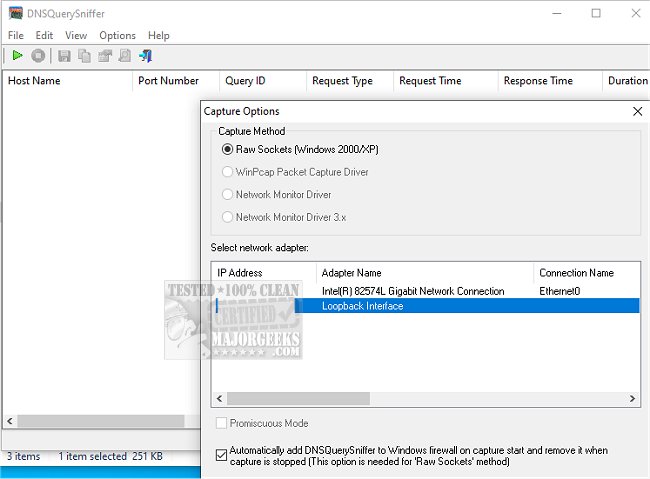
DNSQuerySniffer version 2.00 has been released, offering enhanced capabilities for monitoring DNS queries on your network. This tool efficiently scans the network to display all DNS queries initiated from your system. For each query, users can access detailed information, including the Host Name, Port Number, Query ID, Request Type (such as A, AAAA, NS, MX, etc.), Request Time, Response Time, Duration, Response Code, Number of records, and the actual content of the DNS records returned.
Additionally, DNSQuerySniffer facilitates the easy export of this information into various formats such as CSV, tab-delimited, XML, and HTML files. Users can also copy the DNS queries directly to the clipboard for pasting into Excel or other spreadsheet applications for further analysis.
In a related context, users may encounter issues such as "Windows Could Not Start Peer Networking Grouping Service on Local Computer," or "Your Connection Was Interrupted - A Network Change Was Detected - ERR_NETWORK_CHANGED," which can be attributed to network configuration changes or interruptions. These issues highlight the importance of tools like DNSQuerySniffer in diagnosing and resolving network-related problems.
With the growing complexity of network environments, the ability to monitor and analyze DNS queries is crucial for IT professionals and network administrators. DNSQuerySniffer not only simplifies this process but also aids in troubleshooting connectivity issues and enhancing overall network performance
Additionally, DNSQuerySniffer facilitates the easy export of this information into various formats such as CSV, tab-delimited, XML, and HTML files. Users can also copy the DNS queries directly to the clipboard for pasting into Excel or other spreadsheet applications for further analysis.
In a related context, users may encounter issues such as "Windows Could Not Start Peer Networking Grouping Service on Local Computer," or "Your Connection Was Interrupted - A Network Change Was Detected - ERR_NETWORK_CHANGED," which can be attributed to network configuration changes or interruptions. These issues highlight the importance of tools like DNSQuerySniffer in diagnosing and resolving network-related problems.
With the growing complexity of network environments, the ability to monitor and analyze DNS queries is crucial for IT professionals and network administrators. DNSQuerySniffer not only simplifies this process but also aids in troubleshooting connectivity issues and enhancing overall network performance
DNSQuerySniffer 2.00 released
DNSQuerySniffer will quickly scan your network and then display all the DNS queries sent on your system.