The latest release of DNSLookupView, version 1.20, offers users the capability to track and analyze DNS queries processed by the Windows DNS Client service. This utility is particularly beneficial for network administrators and security professionals who need to diagnose potential attacks or troubleshoot DNS configuration issues that may hinder access to websites.
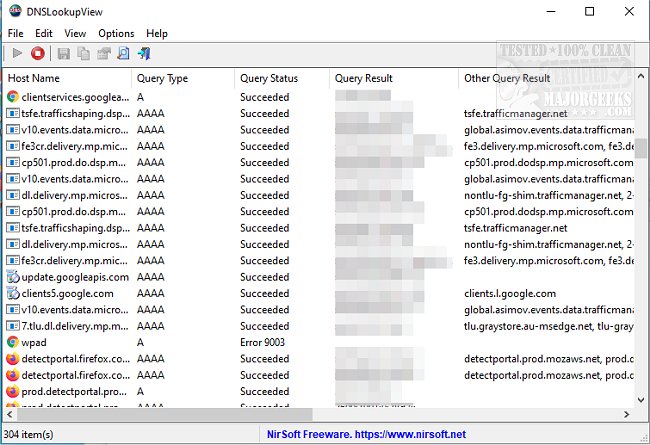
The interface of DNSLookupView is user-friendly, especially for those familiar with other tools developed by the same author. Users can view a range of details for each DNS query, including the Host Name, Query Type (such as A or AAAA), Query Status (indicating success or error), Query Result, Timestamp, ID, and the process name that initiated the DNS lookup.
DNSLookupView operates by leveraging Windows event tracing, specifically through the 'Microsoft-Windows-DNS-Client' provider (ID: 1C95126E-7EEA-49A9-A3FE-A378B03DDB4D). It captures event ID 3008, which contains comprehensive information about each DNS query handled by the Windows DNS Client service.
In addition to its monitoring capabilities, DNSLookupView can assist users in understanding DNS-related issues better. It complements other troubleshooting tools, such as guides for flushing the Windows DNS cache, resetting Winsock, and restoring TCP/IP settings across different versions of Windows.
Extended Insights
With the increasing reliance on online services, understanding DNS operations becomes crucial for maintaining network integrity. DNSLookupView not only aids in troubleshooting but can also enhance security by allowing users to identify unusual DNS query patterns that may indicate malicious activity. This proactive monitoring aligns well with best practices in cybersecurity, especially in environments where sensitive data is handled.
Furthermore, as technology evolves, DNS services are becoming more complex, integrating with various cloud-based solutions. The ability to monitor DNS queries in real-time can provide insights into how these integrations affect performance and security, making DNSLookupView an essential tool for modern IT infrastructure management.
Overall, DNSLookupView 1.20 is a significant upgrade for anyone looking to gain detailed insights into DNS activities on their systems, ensuring better connectivity and enhanced security
The interface of DNSLookupView is user-friendly, especially for those familiar with other tools developed by the same author. Users can view a range of details for each DNS query, including the Host Name, Query Type (such as A or AAAA), Query Status (indicating success or error), Query Result, Timestamp, ID, and the process name that initiated the DNS lookup.
DNSLookupView operates by leveraging Windows event tracing, specifically through the 'Microsoft-Windows-DNS-Client' provider (ID: 1C95126E-7EEA-49A9-A3FE-A378B03DDB4D). It captures event ID 3008, which contains comprehensive information about each DNS query handled by the Windows DNS Client service.
In addition to its monitoring capabilities, DNSLookupView can assist users in understanding DNS-related issues better. It complements other troubleshooting tools, such as guides for flushing the Windows DNS cache, resetting Winsock, and restoring TCP/IP settings across different versions of Windows.
Extended Insights
With the increasing reliance on online services, understanding DNS operations becomes crucial for maintaining network integrity. DNSLookupView not only aids in troubleshooting but can also enhance security by allowing users to identify unusual DNS query patterns that may indicate malicious activity. This proactive monitoring aligns well with best practices in cybersecurity, especially in environments where sensitive data is handled.
Furthermore, as technology evolves, DNS services are becoming more complex, integrating with various cloud-based solutions. The ability to monitor DNS queries in real-time can provide insights into how these integrations affect performance and security, making DNSLookupView an essential tool for modern IT infrastructure management.
Overall, DNSLookupView 1.20 is a significant upgrade for anyone looking to gain detailed insights into DNS activities on their systems, ensuring better connectivity and enhanced security
DNSLookupView 1.20 released
DNSLookupView permits you to monitor the details of all DNS queries sent via the Windows DNS Client service.