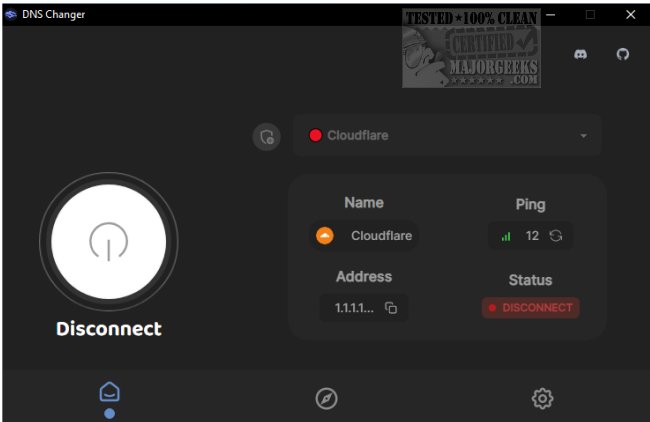
DNS Changer has launched version 2.3.7, providing users with a streamlined way to access a variety of DNS servers from a single platform. This open-source tool is compatible with Windows, Mac, and Linux operating systems. While Internet Service Providers (ISPs) generally assign DNS addresses that function adequately, users may benefit from faster and more secure alternatives.
For those unfamiliar with the manual process of changing DNS settings on Windows 10, the procedure involves navigating to Settings > Network & Internet > Change Adapter Settings, right-clicking the desired connection, selecting Properties, and then adjusting the IPv4 settings. However, DNS Changer simplifies this process with its intuitive user interface, allowing users to quickly select and connect to different DNS servers with just a click. The application also displays useful information such as the server address, ping times, and connection status, making it easy to monitor performance.
Additionally, users can customize their experience by adding their own DNS servers if they prefer not to use the pre-selected options provided by DNS Changer. Overall, this tool aims to enhance the efficiency of changing DNS servers while maintaining a user-friendly approach.
In summary, DNS Changer 2.3.7 is an essential tool for anyone looking to optimize their internet connection through alternative DNS servers. Its ease of use and customization options make it a valuable resource for both novice and experienced users seeking to improve their online security and speed. With ongoing updates and community support, DNS Changer is poised to remain a relevant choice for users looking to manage their DNS settings effectively
For those unfamiliar with the manual process of changing DNS settings on Windows 10, the procedure involves navigating to Settings > Network & Internet > Change Adapter Settings, right-clicking the desired connection, selecting Properties, and then adjusting the IPv4 settings. However, DNS Changer simplifies this process with its intuitive user interface, allowing users to quickly select and connect to different DNS servers with just a click. The application also displays useful information such as the server address, ping times, and connection status, making it easy to monitor performance.
Additionally, users can customize their experience by adding their own DNS servers if they prefer not to use the pre-selected options provided by DNS Changer. Overall, this tool aims to enhance the efficiency of changing DNS servers while maintaining a user-friendly approach.
In summary, DNS Changer 2.3.7 is an essential tool for anyone looking to optimize their internet connection through alternative DNS servers. Its ease of use and customization options make it a valuable resource for both novice and experienced users seeking to improve their online security and speed. With ongoing updates and community support, DNS Changer is poised to remain a relevant choice for users looking to manage their DNS settings effectively
DNS Changer 2.3.7 released
DNS Changer gives you access to some of the best DNS servers, all from a central location.