DJV 3.6.0 has been released, enhancing its status as a free and robust tool for managing image sequences. It provides filmmakers, colorists, and video editors with stunning visuals, precise audio controls, and smooth playback of high-resolution images.
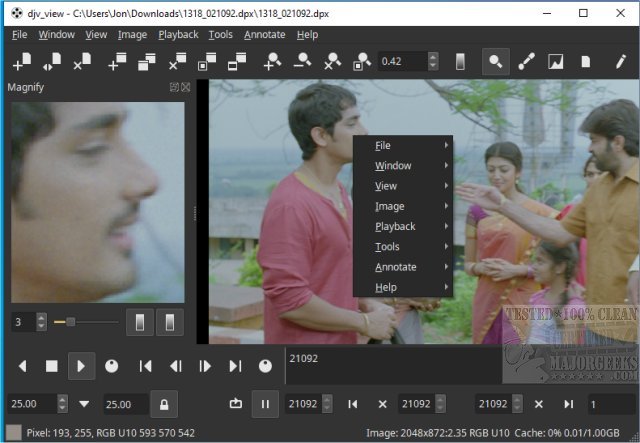
When users launch DJV on Windows, they encounter a user-friendly interface reminiscent of a video editing suite combined with an image viewer. This layout is designed to compartmentalize different tasks, reducing the feeling of overwhelm. The core interface includes several key components:
- Menu Bar: Located at the top, it houses essential settings and commands.
- Toolbars: Positioned below or alongside the menu bar for quick access to transport, layer manipulation, and other vital functions.
- Tab Bar: Found at the top-left, it allows seamless switching between loaded image sequences.
- Viewport: This is the main display area for the current image sequence, optimized for high-quality playback.
- Timeline: Located below the viewport, it visualizes the animation structure, including frame timing and keyframes, with OpenTimelineIO integration facilitating the loading of complex timelines.
Customization options are plentiful, enabling users to declutter their workspace based on specific tasks. The Window menu serves as the command center for interface adjustments, such as:
- Hiding Toolbars: Users can choose to hide specific toolbars that are not essential to their current activities.
- Hiding the Tab Bar: If working on a single file, the tab bar can be hidden for a cleaner interface.
- Hiding Status Bar Info: For those who find the status bar distracting, it can also be toggled off.
The ability to customize the interface significantly enhances user experience, ensuring that only necessary elements are visible. Users are encouraged to explore the Window menu to hide any redundant features and maintain a focused workflow.
In conclusion, DJV 3.6.0 stands out as a powerful and versatile tool for anyone involved in image sequence management. Its rich feature set, including A/B comparison tools and integration with OpenTimelineIO and OpenColorIO, makes it an invaluable resource for both professionals and enthusiasts. With a commitment to user-friendly customization, DJV allows individuals to streamline their workflow effectively.
For those interested in video editing, DJV is an excellent alternative to explore alongside other tools, such as the Microsoft Photo App, to enhance their editing capabilities
When users launch DJV on Windows, they encounter a user-friendly interface reminiscent of a video editing suite combined with an image viewer. This layout is designed to compartmentalize different tasks, reducing the feeling of overwhelm. The core interface includes several key components:
- Menu Bar: Located at the top, it houses essential settings and commands.
- Toolbars: Positioned below or alongside the menu bar for quick access to transport, layer manipulation, and other vital functions.
- Tab Bar: Found at the top-left, it allows seamless switching between loaded image sequences.
- Viewport: This is the main display area for the current image sequence, optimized for high-quality playback.
- Timeline: Located below the viewport, it visualizes the animation structure, including frame timing and keyframes, with OpenTimelineIO integration facilitating the loading of complex timelines.
Customization options are plentiful, enabling users to declutter their workspace based on specific tasks. The Window menu serves as the command center for interface adjustments, such as:
- Hiding Toolbars: Users can choose to hide specific toolbars that are not essential to their current activities.
- Hiding the Tab Bar: If working on a single file, the tab bar can be hidden for a cleaner interface.
- Hiding Status Bar Info: For those who find the status bar distracting, it can also be toggled off.
The ability to customize the interface significantly enhances user experience, ensuring that only necessary elements are visible. Users are encouraged to explore the Window menu to hide any redundant features and maintain a focused workflow.
In conclusion, DJV 3.6.0 stands out as a powerful and versatile tool for anyone involved in image sequence management. Its rich feature set, including A/B comparison tools and integration with OpenTimelineIO and OpenColorIO, makes it an invaluable resource for both professionals and enthusiasts. With a commitment to user-friendly customization, DJV allows individuals to streamline their workflow effectively.
For those interested in video editing, DJV is an excellent alternative to explore alongside other tools, such as the Microsoft Photo App, to enhance their editing capabilities
DJV 3.6.0 released
DJV is a free and powerful tool for managing image sequences that offers stunning visuals, precise audio control, and seamless playback of high-resolution images, making it an excellent choice for filmmakers, colorists, and video editors.