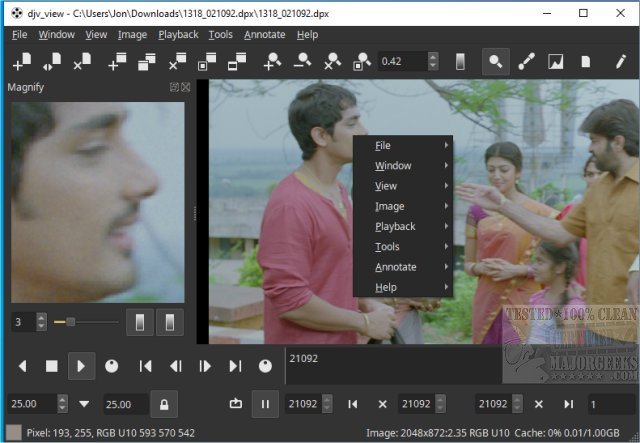
DJV 3.4.1 has been released as a robust, free tool designed for managing image sequences, catering specifically to filmmakers, colorists, and video editors. Its capabilities include stunning visuals, precise audio control, and smooth playback of high-resolution images, making it an ideal choice for professionals in the film and video industry.
Upon launching DJV on a Windows platform, users are greeted with a user-friendly interface that resembles a combination of a video editing suite and an image viewer. The layout is designed to enhance usability by segmenting different task areas, which minimizes overwhelming users. Key components of the DJV interface include:
- Menu Bar: Located at the top, it offers access to essential commands and settings.
- Toolbars: Situated below the menu bar, these provide quick access to frequently used functions such as transport controls and layer manipulation.
- Tab Bar: Found near the top-left corner, it allows for easy navigation between different loaded image sequences.
- Viewport: The primary area for displaying image sequences at high quality.
- Timeline: This feature displays the structure of animations, including frame timing and keyframes, and supports OpenTimelineIO integration for loading complex timelines.
To optimize the DJV workspace, users can customize the interface to reduce clutter and enhance focus during playback or frame comparison. The Window menu serves as a central hub for managing visible elements:
- Hiding Toolbars: Users can deselect unnecessary toolbars to create a focused workspace.
- Hiding the Tab Bar: If working with a single file, the tab bar can be hidden for a cleaner look.
- Hiding Status Bar Information: For those who find status messages distracting, the status bar can also be hidden.
DJV is a powerful and versatile tool for managing image sequences, offering features such as A/B comparison tools, OpenTimelineIO integration, and OpenColorIO support. Its customizable interface caters to both professionals and hobbyists, allowing users to tailor their workspace to meet specific needs. By leveraging the Window menu for clutter management, users can enhance their workflow and maintain focus on their creative tasks.
As DJV continues to evolve, future updates could further improve user experience by incorporating more advanced features, such as enhanced collaboration tools for team projects, support for additional image formats, and more intuitive customization options. Integrating AI-driven functionalities to automate repetitive tasks could also significantly enhance productivity for users in the film and video editing industries
Understanding the DJV Interface
Upon launching DJV on a Windows platform, users are greeted with a user-friendly interface that resembles a combination of a video editing suite and an image viewer. The layout is designed to enhance usability by segmenting different task areas, which minimizes overwhelming users. Key components of the DJV interface include:
- Menu Bar: Located at the top, it offers access to essential commands and settings.
- Toolbars: Situated below the menu bar, these provide quick access to frequently used functions such as transport controls and layer manipulation.
- Tab Bar: Found near the top-left corner, it allows for easy navigation between different loaded image sequences.
- Viewport: The primary area for displaying image sequences at high quality.
- Timeline: This feature displays the structure of animations, including frame timing and keyframes, and supports OpenTimelineIO integration for loading complex timelines.
Customizing Your DJV Workspace
To optimize the DJV workspace, users can customize the interface to reduce clutter and enhance focus during playback or frame comparison. The Window menu serves as a central hub for managing visible elements:
- Hiding Toolbars: Users can deselect unnecessary toolbars to create a focused workspace.
- Hiding the Tab Bar: If working with a single file, the tab bar can be hidden for a cleaner look.
- Hiding Status Bar Information: For those who find status messages distracting, the status bar can also be hidden.
Conclusion
DJV is a powerful and versatile tool for managing image sequences, offering features such as A/B comparison tools, OpenTimelineIO integration, and OpenColorIO support. Its customizable interface caters to both professionals and hobbyists, allowing users to tailor their workspace to meet specific needs. By leveraging the Window menu for clutter management, users can enhance their workflow and maintain focus on their creative tasks.
Future Enhancements
As DJV continues to evolve, future updates could further improve user experience by incorporating more advanced features, such as enhanced collaboration tools for team projects, support for additional image formats, and more intuitive customization options. Integrating AI-driven functionalities to automate repetitive tasks could also significantly enhance productivity for users in the film and video editing industries
DJV 3.4.1 released
DJV is a free and powerful tool for managing image sequences that offers stunning visuals, precise audio control, and seamless playback of high-resolution images, making it an excellent choice for filmmakers, colorists, and video editors.