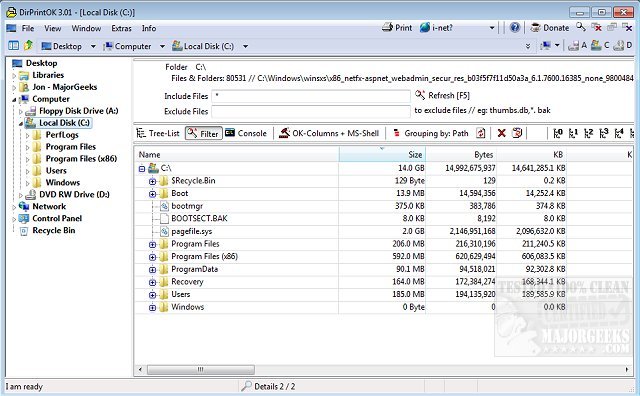
DirPrintOK has released version 7.61, enhancing its reputation as a fast, freeware, and portable tool designed for efficiently printing the contents of specific directories. This software streamlines the printing process by allowing users to select a target directory, customize file details (such as including or excluding MP3 ID3 tags), and print with ease.
Key features of DirPrintOK include a print preview option with a variable aspect ratio, as well as the ability to export directory contents to various formats, including XLS, HTML, CSV, and TXT. The program also offers multiple viewing options, such as tree-list, tree-list-plus, filters, and console views. Additional functionalities include the ability to group files by extension, modification time, size, or folders, and a multi-tab feature that enables users to open a second folder in a new tab. Users can also print a directory list directly from the command prompt.
For users seeking further assistance with printing in Windows, related topics include managing installed printers, customizing the 'Devices and Printers' section on Windows 10 and 11, and troubleshooting common printer issues.
In extension to the existing features, future versions could benefit from enhanced cloud integration, allowing users to print directories stored in cloud services directly. Additionally, incorporating a more advanced filtering system with user-defined parameters could further improve the software's versatility. Enhanced support for mobile devices and cross-platform compatibility might also broaden its user base, making DirPrintOK an even more invaluable tool for directory management and printing tasks
Key features of DirPrintOK include a print preview option with a variable aspect ratio, as well as the ability to export directory contents to various formats, including XLS, HTML, CSV, and TXT. The program also offers multiple viewing options, such as tree-list, tree-list-plus, filters, and console views. Additional functionalities include the ability to group files by extension, modification time, size, or folders, and a multi-tab feature that enables users to open a second folder in a new tab. Users can also print a directory list directly from the command prompt.
For users seeking further assistance with printing in Windows, related topics include managing installed printers, customizing the 'Devices and Printers' section on Windows 10 and 11, and troubleshooting common printer issues.
In extension to the existing features, future versions could benefit from enhanced cloud integration, allowing users to print directories stored in cloud services directly. Additionally, incorporating a more advanced filtering system with user-defined parameters could further improve the software's versatility. Enhanced support for mobile devices and cross-platform compatibility might also broaden its user base, making DirPrintOK an even more invaluable tool for directory management and printing tasks
DirPrintOK 7.61 released
DirPrintOK is a fast, freeware, portable option for printing the content of a specific directory.