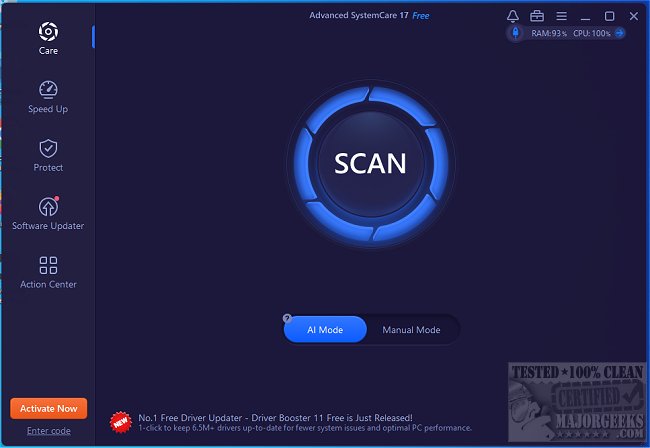
Advanced SystemCare is a highly regarded all-in-one computer optimization tool designed to clean, enhance, speed up, and secure your PC. A video tutorial is available for users to familiarize themselves with its features.
Optimize Your PC with Ease
If your computer is showing signs of sluggishness, clutter, or performance issues, Advanced SystemCare is tailored to restore its efficiency. With a simple one-click optimization feature, it effectively cleans junk files, reduces startup times, repairs registry errors, and bolsters privacy protections. Whether your computing needs involve work, gaming, or casual browsing, Advanced SystemCare ensures that your system operates smoothly without requiring extensive user intervention.
Why Use Advanced SystemCare?
Over time, computers accumulate junk files, unnecessary startup programs, and overall system clutter, leading to decreased performance. Rather than manually sifting through settings and files, Advanced SystemCare automates the process, delivering a fast, responsive, and secure computer with minimal effort.
Key Features of Advanced SystemCare
Advanced SystemCare offers a comprehensive suite of tools to tailor your PC's performance. It enhances speed by terminating unnecessary background processes and freeing up RAM, while also cleaning up junk files and removing residual traces from uninstalled software. The software aids in achieving quicker boot times by disabling non-essential startup programs and resolves system errors by rectifying registry issues that may lead to crashes or slowdowns. Moreover, it provides real-time monitoring of CPU, RAM, and disk usage to avert performance drops. Privacy features include clearing browsing histories and blocking trackers, while the Turbo Boost mode is designed to enhance gaming and professional performance by reallocating system resources.
When to Utilize Advanced SystemCare
- Slow Startup: Use the Startup Manager to decrease boot times.
- Low Storage: Clean up junk files to recover significant disk space.
- Lagging Apps: Leverage AI optimization to combat sluggish performance.
- Gaming Issues: Activate Turbo Boost mode to optimize RAM and CPU for enhanced frame rates.
- Privacy Concerns: Clear browsing history and block tracking attempts.
- No Time for Tweaks: One-click cleanup simplifies maintenance.
Advantages and Disadvantages
Pros:
- Simple one-click cleanup and performance enhancement.
- Improves Windows performance without requiring complex adjustments.
- Ideal for gaming and demanding applications.
- Robust privacy and security features protect user data.
Cons:
- Certain advanced functionalities necessitate a Pro version.
- May prompt users to install additional IObit software.
Conclusion
After extensive usage, it's clear that Advanced SystemCare is a straightforward solution for anyone looking to clean, speed up, and optimize their PC. Whether you're facing slow startup issues, limited disk space, or performance lags, Advanced SystemCare can resolve these challenges automatically, making it an essential tool for maintaining optimal computer performance.
For those interested, a video tutorial on using Advanced SystemCare can be accessed [here](https://www.youtube.com/embed/xS90_29d3Es?autoplay=1&rel=0&modestbranding=1).
For further reading, check out guides on managing storage, improving network performance, fixing slow internet, and downloading the latest drivers in Windows
Optimize Your PC with Ease
If your computer is showing signs of sluggishness, clutter, or performance issues, Advanced SystemCare is tailored to restore its efficiency. With a simple one-click optimization feature, it effectively cleans junk files, reduces startup times, repairs registry errors, and bolsters privacy protections. Whether your computing needs involve work, gaming, or casual browsing, Advanced SystemCare ensures that your system operates smoothly without requiring extensive user intervention.
Why Use Advanced SystemCare?
Over time, computers accumulate junk files, unnecessary startup programs, and overall system clutter, leading to decreased performance. Rather than manually sifting through settings and files, Advanced SystemCare automates the process, delivering a fast, responsive, and secure computer with minimal effort.
Key Features of Advanced SystemCare
Advanced SystemCare offers a comprehensive suite of tools to tailor your PC's performance. It enhances speed by terminating unnecessary background processes and freeing up RAM, while also cleaning up junk files and removing residual traces from uninstalled software. The software aids in achieving quicker boot times by disabling non-essential startup programs and resolves system errors by rectifying registry issues that may lead to crashes or slowdowns. Moreover, it provides real-time monitoring of CPU, RAM, and disk usage to avert performance drops. Privacy features include clearing browsing histories and blocking trackers, while the Turbo Boost mode is designed to enhance gaming and professional performance by reallocating system resources.
When to Utilize Advanced SystemCare
- Slow Startup: Use the Startup Manager to decrease boot times.
- Low Storage: Clean up junk files to recover significant disk space.
- Lagging Apps: Leverage AI optimization to combat sluggish performance.
- Gaming Issues: Activate Turbo Boost mode to optimize RAM and CPU for enhanced frame rates.
- Privacy Concerns: Clear browsing history and block tracking attempts.
- No Time for Tweaks: One-click cleanup simplifies maintenance.
Advantages and Disadvantages
Pros:
- Simple one-click cleanup and performance enhancement.
- Improves Windows performance without requiring complex adjustments.
- Ideal for gaming and demanding applications.
- Robust privacy and security features protect user data.
Cons:
- Certain advanced functionalities necessitate a Pro version.
- May prompt users to install additional IObit software.
Conclusion
After extensive usage, it's clear that Advanced SystemCare is a straightforward solution for anyone looking to clean, speed up, and optimize their PC. Whether you're facing slow startup issues, limited disk space, or performance lags, Advanced SystemCare can resolve these challenges automatically, making it an essential tool for maintaining optimal computer performance.
For those interested, a video tutorial on using Advanced SystemCare can be accessed [here](https://www.youtube.com/embed/xS90_29d3Es?autoplay=1&rel=0&modestbranding=1).
For further reading, check out guides on managing storage, improving network performance, fixing slow internet, and downloading the latest drivers in Windows
Advanced SystemCare 19.4.0.210 released
Advanced SystemCare is a popular and efficient all-in-one computer tweaker that will help clean, optimize, speed up, and protect your computer. Video tutorial available.