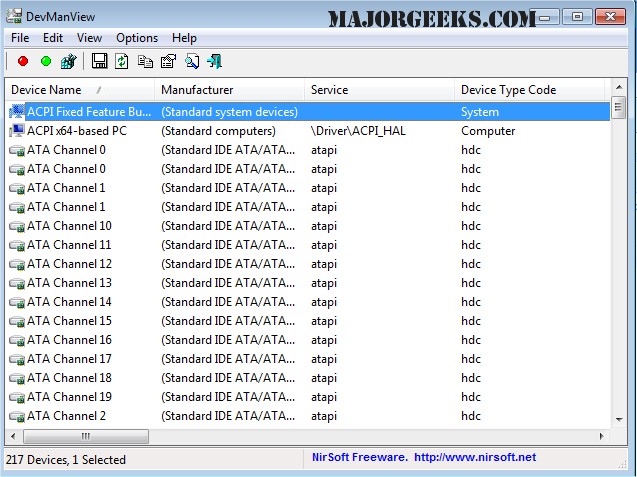
DevManView version 1.81 has been released, providing users with a streamlined alternative to the traditional Device Manager. Unlike the standard tree viewer, DevManView presents all devices and their properties in a flat table format, making it easier to navigate and manage hardware components.
One of the key features of DevManView is its ability to display devices from remote computers on the same network, provided users have the necessary administrator access. This can be particularly beneficial for IT professionals or individuals managing multiple machines. Additionally, the tool allows users to load device lists from external Windows instances, enabling them to disable problematic devices that may be causing booting issues.
This functionality can be extremely useful during troubleshooting processes, as users can quickly identify and manage devices that may be impeding system performance.
For those interested in further exploring their computer's hardware, DevManView complements various resources, such as guides on identifying hardware components, finding serial numbers, determining processor generations, checking CPU cores, and updating Windows Experience Index scores.
As DevManView continues to evolve, users can expect enhancements that will further simplify device management and troubleshooting processes, making it an invaluable tool for both casual users and IT professionals alike. Future updates may include additional features, improved user interfaces, and expanded compatibility with newer operating systems and devices
One of the key features of DevManView is its ability to display devices from remote computers on the same network, provided users have the necessary administrator access. This can be particularly beneficial for IT professionals or individuals managing multiple machines. Additionally, the tool allows users to load device lists from external Windows instances, enabling them to disable problematic devices that may be causing booting issues.
This functionality can be extremely useful during troubleshooting processes, as users can quickly identify and manage devices that may be impeding system performance.
For those interested in further exploring their computer's hardware, DevManView complements various resources, such as guides on identifying hardware components, finding serial numbers, determining processor generations, checking CPU cores, and updating Windows Experience Index scores.
As DevManView continues to evolve, users can expect enhancements that will further simplify device management and troubleshooting processes, making it an invaluable tool for both casual users and IT professionals alike. Future updates may include additional features, improved user interfaces, and expanded compatibility with newer operating systems and devices
DevManView 1.81 released
DevManView is an alternative to the standard Device Manager that displays all devices and their properties in a flat table instead of a tree viewer.