DCP-o-matic has released version 2.18.40 of its 64-bit application, along with a 32-bit version, designed for the creation of Digital Cinema Packages (DCPs). This open-source software allows users to compile various media formats—including images, videos, sound, and subtitles—into a DCP that is compatible with DCI-compliant cinema projectors.
The software supports a wide array of file types such as MP4, Apple ProRes, MOV, AVI, M2TS (from Blu-Ray), VOB (from DVD), WMV, MKV, JPEG, PNG, and TIFF, making it versatile for filmmakers and content creators. DCP-o-matic features a user-friendly interface that accommodates users of all skill levels, and a comprehensive help manual is provided for guidance.
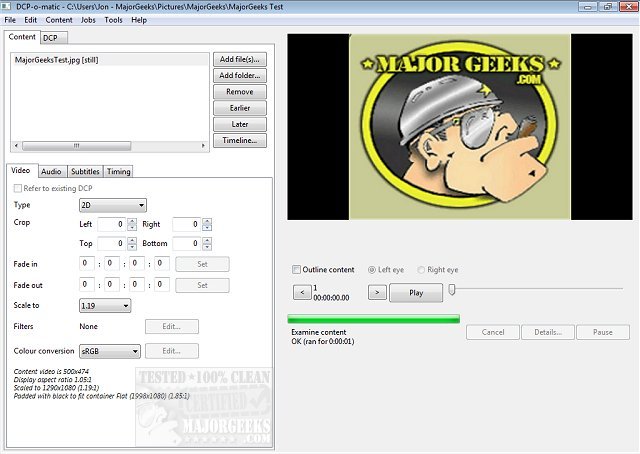
The interface is divided into two main tabs: the first tab is dedicated to loading, creating, and modifying DCP content, while the second tab focuses on adjusting DCP settings. This layout facilitates quick access to manage various elements related to video, audio, subtitles, and timing.
To extend this information, it would be beneficial to highlight some potential use cases for DCP-o-matic. For example, independent filmmakers can use the software to prepare their films for festival submissions, ensuring that their work meets industry standards for projection. Additionally, educational institutions can employ DCP-o-matic to create DCPs for film studies programs, allowing students to learn the technical aspects of digital cinema. Moreover, community theaters and art houses can utilize this tool to showcase diverse content, from classic films to new independent releases, expanding their programming options. By making DCP creation accessible, DCP-o-matic supports the democratization of film distribution, empowering creators to share their stories on the big screen without the barrier of expensive proprietary software
The software supports a wide array of file types such as MP4, Apple ProRes, MOV, AVI, M2TS (from Blu-Ray), VOB (from DVD), WMV, MKV, JPEG, PNG, and TIFF, making it versatile for filmmakers and content creators. DCP-o-matic features a user-friendly interface that accommodates users of all skill levels, and a comprehensive help manual is provided for guidance.
The interface is divided into two main tabs: the first tab is dedicated to loading, creating, and modifying DCP content, while the second tab focuses on adjusting DCP settings. This layout facilitates quick access to manage various elements related to video, audio, subtitles, and timing.
To extend this information, it would be beneficial to highlight some potential use cases for DCP-o-matic. For example, independent filmmakers can use the software to prepare their films for festival submissions, ensuring that their work meets industry standards for projection. Additionally, educational institutions can employ DCP-o-matic to create DCPs for film studies programs, allowing students to learn the technical aspects of digital cinema. Moreover, community theaters and art houses can utilize this tool to showcase diverse content, from classic films to new independent releases, expanding their programming options. By making DCP creation accessible, DCP-o-matic supports the democratization of film distribution, empowering creators to share their stories on the big screen without the barrier of expensive proprietary software
DCP-o-matic 64 Bit 2.18.40 released
DCP-o-matic is an Open Source app for creating Digital Cinema Packages (DCPs) from images, videos, sound, and subtitle files. Also available for 32-Bit.