DCP-o-matic has released version 2.18.38 of its 64-bit application, which can also operate in a 32-bit format. This open-source software is designed to facilitate the creation of Digital Cinema Packages (DCPs) from a variety of media files, including images, videos, sounds, and subtitles. The primary goal of DCP-o-matic is to enable the production of content suitable for playback on DCI-compliant cinema projectors.
The software supports multiple file formats, such as MP4, Apple ProRes, MOV, AVI, M2TS (typically from Blu-Ray), VOB (from DVD), WMV, MKV, JPEG, PNG, and TIFF, making it a versatile tool for filmmakers. DCP-o-matic features a user-friendly interface that caters to users of all skill levels, complemented by a comprehensive help manual for those who may need assistance.
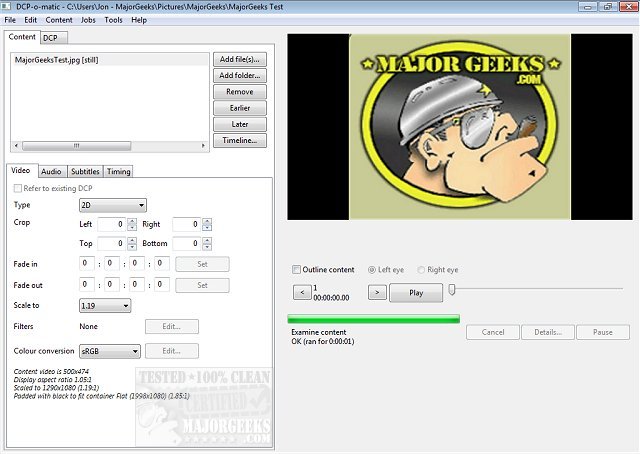
The application is organized into two main tabs: one for loading, creating, and modifying DCP content, and another dedicated to configuring DCP settings. This tabbed structure allows users to efficiently manage video, audio, subtitle, and timing-related settings all in one place.
In addition to its core features, DCP-o-matic is continually updated to enhance functionality and user experience, reflecting the ongoing commitment of its developers to support the cinematic community. New features in the latest release may include improved file compatibility, enhanced rendering speed, and additional options for audio and subtitle synchronization.
Overall, DCP-o-matic stands as an essential tool for independent filmmakers and studios aiming to produce high-quality digital cinema packages that adhere to industry standards. Whether you're an experienced professional or a novice filmmaker, this software provides the necessary tools to bring your cinematic vision to life
The software supports multiple file formats, such as MP4, Apple ProRes, MOV, AVI, M2TS (typically from Blu-Ray), VOB (from DVD), WMV, MKV, JPEG, PNG, and TIFF, making it a versatile tool for filmmakers. DCP-o-matic features a user-friendly interface that caters to users of all skill levels, complemented by a comprehensive help manual for those who may need assistance.
The application is organized into two main tabs: one for loading, creating, and modifying DCP content, and another dedicated to configuring DCP settings. This tabbed structure allows users to efficiently manage video, audio, subtitle, and timing-related settings all in one place.
In addition to its core features, DCP-o-matic is continually updated to enhance functionality and user experience, reflecting the ongoing commitment of its developers to support the cinematic community. New features in the latest release may include improved file compatibility, enhanced rendering speed, and additional options for audio and subtitle synchronization.
Overall, DCP-o-matic stands as an essential tool for independent filmmakers and studios aiming to produce high-quality digital cinema packages that adhere to industry standards. Whether you're an experienced professional or a novice filmmaker, this software provides the necessary tools to bring your cinematic vision to life
DCP-o-matic 64 Bit 2.18.38 released
DCP-o-matic is an Open Source app for creating Digital Cinema Packages (DCPs) from images, videos, sound, and subtitle files. Also available for 32-Bit.