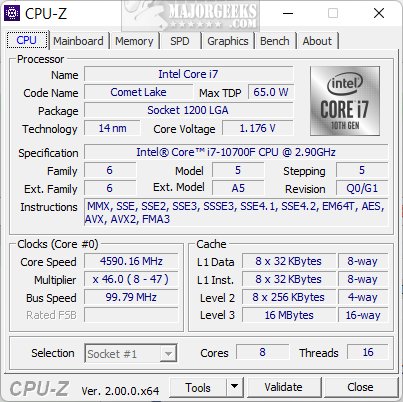
CPU-Z, a free utility developed by CPUID, has just rolled out its version 3.02. This lightweight tool is essential for anyone looking to gain detailed insights into their computer's hardware. Whether you're a PC enthusiast, a performance optimizer, or the go-to tech expert in your family, CPU-Z simplifies the task of uncovering the mysteries of your system's specifications.
With CPU-Z, you can effortlessly find out what processor powers your PC, check RAM specifications before upgrading, or monitor real-time frequencies and voltages—no need for dismantling your machine. This utility is designed to provide immediate answers to your hardware questions quickly and efficiently.
CPU-Z boasts a variety of features that make it a favorite among tech enthusiasts:
- Processor Information: Displays comprehensive CPU details, including name, cores, threads, clock speeds, cache sizes, and manufacturing codenames.
- Motherboard Info: Identifies the motherboard's manufacturer, model, chipset, and BIOS version, which is critical for firmware updates and compatibility checks.
- Memory Details: Offers insights into RAM types, sizes, speeds, and latency settings, perfect for validating XMP profiles or identifying upgrade options.
- Graphics Card Specs: Provides essential information about both integrated and discrete GPUs, aiding in PC building and troubleshooting.
- Real-Time Monitoring: Tracks core frequencies, voltages, and utilization—ideal for overclockers and performance enthusiasts.
- Benchmarking Tools: Includes lightweight testing for CPU performance in various tasks, enabling comparisons with other processors.
- Report Generation: Exports hardware data into text files for easy sharing or future reference.
CPU-Z is not only robust but also portable. The portable version requires no installation; simply place it on a USB drive to use on any machine. While Windows and Android users can enjoy its benefits, Mac users currently do not have access. Additionally, CPU-Z allows customization of settings, including font sizes and report displays, and features a “ghost mode” for efficient data saving.
For Hardware Upgrades: CPU-Z helps identify the right memory and motherboard specifications, ensuring informed purchasing decisions.
For Overclockers: Monitor CPU voltages and frequencies in real-time to maintain stability during overclocking.
For Troubleshooting: Detailed hardware data assists in pinpointing bottlenecks or faulty components responsible for performance issues.
For Documentation: Export full system reports to simplify client assistance or upgrade planning.
For anyone keen on understanding their PC's inner workings, CPU-Z is an indispensable tool. Its combination of power, accuracy, and user-friendliness makes it suitable for both casual users and hardcore enthusiasts. Best of all, it's free and lightweight, allowing you to run it without any significant resource consumption.
In a world where technology can often seem daunting, CPU-Z empowers users by demystifying their hardware. Whether you're troubleshooting, enhancing performance, or planning an upgrade, this utility should be a staple in your toolkit. Don't hesitate—download CPU-Z today and experience the clarity it brings to your computer's hardware landscape.
- How to Find Motherboard Manufacturer, Model, Serial Number, and Version
- Three Ways to Find Out How Many Cores Your CPU Has
- How to Identify My Intel Processor and Generation
- How to Check Your Memory (RAM) Speed and Available Slots
- How to Identify the Hardware in Your Computer
By utilizing CPU-Z, you can ensure that you're always equipped with the right information to keep your system running smoothly and efficiently
Why You Should Use CPU-Z
With CPU-Z, you can effortlessly find out what processor powers your PC, check RAM specifications before upgrading, or monitor real-time frequencies and voltages—no need for dismantling your machine. This utility is designed to provide immediate answers to your hardware questions quickly and efficiently.
Key Features
CPU-Z boasts a variety of features that make it a favorite among tech enthusiasts:
- Processor Information: Displays comprehensive CPU details, including name, cores, threads, clock speeds, cache sizes, and manufacturing codenames.
- Motherboard Info: Identifies the motherboard's manufacturer, model, chipset, and BIOS version, which is critical for firmware updates and compatibility checks.
- Memory Details: Offers insights into RAM types, sizes, speeds, and latency settings, perfect for validating XMP profiles or identifying upgrade options.
- Graphics Card Specs: Provides essential information about both integrated and discrete GPUs, aiding in PC building and troubleshooting.
- Real-Time Monitoring: Tracks core frequencies, voltages, and utilization—ideal for overclockers and performance enthusiasts.
- Benchmarking Tools: Includes lightweight testing for CPU performance in various tasks, enabling comparisons with other processors.
- Report Generation: Exports hardware data into text files for easy sharing or future reference.
Portability and Customization
CPU-Z is not only robust but also portable. The portable version requires no installation; simply place it on a USB drive to use on any machine. While Windows and Android users can enjoy its benefits, Mac users currently do not have access. Additionally, CPU-Z allows customization of settings, including font sizes and report displays, and features a “ghost mode” for efficient data saving.
Problem-Solving Capabilities
For Hardware Upgrades: CPU-Z helps identify the right memory and motherboard specifications, ensuring informed purchasing decisions.
For Overclockers: Monitor CPU voltages and frequencies in real-time to maintain stability during overclocking.
For Troubleshooting: Detailed hardware data assists in pinpointing bottlenecks or faulty components responsible for performance issues.
For Documentation: Export full system reports to simplify client assistance or upgrade planning.
Conclusion
For anyone keen on understanding their PC's inner workings, CPU-Z is an indispensable tool. Its combination of power, accuracy, and user-friendliness makes it suitable for both casual users and hardcore enthusiasts. Best of all, it's free and lightweight, allowing you to run it without any significant resource consumption.
Final Thoughts
In a world where technology can often seem daunting, CPU-Z empowers users by demystifying their hardware. Whether you're troubleshooting, enhancing performance, or planning an upgrade, this utility should be a staple in your toolkit. Don't hesitate—download CPU-Z today and experience the clarity it brings to your computer's hardware landscape.
Related Resources:
- How to Find Motherboard Manufacturer, Model, Serial Number, and Version
- Three Ways to Find Out How Many Cores Your CPU Has
- How to Identify My Intel Processor and Generation
- How to Check Your Memory (RAM) Speed and Available Slots
- How to Identify the Hardware in Your Computer
By utilizing CPU-Z, you can ensure that you're always equipped with the right information to keep your system running smoothly and efficiently
CPU-Z 3.02 released
CPU-Z is a free utility from CPUID that provides detailed information about your computer's hardware.