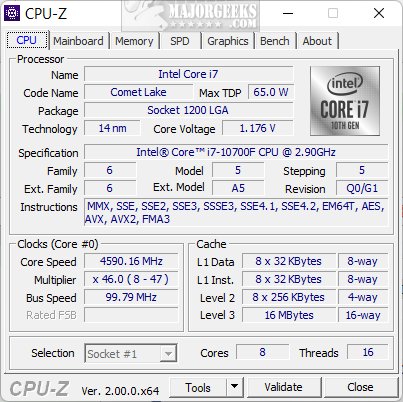
CPU-Z is a free, lightweight utility developed by CPUID that provides users with in-depth information about their computer's hardware. Targeting PC enthusiasts, gamers, and anyone curious about their system’s specs, CPU-Z functions as an essential tool for hardware profiling.
If you've ever wondered about the specifics of your CPU, RAM, or motherboard, or sought to understand performance metrics without disassembling your machine, CPU-Z is here to help. It delivers precise information effortlessly, making it an invaluable resource for hardware analysis, upgrades, and troubleshooting.
1. Processor Information: Get details on your CPU's name, core/thread count, clock speeds, and cache sizes.
2. Motherboard Specs: Identify your motherboard's manufacturer, model, chipset, and BIOS version for compatibility checks.
3. Memory Analysis: Examine your RAM type, size, speed, and latency settings, helping you confirm compatibility for upgrades.
4. Graphics Card Data: Access basic specifications of your GPU, assisting in building or troubleshooting PCs.
5. Real-Time Monitoring: Track core frequencies, voltages, and CPU utilization in real time, making it ideal for overclockers.
6. Benchmarking Tools: Test CPU performance in single-threaded and multi-threaded tasks for system stability or comparisons.
7. Report Generation: Export hardware data to a text file for easy sharing and documentation.
CPU-Z is not just powerful; it’s also user-friendly and portable. You can run it from a USB drive without installation. While it caters mainly to Windows and Android users, Mac compatibility is currently lacking. Users can customize settings, including font sizes and colors, and even utilize “ghost mode” to save reports directly without loading the interface.
1. For Hardware Upgrades: Quickly identify necessary components, ensuring compatibility for upgrades.
2. For Overclocking: Monitor real-time CPU performance metrics to stabilize your overclocking efforts.
3. For Troubleshooting: Use detailed system data to diagnose performance issues and hardware malfunctions.
4. For Documentation: Easily document your system setup for future reference or tech support.
For anyone interested in digging deeper into their PC's hardware, CPU-Z is an essential tool. Its blend of precision, ease of use, and free availability makes it appealing to both casual users and dedicated enthusiasts. Whether you're upgrading, fine-tuning performance, or simply satisfying your curiosity, CPU-Z is a reliable companion.
As technology continues to evolve, CPU-Z may expand its features to cater to emerging hardware standards and operating systems, potentially including support for Mac users. Continuous updates will ensure that it remains relevant and useful in a fast-paced tech landscape.
In summary, if you haven’t yet tried CPU-Z, it’s time to download this utility and unlock the secrets of your computer hardware—your device’s mysteries await
Why CPU-Z Is Indispensable
If you've ever wondered about the specifics of your CPU, RAM, or motherboard, or sought to understand performance metrics without disassembling your machine, CPU-Z is here to help. It delivers precise information effortlessly, making it an invaluable resource for hardware analysis, upgrades, and troubleshooting.
Key Features of CPU-Z
1. Processor Information: Get details on your CPU's name, core/thread count, clock speeds, and cache sizes.
2. Motherboard Specs: Identify your motherboard's manufacturer, model, chipset, and BIOS version for compatibility checks.
3. Memory Analysis: Examine your RAM type, size, speed, and latency settings, helping you confirm compatibility for upgrades.
4. Graphics Card Data: Access basic specifications of your GPU, assisting in building or troubleshooting PCs.
5. Real-Time Monitoring: Track core frequencies, voltages, and CPU utilization in real time, making it ideal for overclockers.
6. Benchmarking Tools: Test CPU performance in single-threaded and multi-threaded tasks for system stability or comparisons.
7. Report Generation: Export hardware data to a text file for easy sharing and documentation.
User-Friendly and Customizable
CPU-Z is not just powerful; it’s also user-friendly and portable. You can run it from a USB drive without installation. While it caters mainly to Windows and Android users, Mac compatibility is currently lacking. Users can customize settings, including font sizes and colors, and even utilize “ghost mode” to save reports directly without loading the interface.
Problem-Solving Capabilities
1. For Hardware Upgrades: Quickly identify necessary components, ensuring compatibility for upgrades.
2. For Overclocking: Monitor real-time CPU performance metrics to stabilize your overclocking efforts.
3. For Troubleshooting: Use detailed system data to diagnose performance issues and hardware malfunctions.
4. For Documentation: Easily document your system setup for future reference or tech support.
Conclusion: A Must-Have Utility
For anyone interested in digging deeper into their PC's hardware, CPU-Z is an essential tool. Its blend of precision, ease of use, and free availability makes it appealing to both casual users and dedicated enthusiasts. Whether you're upgrading, fine-tuning performance, or simply satisfying your curiosity, CPU-Z is a reliable companion.
Future Considerations
As technology continues to evolve, CPU-Z may expand its features to cater to emerging hardware standards and operating systems, potentially including support for Mac users. Continuous updates will ensure that it remains relevant and useful in a fast-paced tech landscape.
In summary, if you haven’t yet tried CPU-Z, it’s time to download this utility and unlock the secrets of your computer hardware—your device’s mysteries await
CPU-Z 2.20 released
CPU-Z is a free utility from CPUID that provides detailed information about your computer's hardware.