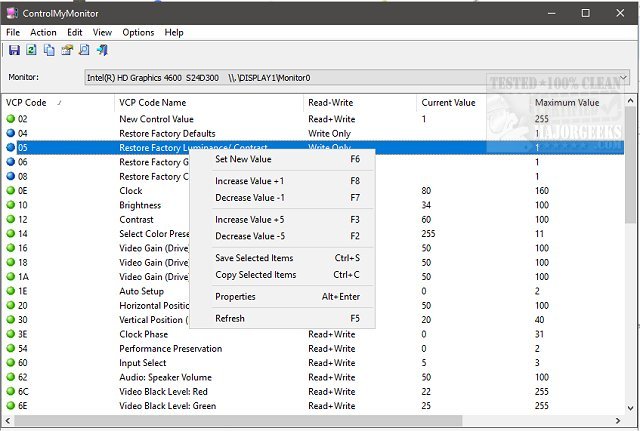
ControlMyMonitor 1.42 has been released as a user-friendly freeware utility designed to help users easily view and modify their monitor's display settings. This software supports a wide range of Virtual Control Panel (VCP) settings, allowing adjustments to brightness, contrast, sharpness, and the red, green, and blue color balance, among other features.
Users can choose to modify settings through a command line interface or a graphical user interface (GUI) based on their preferences. The application is compatible with multiple monitors, which can be managed from a drop-down menu in the main window. Using the GUI is straightforward; users can select a setting they wish to change, then either press F6 or double-click on it to access the modification options. Additionally, ControlMyMonitor can be accessed via the right-click context menu for even more convenience.
One of the standout features of ControlMyMonitor is the ability to export monitor settings to a configuration file. This capability allows users to save specific setups and load them later, which is particularly useful for those who prefer different settings for activities such as gaming or general desktop use.
In extending its capabilities, future updates could incorporate more advanced features such as automated profiles that switch settings based on specific applications, improved support for high dynamic range (HDR) displays, or integration with other system utilities for enhanced performance monitoring. Additionally, providing users with a tutorial or help section within the application could further ease the learning curve for new users. Overall, ControlMyMonitor serves as a versatile tool for managing monitor settings effectively
Users can choose to modify settings through a command line interface or a graphical user interface (GUI) based on their preferences. The application is compatible with multiple monitors, which can be managed from a drop-down menu in the main window. Using the GUI is straightforward; users can select a setting they wish to change, then either press F6 or double-click on it to access the modification options. Additionally, ControlMyMonitor can be accessed via the right-click context menu for even more convenience.
One of the standout features of ControlMyMonitor is the ability to export monitor settings to a configuration file. This capability allows users to save specific setups and load them later, which is particularly useful for those who prefer different settings for activities such as gaming or general desktop use.
In extending its capabilities, future updates could incorporate more advanced features such as automated profiles that switch settings based on specific applications, improved support for high dynamic range (HDR) displays, or integration with other system utilities for enhanced performance monitoring. Additionally, providing users with a tutorial or help section within the application could further ease the learning curve for new users. Overall, ControlMyMonitor serves as a versatile tool for managing monitor settings effectively
ControlMyMonitor 1.42 released
ControlMyMonitor is a freeware monitor utility that provides a simple way to view and modify your monitor's display settings.