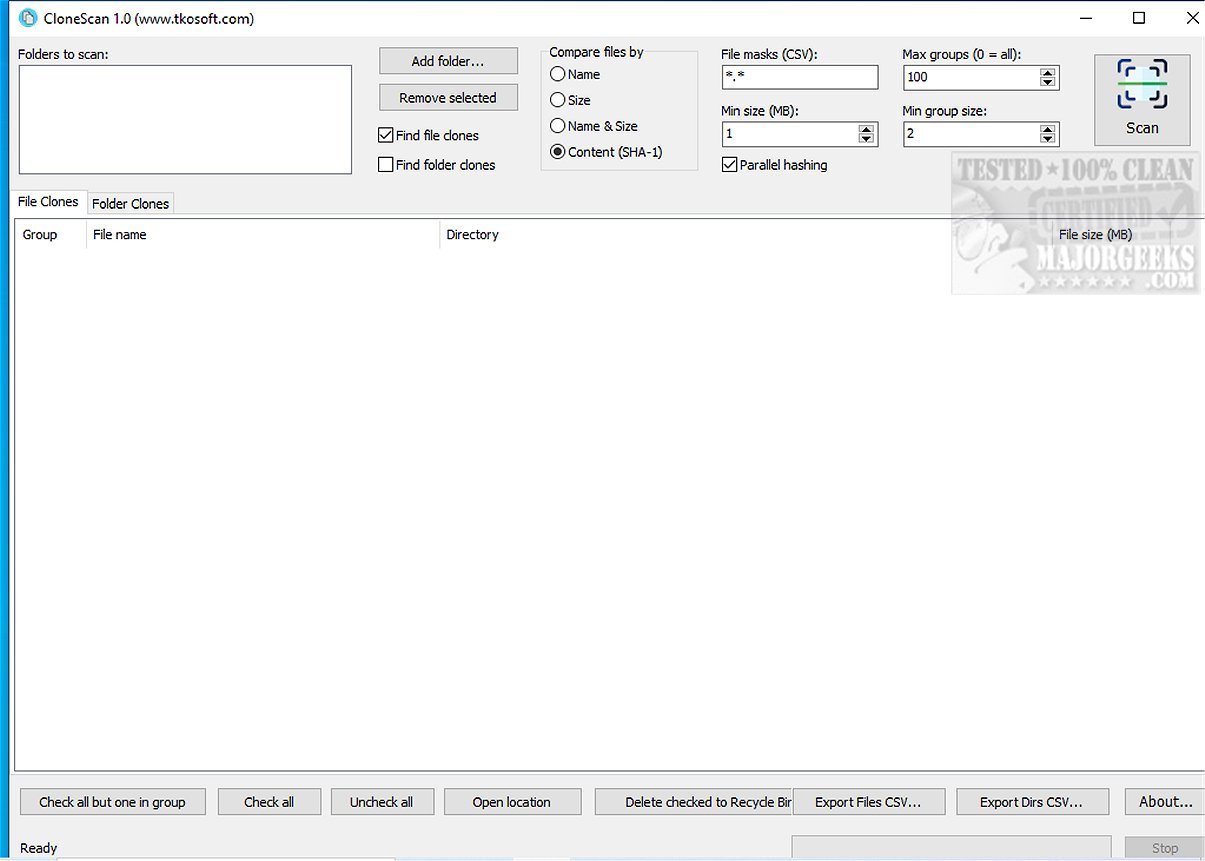
CloneScan 2.4 is a powerful, user-friendly tool designed for Windows users to help identify, evaluate, and securely eliminate duplicate files and folders on their computers. This free utility streamlines the organization of digital spaces by scanning for duplicate content that can lead to wasted storage and clutter.
What Does CloneScan Do?
CloneScan features an intuitive interface that allows users to easily review detected duplicates, making it simple to decide which files and folders to keep or discard. By utilizing CloneScan, users can enhance their system’s storage efficiency and overall performance, leading to a more organized digital environment. The tool not only identifies duplicate files but also detects duplicate folders by analyzing directory contents and generating folder signatures based on their files and subfolders. This capability is particularly useful for uncovering copied project folders, duplicated backups, and unnecessary archives.
Performance During Testing
In testing, CloneScan demonstrated impressive speed, even with extensive scanning criteria, and provided well-organized results for easy viewing and removal. The straightforward interface significantly simplified the scanning process, allowing users to complete tasks efficiently.
Key Features of CloneScan:
- Free duplicate file finder for Windows
- Find duplicates by name, size, both name and size, or SHA-1 content hash
- Detect duplicate folders and copied directory structures
- File mask filtering for targeted scans
- Parallel SHA-1 hashing for faster scanning
- Grouped duplicate results sorted by total wasted space
- Safe deletion to the Recycle Bin
- Export results to CSV
- Free for both personal and commercial use
Tailored Scanning Process
CloneScan allows users to customize their scanning process with file masks, enabling them to limit scans to specific file types. Users can select to scan only certain file extensions or patterns, ensuring targeted searches instead of blanket scans. Multiple masks can be applied, separated by commas, semicolons, spaces, or vertical bars.
Safe Deletion Process
A notable feature of CloneScan is its approach to file deletion; items are not permanently deleted immediately. Instead, selected files and folders are moved to the Windows Recycle Bin, providing users with a safety net to restore any accidentally deleted items. Additionally, CloneScan allows for exporting scan results to CSV files, which can be beneficial for reporting, further analysis in spreadsheet software, or archiving purposes.
Geek Verdict
CloneScan is an indispensable tool for anyone looking to declutter their digital life. With its intuitive design, users can easily find, assess, and securely remove those pesky duplicate files and folders that contribute to computer clutter. The fact that it’s completely free makes it an even more attractive option for users seeking to reclaim valuable storage space and create a well-organized digital environment. Say goodbye to digital chaos and embrace a streamlined system with CloneScan!
Related Tools and Tips:
- How to Use Storage Sense to Automatically Delete Junk Files in Windows 10/11
- How to Run Disk Cleanup Automatically with All Items Checked
- Best Drive Cleaner? CCleaner vs. Wise Disk Cleaner vs. PrivaZer
- How to Show, Hide, Add, or Remove a Folder From Libraries in Windows 10 & 11
In conclusion, CloneScan 2.4 stands out as a reliable solution for managing duplicated content on Windows, ensuring that users can maintain an efficient and organized digital workspace
What Does CloneScan Do?
CloneScan features an intuitive interface that allows users to easily review detected duplicates, making it simple to decide which files and folders to keep or discard. By utilizing CloneScan, users can enhance their system’s storage efficiency and overall performance, leading to a more organized digital environment. The tool not only identifies duplicate files but also detects duplicate folders by analyzing directory contents and generating folder signatures based on their files and subfolders. This capability is particularly useful for uncovering copied project folders, duplicated backups, and unnecessary archives.
Performance During Testing
In testing, CloneScan demonstrated impressive speed, even with extensive scanning criteria, and provided well-organized results for easy viewing and removal. The straightforward interface significantly simplified the scanning process, allowing users to complete tasks efficiently.
Key Features of CloneScan:
- Free duplicate file finder for Windows
- Find duplicates by name, size, both name and size, or SHA-1 content hash
- Detect duplicate folders and copied directory structures
- File mask filtering for targeted scans
- Parallel SHA-1 hashing for faster scanning
- Grouped duplicate results sorted by total wasted space
- Safe deletion to the Recycle Bin
- Export results to CSV
- Free for both personal and commercial use
Tailored Scanning Process
CloneScan allows users to customize their scanning process with file masks, enabling them to limit scans to specific file types. Users can select to scan only certain file extensions or patterns, ensuring targeted searches instead of blanket scans. Multiple masks can be applied, separated by commas, semicolons, spaces, or vertical bars.
Safe Deletion Process
A notable feature of CloneScan is its approach to file deletion; items are not permanently deleted immediately. Instead, selected files and folders are moved to the Windows Recycle Bin, providing users with a safety net to restore any accidentally deleted items. Additionally, CloneScan allows for exporting scan results to CSV files, which can be beneficial for reporting, further analysis in spreadsheet software, or archiving purposes.
Geek Verdict
CloneScan is an indispensable tool for anyone looking to declutter their digital life. With its intuitive design, users can easily find, assess, and securely remove those pesky duplicate files and folders that contribute to computer clutter. The fact that it’s completely free makes it an even more attractive option for users seeking to reclaim valuable storage space and create a well-organized digital environment. Say goodbye to digital chaos and embrace a streamlined system with CloneScan!
Related Tools and Tips:
- How to Use Storage Sense to Automatically Delete Junk Files in Windows 10/11
- How to Run Disk Cleanup Automatically with All Items Checked
- Best Drive Cleaner? CCleaner vs. Wise Disk Cleaner vs. PrivaZer
- How to Show, Hide, Add, or Remove a Folder From Libraries in Windows 10 & 11
In conclusion, CloneScan 2.4 stands out as a reliable solution for managing duplicated content on Windows, ensuring that users can maintain an efficient and organized digital workspace
CloneScan 2.4 released
CloneScan is a user-friendly Windows tool that helps you identify, evaluate, and securely remove duplicate files and folders on your computer. This free utility simplifies organizing your digital space by scanning your system for duplicate content, which can waste storage and create clutter.