The newly released Click and Clean 0.4.0 is an efficient browser extension designed for Chromium-based browsers, enabling users to swiftly clear their browsing data, including open windows, history, cookies, and more. This tool serves as a quick solution for those looking to maintain their online privacy and security by purging various types of browsing data in one go.
One-Click Functionality
With a simple click or by using the keyboard shortcut Ctrl + Shift + E, users can expeditiously delete all their browsing data along with any open windows. This streamlined feature ensures that users can keep their browsing sessions clean and secure without navigating through multiple menus.
Customization Options
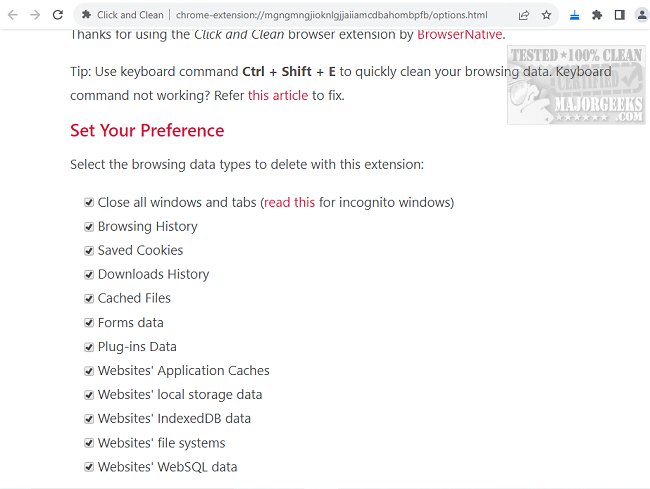
Click and Clean offers a range of customizable settings accessible through the Options tab. Users can specify their preferences regarding what data to clear, including browsing history, saved cookies, download history, cached files, form data, and more. Importantly, the extension closes all tabs—both pinned and opened—so users should take care to save any important URLs beforehand. However, this behavior can be modified by adjusting the option in the settings.
Enhanced Security
By clearing potentially harmful or compromised tabs, Click and Clean reduces the risk of malware, spyware, and other security threats during browsing sessions. Although Chrome's built-in settings facilitate similar functions, Click and Clean enhances the user experience by providing added convenience, extensive customization options, and improved efficiency.
Conclusion
Click and Clean is an excellent choice for users who value quick, comprehensive control over their browsing data. As internet safety becomes increasingly crucial, tools like Click and Clean offer a valuable service in the fight against privacy invasions and browsing-related threats.
Further Recommendations
For users looking to optimize their digital environments further, they might explore other tools such as CCleaner, Wise Disk Cleaner, and PrivaZer for broader system cleanup. Additionally, tutorials on using Storage Sense in Windows 10/11 to automatically delete junk files, as well as guides on managing cookies in Microsoft Edge and optimizing browser performance in Google Chrome and Mozilla Firefox, can provide users with comprehensive strategies to maintain a clean and efficient online experience
One-Click Functionality
With a simple click or by using the keyboard shortcut Ctrl + Shift + E, users can expeditiously delete all their browsing data along with any open windows. This streamlined feature ensures that users can keep their browsing sessions clean and secure without navigating through multiple menus.
Customization Options
Click and Clean offers a range of customizable settings accessible through the Options tab. Users can specify their preferences regarding what data to clear, including browsing history, saved cookies, download history, cached files, form data, and more. Importantly, the extension closes all tabs—both pinned and opened—so users should take care to save any important URLs beforehand. However, this behavior can be modified by adjusting the option in the settings.
Enhanced Security
By clearing potentially harmful or compromised tabs, Click and Clean reduces the risk of malware, spyware, and other security threats during browsing sessions. Although Chrome's built-in settings facilitate similar functions, Click and Clean enhances the user experience by providing added convenience, extensive customization options, and improved efficiency.
Conclusion
Click and Clean is an excellent choice for users who value quick, comprehensive control over their browsing data. As internet safety becomes increasingly crucial, tools like Click and Clean offer a valuable service in the fight against privacy invasions and browsing-related threats.
Further Recommendations
For users looking to optimize their digital environments further, they might explore other tools such as CCleaner, Wise Disk Cleaner, and PrivaZer for broader system cleanup. Additionally, tutorials on using Storage Sense in Windows 10/11 to automatically delete junk files, as well as guides on managing cookies in Microsoft Edge and optimizing browser performance in Google Chrome and Mozilla Firefox, can provide users with comprehensive strategies to maintain a clean and efficient online experience
Click and Clean 0.4.0 released
Click and Clean lets you quickly clear your browsing data, such as open windows, browsing history, cookies, and more.