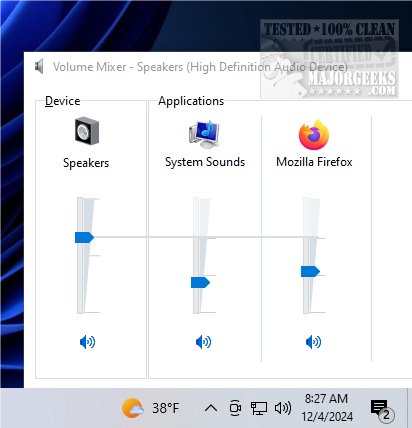
ClassicMixer 3.1 has been released, bringing back the familiar volume mixer interface to Windows 11. This application allows users to manage audio levels for individual applications with ease, enhancing the overall user experience for those who prefer a classic design. ClassicMixer is particularly beneficial for users looking to customize their audio settings more effectively, as it enables effortless control over the volume of all programs running on their computer.
One of the standout features of ClassicMixer is its compatibility with all screen resolutions and sizes. Designed to work seamlessly across various devices, it is set by default for 4K displays, but users can customize the width and height settings to suit their specific screen resolution, ensuring optimal performance whether on high-definition monitors, standard displays, or mobile devices.
While ClassicMixer does not have a dedicated settings window, users can set it to launch automatically at startup using the Task Scheduler. This setup process involves creating a basic task where users can name the task, select a trigger to start "At log on," and specify the action to start the ClassicMixer application file. Once configured, ClassicMixer will open automatically upon logging into the computer, providing convenient access to audio controls.
ClassicMixer allows users to switch between sound sources effortlessly, giving them greater control over their listening experience. With its intuitive interface, users can individually adjust the volume for music, videos, and voice calls, ensuring a tailored audio experience.
In addition to ClassicMixer, users interested in enhancing their audio experience can explore other related topics, such as enabling Windows Sonic Surround Sound on Windows 10 and 11, renaming sound input or output devices, changing audio balance, and modifying the default sound output device.
As audio management becomes increasingly important in a digital world filled with multiple applications, tools like ClassicMixer provide users with the flexibility and control they need to create their ideal sound environment. Whether for work, leisure, or communication, ClassicMixer is an invaluable tool for anyone seeking to optimize their audio settings on Windows 11
One of the standout features of ClassicMixer is its compatibility with all screen resolutions and sizes. Designed to work seamlessly across various devices, it is set by default for 4K displays, but users can customize the width and height settings to suit their specific screen resolution, ensuring optimal performance whether on high-definition monitors, standard displays, or mobile devices.
While ClassicMixer does not have a dedicated settings window, users can set it to launch automatically at startup using the Task Scheduler. This setup process involves creating a basic task where users can name the task, select a trigger to start "At log on," and specify the action to start the ClassicMixer application file. Once configured, ClassicMixer will open automatically upon logging into the computer, providing convenient access to audio controls.
ClassicMixer allows users to switch between sound sources effortlessly, giving them greater control over their listening experience. With its intuitive interface, users can individually adjust the volume for music, videos, and voice calls, ensuring a tailored audio experience.
In addition to ClassicMixer, users interested in enhancing their audio experience can explore other related topics, such as enabling Windows Sonic Surround Sound on Windows 10 and 11, renaming sound input or output devices, changing audio balance, and modifying the default sound output device.
As audio management becomes increasingly important in a digital world filled with multiple applications, tools like ClassicMixer provide users with the flexibility and control they need to create their ideal sound environment. Whether for work, leisure, or communication, ClassicMixer is an invaluable tool for anyone seeking to optimize their audio settings on Windows 11
ClassicMixer 3.1 released
ClassicMixer brings back the traditional volume mixer interface on Windows 11, allowing you to easily manage audio levels for individual applications.