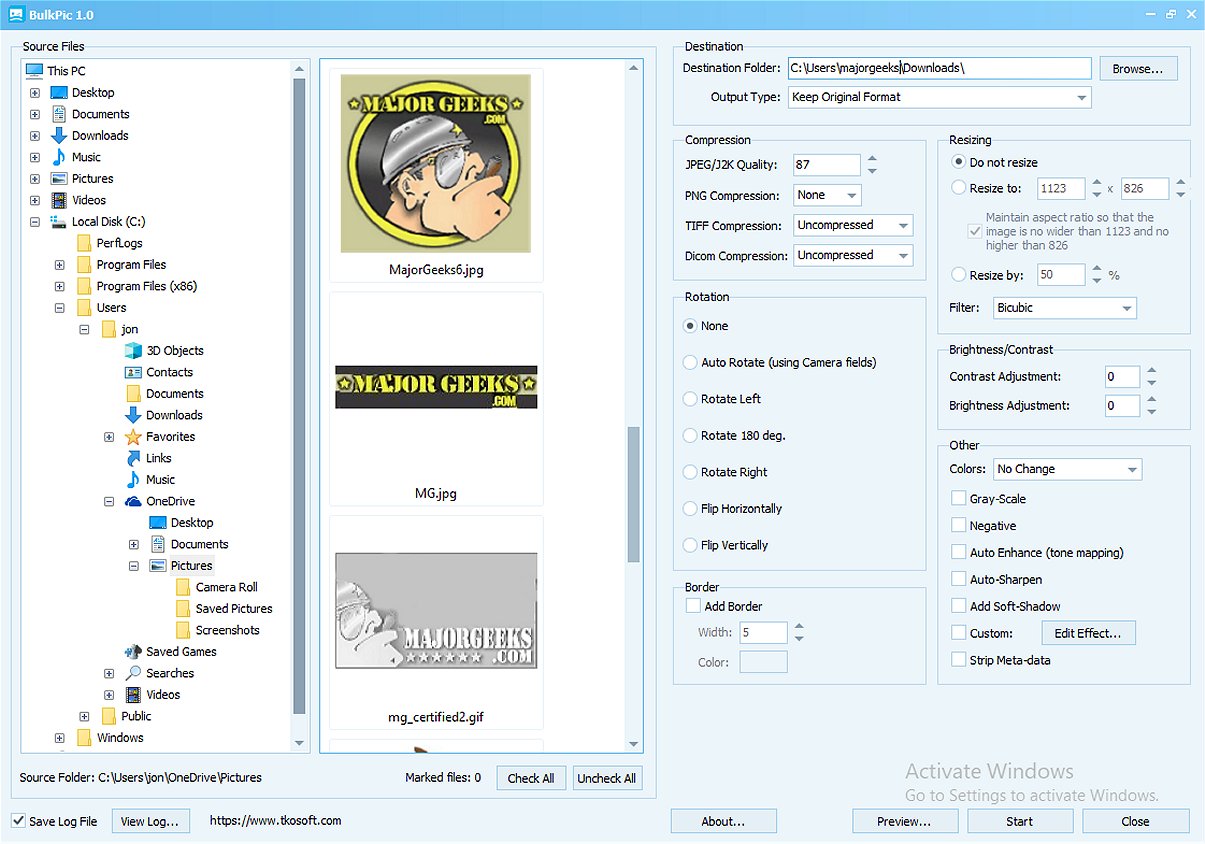
BulkPic is a newly released batch image converter and editor designed to cater to both individuals and professionals who require efficient handling of large volumes of images without compromising on quality. This versatile tool simplifies the image management process by offering a range of functionalities that streamline conversion and editing tasks.
Key Features of BulkPic
1. Bulk Conversion: Users can convert images in bulk to a wide array of popular formats, including JPG, PNG, BMP, TIFF, GIF, and more. The tool also allows users to retain original formats for maximum flexibility.
2. Advanced Resizing Options: BulkPic features a powerful resizing tool capable of precise adjustments—users can specify exact dimensions or resize images by percentage. It supports various high-quality resizing filters to maintain image integrity.
3. Image Manipulation and Enhancement: The program allows users to perform a variety of edits, such as rotating, flipping, and cropping images. Additionally, it enhances image quality through adjustments to brightness, contrast, and other parameters. The custom effects editor includes sophisticated tools for achieving desired visual effects.
4. Output Control: BulkPic provides users with control over output quality and compression settings, allowing for optimized file sizes and quality tailored to specific needs, including web use.
5. Creative Effects: Users can apply a range of effects such as sharpening, denoising, and converting images to grayscale or sepia tones. Advanced color correction techniques enhance overall visual appeal.
Why Choose BulkPic?
BulkPic is a comprehensive solution for batch image processing, making it an essential tool for anyone looking to improve their image editing workflow. Its user-friendly interface, combined with its powerful features, makes it a standout option in the realm of image editing software. Best of all, it is available for free, providing exceptional value to users.
Future Enhancements and Community Engagement
Looking ahead, BulkPic may introduce additional features based on user feedback, such as integration with cloud storage options for easier access to images or enhanced batch processing capabilities. Community engagement through forums or user groups could provide a platform for sharing tips, tutorials, and creative uses of BulkPic, helping users maximize the software's potential.
In conclusion, BulkPic 1.0 is a robust tool that addresses the needs of both casual users and professionals in managing and editing large batches of images efficiently. Its combination of versatility, quality, and user-friendliness positions it as a key player in the image editing landscape
Key Features of BulkPic
1. Bulk Conversion: Users can convert images in bulk to a wide array of popular formats, including JPG, PNG, BMP, TIFF, GIF, and more. The tool also allows users to retain original formats for maximum flexibility.
2. Advanced Resizing Options: BulkPic features a powerful resizing tool capable of precise adjustments—users can specify exact dimensions or resize images by percentage. It supports various high-quality resizing filters to maintain image integrity.
3. Image Manipulation and Enhancement: The program allows users to perform a variety of edits, such as rotating, flipping, and cropping images. Additionally, it enhances image quality through adjustments to brightness, contrast, and other parameters. The custom effects editor includes sophisticated tools for achieving desired visual effects.
4. Output Control: BulkPic provides users with control over output quality and compression settings, allowing for optimized file sizes and quality tailored to specific needs, including web use.
5. Creative Effects: Users can apply a range of effects such as sharpening, denoising, and converting images to grayscale or sepia tones. Advanced color correction techniques enhance overall visual appeal.
Why Choose BulkPic?
BulkPic is a comprehensive solution for batch image processing, making it an essential tool for anyone looking to improve their image editing workflow. Its user-friendly interface, combined with its powerful features, makes it a standout option in the realm of image editing software. Best of all, it is available for free, providing exceptional value to users.
Future Enhancements and Community Engagement
Looking ahead, BulkPic may introduce additional features based on user feedback, such as integration with cloud storage options for easier access to images or enhanced batch processing capabilities. Community engagement through forums or user groups could provide a platform for sharing tips, tutorials, and creative uses of BulkPic, helping users maximize the software's potential.
In conclusion, BulkPic 1.0 is a robust tool that addresses the needs of both casual users and professionals in managing and editing large batches of images efficiently. Its combination of versatility, quality, and user-friendliness positions it as a key player in the image editing landscape
BulkPic 1.0 released
BulkPic is a versatile, user-friendly batch image converter and editor. It is ideal for individuals and professionals alike who need to handle large volumes of images efficiently without sacrificing quality.