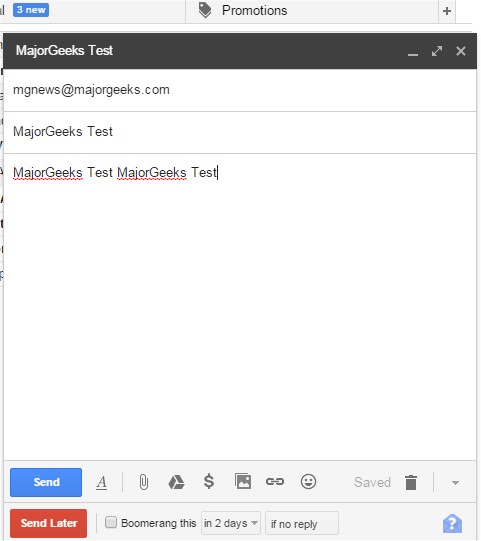
The recently released version 1.9.3 of Boomerang for Gmail is now available for multiple browsers, including Chrome, Firefox, Edge, Safari, and Opera. This powerful email management tool enables users to schedule the sending of their emails at a designated time. With its user-friendly interface, you can easily compose your emails and hit the "send later" button, utilizing either a calendar picker or a smart text box that recognizes common phrases like "next Friday" for precise scheduling.
In addition to scheduling, Boomerang helps organize your inbox effectively. By clicking the Boomerang button while viewing an email, users can specify when they want to revisit that email, allowing the tool to archive it and return it to the inbox as unread at the chosen time. This feature can be particularly beneficial for various tasks, such as remembering to send birthday greetings, managing projects, keeping track of bill payments, following up on sales leads, coordinating communication across different time zones, and handling travel confirmations by returning necessary emails on the day of travel.
Furthermore, the Boomerang tool is complemented by a variety of tips and tricks for enhancing browsing experiences across different browsers. These include improving performance in Google Chrome and Mozilla Firefox, managing autofill entries, changing saved phone numbers, editing credit card information, and discovering hidden Google games.
Overall, Boomerang for Gmail is an invaluable tool for anyone looking to streamline their email management and enhance productivity. Whether for personal or professional use, its features can help users stay organized and ensure timely communication
In addition to scheduling, Boomerang helps organize your inbox effectively. By clicking the Boomerang button while viewing an email, users can specify when they want to revisit that email, allowing the tool to archive it and return it to the inbox as unread at the chosen time. This feature can be particularly beneficial for various tasks, such as remembering to send birthday greetings, managing projects, keeping track of bill payments, following up on sales leads, coordinating communication across different time zones, and handling travel confirmations by returning necessary emails on the day of travel.
Furthermore, the Boomerang tool is complemented by a variety of tips and tricks for enhancing browsing experiences across different browsers. These include improving performance in Google Chrome and Mozilla Firefox, managing autofill entries, changing saved phone numbers, editing credit card information, and discovering hidden Google games.
Overall, Boomerang for Gmail is an invaluable tool for anyone looking to streamline their email management and enhance productivity. Whether for personal or professional use, its features can help users stay organized and ensure timely communication
Boomerang Gmail for Chrome, Firefox, Edge, Safari, and Opera 1.9.3 released
Boomerang for Gmail allows you to schedule the time when your emails are sent and more.
Boomerang Gmail for Chrome, Firefox, Edge, Safari, and Opera 1.9.3 released @ MajorGeeks