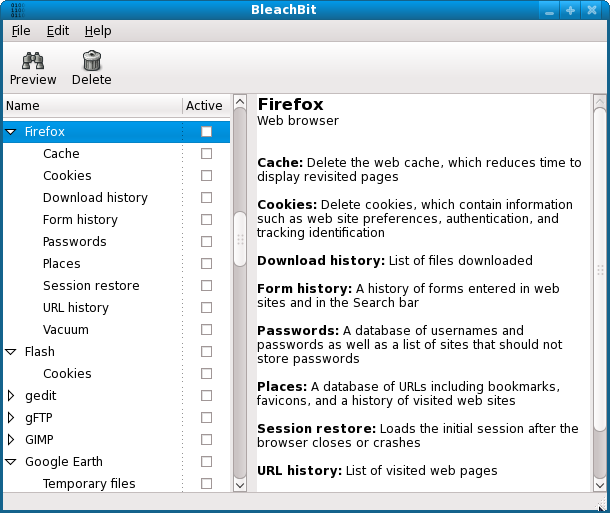
BleachBit, a free and open-source system cleaning tool for both Windows and Linux, has released version 6.0.2. This software is designed to help users delete unnecessary files, improve system performance, and protect their privacy by removing digital traces effectively.
Key Features of BleachBit:
1. Deep System Cleaning: BleachBit efficiently cleans up cache, cookies, internet history, temporary files, logs, and unnecessary junk from a multitude of applications, including various web browsers and office software.
2. Privacy Protection: The tool offers robust privacy features, allowing users to shred files irreversibly, wipe free disk space, and ensure that deleted data cannot be recovered.
3. Lightweight and Fast: Unlike many other system cleaners, BleachBit avoids unnecessary features that could slow down performance, focusing solely on effective cleaning.
4. Cross-Platform Compatibility: It supports both Windows and Linux operating systems, making it versatile for different users.
5. Open Source and Free: There are no ads or subscription fees, and the software's transparency and community-driven development enhance user trust.
Benefits of Using BleachBit:
For users with limited storage space, BleachBit can reclaim several gigabytes of space with just a few clicks. Privacy-focused individuals will find it invaluable for securely erasing browsing history, chat logs, and sensitive documents, helping them manage their digital footprints effectively. Additionally, IT professionals and system administrators can utilize its command-line interface for automated cleaning tasks, simplifying system maintenance.
The Bottom Line:
BleachBit stands out as a powerful and straightforward tool for deep cleaning and maintaining privacy. Its open-source nature, comprehensive feature set, and lightweight design make it an essential application for anyone looking to keep their systems clean, secure, and optimized for performance. Users are encouraged to try BleachBit to experience its benefits firsthand.
Future Considerations:
As users continue to face challenges related to digital clutter and privacy concerns, tools like BleachBit will likely become increasingly important. Future updates could include enhanced features for data recovery prevention, integration with cloud storage services, and improved user interfaces to further streamline the cleaning process. Additionally, ongoing community feedback will play a crucial role in shaping the development of BleachBit, ensuring it meets the evolving needs of its users
Key Features of BleachBit:
1. Deep System Cleaning: BleachBit efficiently cleans up cache, cookies, internet history, temporary files, logs, and unnecessary junk from a multitude of applications, including various web browsers and office software.
2. Privacy Protection: The tool offers robust privacy features, allowing users to shred files irreversibly, wipe free disk space, and ensure that deleted data cannot be recovered.
3. Lightweight and Fast: Unlike many other system cleaners, BleachBit avoids unnecessary features that could slow down performance, focusing solely on effective cleaning.
4. Cross-Platform Compatibility: It supports both Windows and Linux operating systems, making it versatile for different users.
5. Open Source and Free: There are no ads or subscription fees, and the software's transparency and community-driven development enhance user trust.
Benefits of Using BleachBit:
For users with limited storage space, BleachBit can reclaim several gigabytes of space with just a few clicks. Privacy-focused individuals will find it invaluable for securely erasing browsing history, chat logs, and sensitive documents, helping them manage their digital footprints effectively. Additionally, IT professionals and system administrators can utilize its command-line interface for automated cleaning tasks, simplifying system maintenance.
The Bottom Line:
BleachBit stands out as a powerful and straightforward tool for deep cleaning and maintaining privacy. Its open-source nature, comprehensive feature set, and lightweight design make it an essential application for anyone looking to keep their systems clean, secure, and optimized for performance. Users are encouraged to try BleachBit to experience its benefits firsthand.
Future Considerations:
As users continue to face challenges related to digital clutter and privacy concerns, tools like BleachBit will likely become increasingly important. Future updates could include enhanced features for data recovery prevention, integration with cloud storage services, and improved user interfaces to further streamline the cleaning process. Additionally, ongoing community feedback will play a crucial role in shaping the development of BleachBit, ensuring it meets the evolving needs of its users
BleachBit 6.0.2 released
BleachBit for Windows and Linux deletes unnecessary files to free valuable disk space, maintain privacy, and remove junk.