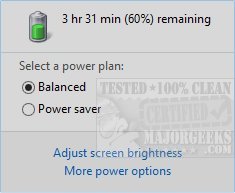
Battery Mode version 4.3.2.206 has been released, offering users an enhanced alternative to the default battery indicator. This application is particularly beneficial for laptop users, providing extensive options and control over battery management. Although primarily designed for Windows desktop environments, Battery Mode also caters to desktops, enabling quick access to power options and the ability to toggle system icons.
Key features of Battery Mode include the ability to adjust backlight settings, select power schemes, and view detailed battery information. Users can conveniently modify power settings directly from the system tray icon, enjoying more functionality than the standard battery indicator provides. Additionally, the application allows for scheduling automatic changes to power schemes, enhancing user convenience.
Battery Mode also supports customizable hotkeys for switching power schemes and includes a utility called NextScheme.exe. This tool can facilitate script-based control for power scheme switching and screen backlight adjustments. Users can access help documentation for NextScheme by typing "NextScheme*.exe -?" in the command prompt.
For those interested in optimizing their laptop's battery life and performance, Battery Mode offers a range of useful utilities, such as diagnosing battery issues, customizing function keys, and creating notifications for battery status.
In summary, Battery Mode is a versatile tool for managing battery settings on laptops and desktops, providing users with greater control and flexibility over their power management configurations. Whether you are looking to enhance battery performance or streamline your power settings, Battery Mode can be an invaluable resource
Key features of Battery Mode include the ability to adjust backlight settings, select power schemes, and view detailed battery information. Users can conveniently modify power settings directly from the system tray icon, enjoying more functionality than the standard battery indicator provides. Additionally, the application allows for scheduling automatic changes to power schemes, enhancing user convenience.
Battery Mode also supports customizable hotkeys for switching power schemes and includes a utility called NextScheme.exe. This tool can facilitate script-based control for power scheme switching and screen backlight adjustments. Users can access help documentation for NextScheme by typing "NextScheme*.exe -?" in the command prompt.
For those interested in optimizing their laptop's battery life and performance, Battery Mode offers a range of useful utilities, such as diagnosing battery issues, customizing function keys, and creating notifications for battery status.
In summary, Battery Mode is a versatile tool for managing battery settings on laptops and desktops, providing users with greater control and flexibility over their power management configurations. Whether you are looking to enhance battery performance or streamline your power settings, Battery Mode can be an invaluable resource
Battery Mode 4.3.2.206 released
Battery Mode is designed to replace the default battery indicator allowing you more options and control.