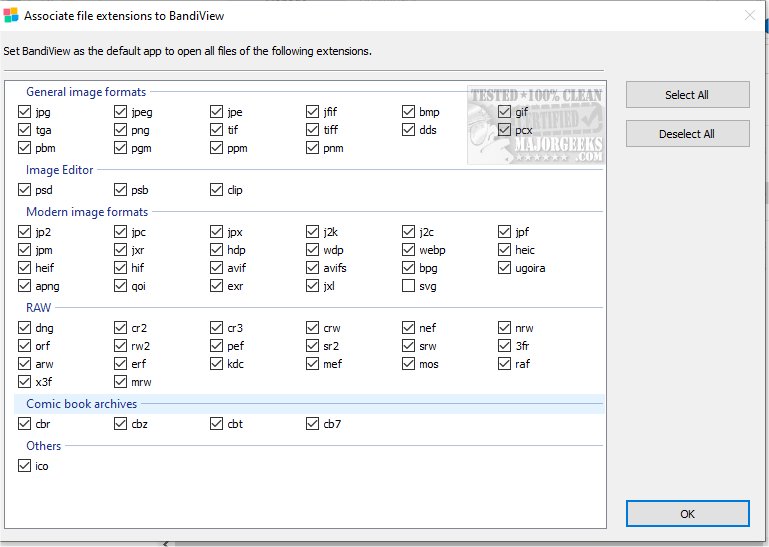
BandiView 8.01 has been released as a high-speed image viewer that accommodates a variety of popular image formats. It allows users to view images directly from ZIP or RAR archives without the need for extraction, enhancing convenience for image management. Users can easily copy or move images to designated folders, and if the images include GPS data, they can view corresponding locations on Google Maps through a simple toolbar button.
This software is the successor to Honeyview, retaining its predecessor's emphasis on speed and user-friendliness, while also integrating significant improvements. BandiView enables the display of multiple images in a vertical layout, making it particularly useful for storytelling with images. It supports RAW files from various cameras as well as professional graphics formats like Clip Studio Paint, and HEIC files from iPhones.
BandiView supports an extensive range of formats, including but not limited to BMP, JPG, GIF, PNG, PSD, DDS, and various RAW formats such as NEF and CR2. It also accommodates newer formats like AVIF and JXL, along with animated formats such as GIF and WebP.
In addition to viewing, BandiView excels at format conversions, offering the ability to convert multiple images in terms of format or size at a speed that is reported to be ten times faster than comparable converters, all achievable with just a few clicks.
This new release not only enhances the functionality and efficiency of image viewing and management but also positions BandiView as a versatile tool for both casual users and professionals who require robust image handling capabilities.
As BandiView continues to evolve, future updates may introduce even more features, such as enhanced editing tools, improved integration with cloud services, and expanded support for emerging file formats, further solidifying its place in the digital imaging landscape
This software is the successor to Honeyview, retaining its predecessor's emphasis on speed and user-friendliness, while also integrating significant improvements. BandiView enables the display of multiple images in a vertical layout, making it particularly useful for storytelling with images. It supports RAW files from various cameras as well as professional graphics formats like Clip Studio Paint, and HEIC files from iPhones.
BandiView supports an extensive range of formats, including but not limited to BMP, JPG, GIF, PNG, PSD, DDS, and various RAW formats such as NEF and CR2. It also accommodates newer formats like AVIF and JXL, along with animated formats such as GIF and WebP.
In addition to viewing, BandiView excels at format conversions, offering the ability to convert multiple images in terms of format or size at a speed that is reported to be ten times faster than comparable converters, all achievable with just a few clicks.
This new release not only enhances the functionality and efficiency of image viewing and management but also positions BandiView as a versatile tool for both casual users and professionals who require robust image handling capabilities.
As BandiView continues to evolve, future updates may introduce even more features, such as enhanced editing tools, improved integration with cloud services, and expanded support for emerging file formats, further solidifying its place in the digital imaging landscape
BandiView 8.01 released
BandiView is designed as a high-speed image viewer that supports a wide range of popular image formats.