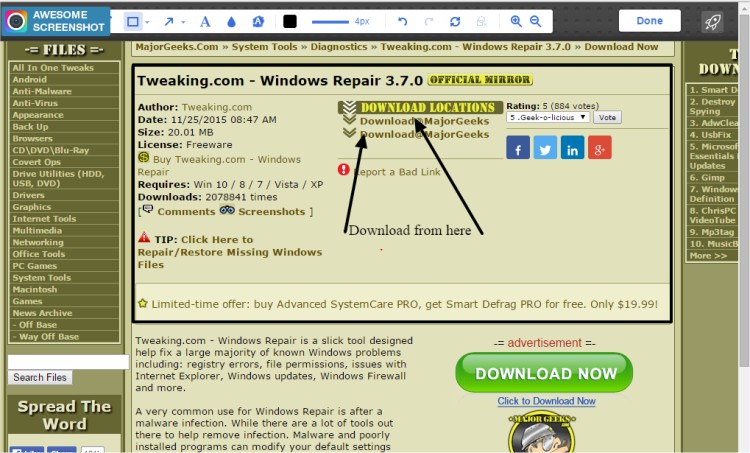
Awesome Screenshot and Screen Recorder for Chrome and Firefox has released version 4.4.39, enhancing its capabilities for users to effortlessly capture web pages. This extension enables users to capture the entire page, a selected area, or just the visible portion, and offers robust annotation features, including the ability to add comments, blur out sensitive information, and share screenshots with one-click uploads.
The extension is particularly useful for professionals who require a seamless experience without the need for multiple tools. Users have noted a minor issue with the alignment of arrows and highlights; there can be a slight discrepancy between where the user intends to place these annotations and where they actually appear on the captured image. Despite this, the tool functions well overall.
Key features of Awesome Screenshot & Screen Recorder include:
- The ability to capture selected areas, visible portions, or entire webpages.
- Support for PNG format.
- Horizontal scrolling for capturing lengthy content.
- Desktop screen capture capabilities.
- Various annotation tools such as rectangles, circles, arrows, lines, and text.
- Options to crop images and display crop area dimensions.
- The ability to blur sections to conceal sensitive data.
- Easy sharing via copy-paste functionality to platforms like Gmail, Facebook, and Twitter.
This extension is compatible with both Windows and Linux operating systems, making it accessible to a wide range of users.
In conclusion, Awesome Screenshot & Screen Recorder continues to be a valuable tool for both personal and professional use, streamlining the process of capturing and annotating screenshots. As technology evolves, users can expect further improvements and features in future updates that will enhance the screenshotting experience even more
The extension is particularly useful for professionals who require a seamless experience without the need for multiple tools. Users have noted a minor issue with the alignment of arrows and highlights; there can be a slight discrepancy between where the user intends to place these annotations and where they actually appear on the captured image. Despite this, the tool functions well overall.
Key features of Awesome Screenshot & Screen Recorder include:
- The ability to capture selected areas, visible portions, or entire webpages.
- Support for PNG format.
- Horizontal scrolling for capturing lengthy content.
- Desktop screen capture capabilities.
- Various annotation tools such as rectangles, circles, arrows, lines, and text.
- Options to crop images and display crop area dimensions.
- The ability to blur sections to conceal sensitive data.
- Easy sharing via copy-paste functionality to platforms like Gmail, Facebook, and Twitter.
This extension is compatible with both Windows and Linux operating systems, making it accessible to a wide range of users.
In conclusion, Awesome Screenshot & Screen Recorder continues to be a valuable tool for both personal and professional use, streamlining the process of capturing and annotating screenshots. As technology evolves, users can expect further improvements and features in future updates that will enhance the screenshotting experience even more
Awesome Screenshot and Screen Recorder for Chrome and Firefox 4.4.39 released
Awesome Screenshot & Screen Recorder for Chrome and Firefox allows you to easily capture all or part of any web page with the ability to add annotations, comments, blur sensitive info, and share with one-click uploads.
Awesome Screenshot and Screen Recorder for Chrome and Firefox 4.4.39 released @ MajorGeeks