AutoClick version 1.5.4 has been released, offering users an efficient and user-friendly solution for automating mouse clicks. This application is particularly beneficial for individuals engaged in repetitive clicking tasks such as gaming, data entry, and other click-intensive activities. Its intuitive interface allows for easy customization of clicking speed and patterns, making it adaptable to various needs.
One of the standout features of AutoClick is its ability to set precise time intervals and geographic coordinates for clicking sequences. This is especially useful for gamers who need to execute rapid clicks to succeed in challenging scenarios. Additionally, the app prevents computers from entering idle mode during long tasks, ensuring uninterrupted workflow.
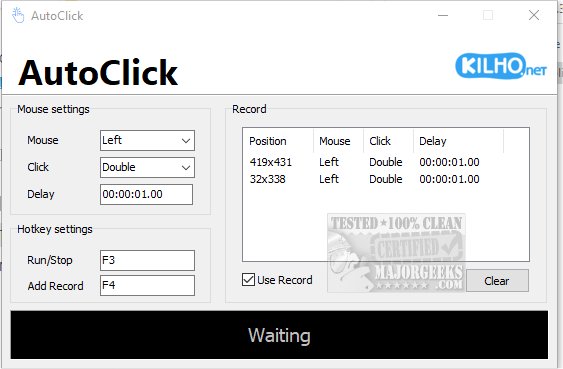
Using AutoClick is straightforward. Users can create a click sequence by specifying the order, type, and timing of mouse actions. After moving the cursor to the desired target position, users can select the appropriate mouse button (left, right, or wheel) and determine the type of click action (single, double, or wheel action). A delay can also be set between actions for more controlled execution. Once the parameters are defined, users can activate the process using a designated hotkey, and all recorded actions are displayed in an organized table format for easy reference.
While AutoClick excels in simplicity, it currently lacks the feature to save click profiles, which would enhance its usability. Nevertheless, it remains a solid choice for anyone seeking a basic auto-clicker app, suitable for users of all skill levels.
To extend the discussion, AutoClick might benefit from future updates that include profile-saving capabilities, allowing users to store and quickly access their preferred click sequences. Additionally, incorporating a built-in tutorial or help section could further enhance user experience, especially for beginners. As technology continues to evolve, integrating machine learning algorithms could allow AutoClick to adapt and optimize clicking patterns based on user behavior, making it even more efficient for various tasks. Overall, AutoClick stands out as a practical tool for automation, with potential for further enhancements to meet user needs
One of the standout features of AutoClick is its ability to set precise time intervals and geographic coordinates for clicking sequences. This is especially useful for gamers who need to execute rapid clicks to succeed in challenging scenarios. Additionally, the app prevents computers from entering idle mode during long tasks, ensuring uninterrupted workflow.
Using AutoClick is straightforward. Users can create a click sequence by specifying the order, type, and timing of mouse actions. After moving the cursor to the desired target position, users can select the appropriate mouse button (left, right, or wheel) and determine the type of click action (single, double, or wheel action). A delay can also be set between actions for more controlled execution. Once the parameters are defined, users can activate the process using a designated hotkey, and all recorded actions are displayed in an organized table format for easy reference.
While AutoClick excels in simplicity, it currently lacks the feature to save click profiles, which would enhance its usability. Nevertheless, it remains a solid choice for anyone seeking a basic auto-clicker app, suitable for users of all skill levels.
To extend the discussion, AutoClick might benefit from future updates that include profile-saving capabilities, allowing users to store and quickly access their preferred click sequences. Additionally, incorporating a built-in tutorial or help section could further enhance user experience, especially for beginners. As technology continues to evolve, integrating machine learning algorithms could allow AutoClick to adapt and optimize clicking patterns based on user behavior, making it even more efficient for various tasks. Overall, AutoClick stands out as a practical tool for automation, with potential for further enhancements to meet user needs
AutoClick 1.5.4 released
AutoClick is a straightforward app designed to automate mouse clicks, allowing you to perform repetitive clicking tasks effortlessly.