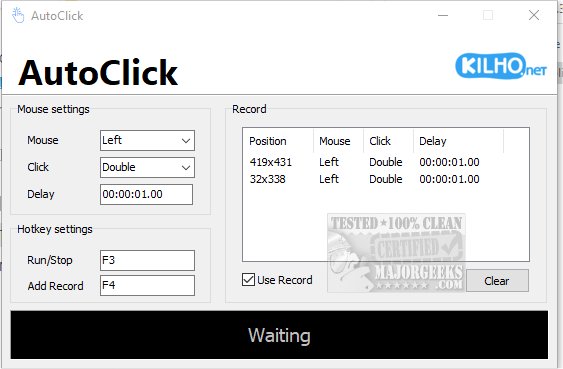
AutoClick 1.5.3 has been released as a user-friendly application designed to automate mouse clicks, making repetitive clicking tasks effortless. The app features an intuitive interface that allows users to customize clicking speed and patterns according to their specific needs. This makes it especially useful for gamers, data entry jobs, or any scenario requiring frequent mouse clicks.
One of the key functionalities of AutoClick is the ability to set precise time intervals and geographic coordinates for various clicking patterns. This feature is particularly advantageous for gamers tackling complex challenges that demand rapid and repeated clicks. Furthermore, AutoClick helps prevent a computer from going into idle mode during lengthy tasks, ensuring uninterrupted workflow.
Using AutoClick is straightforward. Users begin by creating a click sequence that defines the series of clicks, their timing, and order. Once the sequence is established, users can position their cursor at the desired screen location and select the appropriate mouse button (left, right, or wheel) to perform specific actions, such as single or double clicks. The app also allows users to set delays between actions for more controlled execution. Activation of the automation process is done through a designated keyboard hotkey, and all recorded actions are presented in an organized table format for easy reference.
However, one notable limitation is the lack of a feature to save click profiles, which could enhance usability for those needing to switch between different sequences frequently. Nevertheless, AutoClick remains a solid choice for those seeking a simple auto-clicker application, suitable for users of all skill levels.
Moving forward, potential improvements could include the addition of a profile-saving feature, allowing users to save and quickly switch between different click sequences. Additionally, introducing more advanced customization options, such as the ability to set random intervals between clicks or the integration of a scheduling feature for automated tasks, could further enhance the app's versatility. Overall, AutoClick 1.5.3 provides a practical solution for automating mouse clicks, contributing to increased efficiency in various tasks
One of the key functionalities of AutoClick is the ability to set precise time intervals and geographic coordinates for various clicking patterns. This feature is particularly advantageous for gamers tackling complex challenges that demand rapid and repeated clicks. Furthermore, AutoClick helps prevent a computer from going into idle mode during lengthy tasks, ensuring uninterrupted workflow.
Using AutoClick is straightforward. Users begin by creating a click sequence that defines the series of clicks, their timing, and order. Once the sequence is established, users can position their cursor at the desired screen location and select the appropriate mouse button (left, right, or wheel) to perform specific actions, such as single or double clicks. The app also allows users to set delays between actions for more controlled execution. Activation of the automation process is done through a designated keyboard hotkey, and all recorded actions are presented in an organized table format for easy reference.
However, one notable limitation is the lack of a feature to save click profiles, which could enhance usability for those needing to switch between different sequences frequently. Nevertheless, AutoClick remains a solid choice for those seeking a simple auto-clicker application, suitable for users of all skill levels.
Moving forward, potential improvements could include the addition of a profile-saving feature, allowing users to save and quickly switch between different click sequences. Additionally, introducing more advanced customization options, such as the ability to set random intervals between clicks or the integration of a scheduling feature for automated tasks, could further enhance the app's versatility. Overall, AutoClick 1.5.3 provides a practical solution for automating mouse clicks, contributing to increased efficiency in various tasks
AutoClick 1.5.3 released
AutoClick is a straightforward app designed to automate mouse clicks, allowing you to perform repetitive clicking tasks effortlessly.