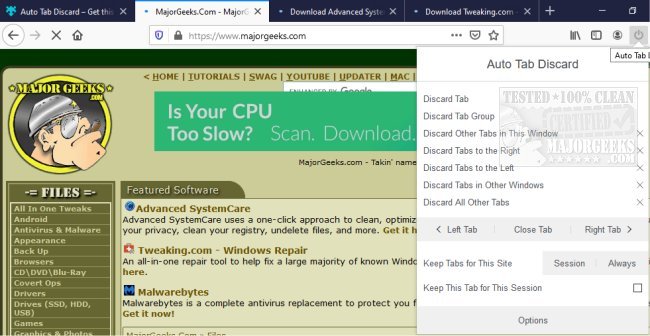
The Auto Tab Discard extension has been released in version 0.7.4 for Chrome, Firefox, Edge, and Opera. This tool is designed to enhance browser performance by automatically discarding inactive tabs, which helps in reducing memory usage and preventing background scripts from consuming computational resources when those tabs are not in use.
By utilizing a native method for tab management, Auto Tab Discard ensures that discarded tabs do not occupy any memory. Users can easily restore these tabs to their previous state, maintaining important details such as scroll position. The extension comes with several useful features, including:
- Automatic discarding of inactive tabs after a user-defined duration.
- The ability to discard all tabs or only those in the current window based on user actions.
- A whitelist option allowing users to specify hostnames that should remain active and not be discarded.
- Conditional settings that prevent certain tabs from being discarded, such as pinned tabs, tabs playing media, and tabs in use while the device is connected to power.
Additionally, Auto Tab Discard complements other browsing tools and functionalities, such as restoring accidentally closed tabs and muting tabs in various browsers. This extension is ideal for users looking to optimize their browsing experience and improve system performance by managing tab usage effectively.
In a world where multitasking and extensive tab usage are commonplace, tools like Auto Tab Discard are essential for maintaining a smooth and efficient browsing experience. Future versions could potentially include features like customizable discard thresholds for different types of content, better integration with productivity tools, or enhanced notifications to remind users about discarded tabs. Overall, Auto Tab Discard is a practical solution for anyone looking to enhance their browser's efficiency while managing multiple tabs effectively
By utilizing a native method for tab management, Auto Tab Discard ensures that discarded tabs do not occupy any memory. Users can easily restore these tabs to their previous state, maintaining important details such as scroll position. The extension comes with several useful features, including:
- Automatic discarding of inactive tabs after a user-defined duration.
- The ability to discard all tabs or only those in the current window based on user actions.
- A whitelist option allowing users to specify hostnames that should remain active and not be discarded.
- Conditional settings that prevent certain tabs from being discarded, such as pinned tabs, tabs playing media, and tabs in use while the device is connected to power.
Additionally, Auto Tab Discard complements other browsing tools and functionalities, such as restoring accidentally closed tabs and muting tabs in various browsers. This extension is ideal for users looking to optimize their browsing experience and improve system performance by managing tab usage effectively.
In a world where multitasking and extensive tab usage are commonplace, tools like Auto Tab Discard are essential for maintaining a smooth and efficient browsing experience. Future versions could potentially include features like customizable discard thresholds for different types of content, better integration with productivity tools, or enhanced notifications to remind users about discarded tabs. Overall, Auto Tab Discard is a practical solution for anyone looking to enhance their browser's efficiency while managing multiple tabs effectively
Auto Tab Discard for Chrome, Firefox, Edge, and Opera 0.7.4 released
Auto Tab Discard for Chrome, Firefox, Edge, and Opera automatically discard inactive tabs to free up tab memory usage and prevent background scripts from using your browser's computational power when the tab is inactive.
Auto Tab Discard for Chrome, Firefox, Edge, and Opera 0.7.4 released @ MajorGeeks