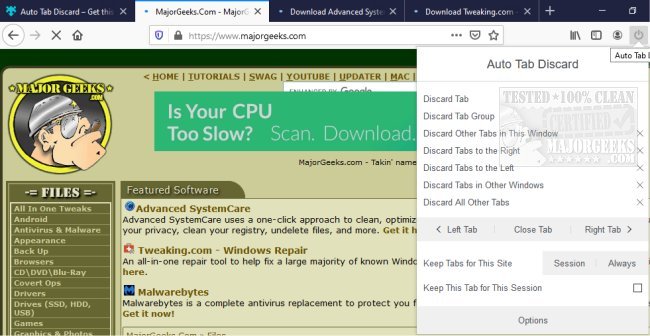
The latest version 0.6.9.1 of Auto Tab Discard has been released for popular web browsers including Chrome, Firefox, Edge, and Opera. This extension is designed to optimize browser performance by automatically discarding inactive tabs, which helps to conserve memory usage and reduces the computational burden caused by background scripts when tabs are not in use.
Auto Tab Discard employs a native method to manage inactive tabs, ensuring that they do not consume memory while allowing users to restore them to their previous state easily. This includes maintaining the page state, such as the scroll position, making it user-friendly.
Key features of Auto Tab Discard include:
- The ability to discard inactive tabs after a user-defined period.
- Options to discard all tabs or only those in the current window based on user action.
- A whitelist feature that allows users to specify hostnames that should remain active and not be discarded.
- Conditional settings to prevent tab discarding for pinned tabs, tabs with media playing, and when the device is connected to power.
In addition to the core functionalities, users may also find related tools useful, such as options to restore accidentally closed tabs, mute tabs in various browsers, and tips to enhance the performance of Chrome and Firefox.
As web browsing habits evolve, extensions like Auto Tab Discard become increasingly important for maintaining efficient and streamlined user experiences. Users can benefit from these tools to keep their browsing environments organized and responsive, particularly when dealing with multiple open tabs. The ongoing development of such extensions indicates a commitment to improving browser efficiency and user satisfaction
Auto Tab Discard employs a native method to manage inactive tabs, ensuring that they do not consume memory while allowing users to restore them to their previous state easily. This includes maintaining the page state, such as the scroll position, making it user-friendly.
Key features of Auto Tab Discard include:
- The ability to discard inactive tabs after a user-defined period.
- Options to discard all tabs or only those in the current window based on user action.
- A whitelist feature that allows users to specify hostnames that should remain active and not be discarded.
- Conditional settings to prevent tab discarding for pinned tabs, tabs with media playing, and when the device is connected to power.
In addition to the core functionalities, users may also find related tools useful, such as options to restore accidentally closed tabs, mute tabs in various browsers, and tips to enhance the performance of Chrome and Firefox.
As web browsing habits evolve, extensions like Auto Tab Discard become increasingly important for maintaining efficient and streamlined user experiences. Users can benefit from these tools to keep their browsing environments organized and responsive, particularly when dealing with multiple open tabs. The ongoing development of such extensions indicates a commitment to improving browser efficiency and user satisfaction
Auto Tab Discard for Chrome, Firefox, Edge, and Opera 0.6.9.1 released
Auto Tab Discard for Chrome, Firefox, Edge, and Opera automatically discard inactive tabs to free up tab memory usage and prevent background scripts from using your browser's computational power when the tab is inactive.
Auto Tab Discard for Chrome, Firefox, Edge, and Opera 0.6.9.1 released @ MajorGeeks